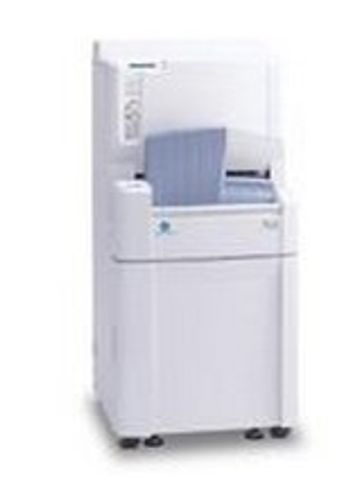
Konica Minolta Regius 190
 Konica Minolta · Model Regius 190
A new Compact, high-performance design. Utilizing a unique dual bay design?the high speed reader of REGIUS Model 190 processes up to 90 plates per hour for maximum performance. This next generation reader radically improves workflow all within a mere 58×58 cm footprint. Centralized image checking for flexible layout The "Ultimate Resource Sharing" concept provides the flexibility to separate the location of the consoles and the readers. This allows for the same fast and through image checking as with conventional systems. The result: system layout and productivity are optimized according to the number of examinations conduded, the work line and floor space. 2ch slot with independent insert / eject simplifies operation. ln this uniquely innovative design, the entire cassette is loaded into the front slot and ejected out of the rear slot. This helps make the examination handling process exceptionally smooth and efficient. 43.75µm Read Function (option) ln addition to the 175 and 87.5µm read capability, REGIUS MODEL 190 is capable of supporting a new 43.75µm read function for mammography?outside US? This function is invaluable for producing diagnostic quality for mammography images, where recognition of subtle pathological changes is essential. Featuring a new cassette size to provide the ideal examination environment. ln addition to the world's first 11"×14" size featured in REGIUS MODEL170, the new line-up available on REGIUS MODEL 190 includes the 15×30cm size to provide even greater examination efficiency.
Key tips
- ·Never bypass a radiation interlock to "just get the image" - this is one of the few true zero-tolerance rules in BMET work.
- ·Trend image-quality phantom results over time - drift shows up before an outright failure does.
- ·Portable/mobile units take real physical abuse from transport - check wheel locks and cable strain reliefs more often than fixed units.
Typical Failure Modes
Compiled for this model from its own documentation and established engineering knowledge for this equipment class - not from a verified service record. Confirm against the manufacturer's service manual.
Poor image quality / artefacts
HighSymptoms: Banding, streaks, ghost images, non-uniform density, dust artefacts.
Root cause: Dirty light guide / scanning optics, a worn erase-lamp array, imaging-plate wear, or transport-roller contamination.
Plate / cassette transport jam or mis-feed
MediumSymptoms: Plate jams in the reader, transport error, plate not returned.
Root cause: Worn or contaminated transport rollers / belts, or a sensor fault.
Incomplete erase / residual latent image
MediumSymptoms: Faint previous image on the next exposure.
Root cause: Erase-lamp array degradation or a driver fault.
Laser / PMT scanning fault
MediumSymptoms: No or very noisy image, scan-error message.
Root cause: Scanning laser or the photomultiplier / detection chain.
Workstation / DICOM fault
MediumSymptoms: Images will not display, annotate or send to PACS.
Root cause: Workstation PC or the DICOM configuration.
Serviceable Parts & Consumables
Serviceable items for this model, compiled from its documentation and engineering knowledge for this equipment class. Service class and relative cost are estimates, not manufacturer figures; no part numbers are given. Confirm intervals and pricing against the manufacturer.
Transport rollers / belts
Class Periodic replacementRel. cost $$R&R Moderate
Erase-lamp array
Class Periodic replacementRel. cost $$$R&R Moderate
Imaging plates / cassettes
Class Periodic replacementRel. cost $$$R&R Easy
Light guide / scanning optics
Class Major service partRel. cost $$$R&R Difficult
Workstation PC
Class Major service partRel. cost $$$R&R Moderate
| Part | Service class | Relative cost | R&R difficulty |
|---|---|---|---|
| Transport rollers / belts | Periodic replacement | $$ | Moderate |
| Erase-lamp array | Periodic replacement | $$$ | Moderate |
| Imaging plates / cassettes | Periodic replacement | $$$ | Easy |
| Light guide / scanning optics | Major service part | $$$ | Difficult |
| Workstation PC | Major service part | $$$ | Moderate |
Relative cost: $ lowest · $$$$ highest service-part cost for this equipment class. Not a price.
PM Checklist
Preventive-maintenance tasks typical of this equipment class. Perform to the manufacturer's procedure and your facility's policy - this is general reference, not a schedule for this specific unit.
- ·Daily QC per modality: image-quality phantom test
- ·Tube and detector inspection
- ·Annual state-required radiation safety survey
- ·Vendor-scheduled preventive maintenance
Error Codes
Extracted directly from this unit's own service manual.
04001A time-out occurred for ON or OFF detection by the Feed HP sensor while the transport unit is moving to its receiving position.
Check MCB2:CN11-, pins 32 through 34 (HP sensor) and MCB2:CN15 (Transportation Motor)
04011A time-out occurred for ON detection by the Feed Escape Position sensor while the transport unit is moving to escape position.
Check MCB2:CN11-, pins 35 through 37 (Feed Escape Position sensors) and MCB2:CN15 (Transportation Motor)
040121) The Feed Escape Position sensor was already ON at the start of motion by the transport unit from the receive position to the absorption position. 2) A limit-over occurred for ON detection by the Feed Escape Position sensor during motion by the transport unit from the receive position to the absorption position.
Check MCB2:CN11-, pins 35 through 37 (Feed Escape Position sensors) and MCB2:CN15 (Transportation Motor)
04013A limit-over occurred for OFF detection by the Feed Escape Position sensor during motion by the transport unit from the absorption position to the escape position.
Check MCB2:CN11-, pins 35 through 37 (Feed Escape Position sensors) and MCB2:CN15 (Transportation Motor)
04014A limit-over occurred for OFF detection by the Feed Escape Position sensor during motion by the transport unit from the absorption position to the escape position.
Check MCB2:CN11-, pins 35 through 37 (Feed Escape Position sensors) and MCB2:CN15 (Transportation Motorr)
04015During motion by the transport unit from the absorption position to the eject position, ON --> OFF detection by the Feed Escape Position sensor occurred within 70 mm from the absorption position.
Check MCB2:CN11-, pins 35 through 37 (Feed Escape Position sensors) and MCB2:CN15 (Transportation Motor)
040211) The Justification Sensor was OFF after the completion of justification operation during cassette intake. 2) The justification sensor was OFF after closing of the insertion slot shutter during cassette take-in. 3) Cassette with a barcode that is not registered or represents wrong size is inserted.
Check MCB2:CN11-, pins 9 through 11 (Justification Sensor- L); MCB2:CN11-, pins 12 through 14 (Justification Sensor-R); and MCB2:CN17 (Justification Motor). Check the loose of the drive pulley. Refer to "2.4.3 Replacement of the Justification Motor (PM2), p.55" and "3.8 Checking and Adjusting the Justification Allowance, p.124"
040221) The Justification Sensor was OFF after the completion of motion by the transport unit to the absorption position during cassette absorption. 2) The Justification Sensor was OFF after lock release during cassette absorption. 3) The Justification Sensor was OFF after the completion of motion by the transport unit to the absorption position during cassette ejection.
Check MCB2:CN11-, pins 9 through 11 (Justification Sensor- L); MCB2:CN11-, pins 12 through 14 (Justification Sensor-R); and MCB2:CN17 (Justification Motor). Check the loose of the drive pulley. Refer to "2.4.3 Replacement of the Justification Motor (PM2), p.55" and "3.8 Checking and Adjusting the Justification Allowance, p.124"
040231) The Justification Sensor was OFF after the completion of motion by the transport unit to the Escape Position following cassette separation. 2) The Justification Sensor was OFF after the completion of erasure.
Check MCB2:CN11-, pins 9 through 11 (Justification Sensor- L); MCB2:CN11-, pins 12 through 14 (Justification Sensor- R); and MCB2:CN17 (Justification Motor). Check the loose of the drive pulley. Refer to "2.4.3 Replacement of the Justification Motor (PM2), p.55" and "3.8 Checking and Adjusting the Justification Allowance, p.124"
04024The Justification Sensor was OFF after the completion of motion by the transport unit to the eject position during cassette ejection.
Check MCB2:CN11-, pins 9 through 11 (Justification Sensor- L); MCB2:CN11-, pins 12 through 14 (Justification Sensor- R); and MCB2:CN17 (Justification Motor). Check the loose of the drive pulley. Refer to "2.4.3 Replacement of the Justification Motor (PM2), p.55" and "3.8 Checking and Adjusting the Justification Allowance, p.124"
040251) A time-out occurred for ON detection by the HP sensor during HP motion processing for initialization by the justify cation. 2) A limit-over occurred for ON detection by the HP sensor during HP motion processing by the justification during cassette ejection.
Check MCB2:CN11-, pins 29 through 31 (Justification HP Sensor) and MCB2:CN17 (Justification Motor)
04026Justification sensor-R NG (at initializing)
Troubleshooting Approach
A starting sequence for this model, compiled from its documentation and engineering knowledge for this equipment class. Follow the manufacturer's service documentation for the actual procedure.
Symptom: Poor image quality / artefacts
- Run the reader's cleaning / calibration procedure.
- Clean the light guide, scanning optics and transport rollers.
- Erase and re-image a plate to check for residual latent image.
- Rotate in a fresh imaging plate to rule out plate wear.
- Escalate a scanning-laser / PMT fault to the manufacturer.
Symptom: Plate transport jam
- Clear the jammed plate / cassette per the manual.
- Inspect and clean / replace the transport rollers and belts.
- Check the transport sensors.
- Cycle several cassettes.
- Confirm reliable feed and return.
Typical Location
Where this class of equipment is typically deployed - general reference, not this unit's own placement record.
- Radiology / Imaging department
- Emergency Department (portable units)
- Operating Room (C-arms)
- Cath lab
- Bedside ICU (portable X-ray)
Documents & Manuals
Troubleshoot this device with Bio
Describe a symptom or error code. Bio answers from this device's own documented error codes, failure modes, parts, and guides.
Ask Bio