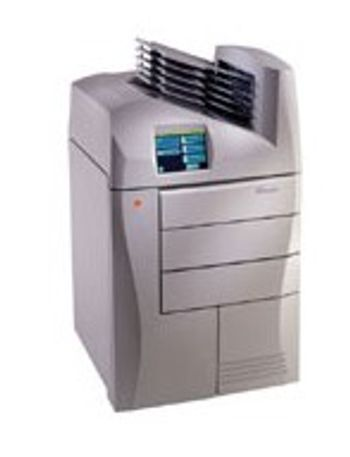
Kodak DRYVIEW 8900
 Kodak · Model DRYVIEW 8900
Never before has a high-throughput dry imager printed every image at 650 dpi on every film size, every time, with no throughput compromises. Quick and agile, the high - resolution KODAK DRYVIEW 8900 Laser Imager delivers outstanding image quality and throughput. Throughput is amazing at up to 200 films per hour each at 650 dpi. Unit features 3 drawers which accommodates various film sizes. Enhanced Options - Configurable and Upgradeable Design an 8900 right for you. Choose one, two, or three film drawers, with an optional six-bin film sorter with a choice of a mammography upgrade. Print high quality mammography images up to 3.6 D-max and over 200 films per hour. Mammography quality assurance test pattern meets stringent U.S. Mammography Quality Standards Act (MQSA) requirements. Energy - save mode is built-in for use during periods of inactivity, use on-demand wake up for after - hours imaging, and preset wake-up time to meet your needs. Superb image quality. 650 - dpi on every image, every film size, every time without throughput compromise. Low image noise floor low - contrast objects are easier visualize. Superior grayscale renders more detail. 16,384 possible levels of gray (14 - bit pixel depth architecture). Largest printable pixel matrix on the market at 9,100 X 11,037. Print multi format CR and DR images without compression or loss of data.
Key tips
- ·Never bypass a radiation interlock to "just get the image" - this is one of the few true zero-tolerance rules in BMET work.
- ·Trend image-quality phantom results over time - drift shows up before an outright failure does.
- ·Portable/mobile units take real physical abuse from transport - check wheel locks and cable strain reliefs more often than fixed units.
Typical Failure Modes
Compiled for this model from its own documentation and established engineering knowledge for this equipment class - not from a verified service record. Confirm against the manufacturer's service manual.
Poor print quality
HighSymptoms: Density too light / dark, banding, streaks, non-uniform image, blotches.
Root cause: Print head / laser optics contamination, film / cartridge issue, or density-calibration drift.
Film jam / transport fault
MediumSymptoms: Film jams in the pick-up or transport, mis-feeds, or multi-feeds.
Root cause: Worn pick-up rollers, a transport-roller fault, or a mis-loaded film cartridge.
Density / calibration fault
MediumSymptoms: Prints do not match the reference, calibration fails, densitometer error.
Root cause: Internal densitometer or the calibration routine.
DICOM / queue fault
MediumSymptoms: Jobs stuck in the queue, printer offline to modalities, association failures.
Root cause: Network / DICOM configuration or the controller board.
Thermal head / laser fault
MediumSymptoms: Whole-image defect, print-engine error.
Root cause: Thermal print head or the laser / optics module.
Serviceable Parts & Consumables
Serviceable items for this model, compiled from its documentation and engineering knowledge for this equipment class. Service class and relative cost are estimates, not manufacturer figures; no part numbers are given. Confirm intervals and pricing against the manufacturer.
Pick-up / transport rollers
Class Periodic replacementRel. cost $$R&R Moderate
Thermal print head / laser optics
Class Periodic replacementRel. cost $$$R&R Difficult
Internal densitometer
Class Major service partRel. cost $$R&R Moderate
Controller / network board
Class Major service partRel. cost $$R&R Moderate
Film (media)
Class ConsumableRel. cost $$R&R Easy
| Part | Service class | Relative cost | R&R difficulty |
|---|---|---|---|
| Pick-up / transport rollers | Periodic replacement | $$ | Moderate |
| Thermal print head / laser optics | Periodic replacement | $$$ | Difficult |
| Internal densitometer | Major service part | $$ | Moderate |
| Controller / network board | Major service part | $$ | Moderate |
| Film (media) | Consumable | $$ | Easy |
Relative cost: $ lowest · $$$$ highest service-part cost for this equipment class. Not a price.
PM Checklist
Preventive-maintenance tasks typical of this equipment class. Perform to the manufacturer's procedure and your facility's policy - this is general reference, not a schedule for this specific unit.
- ·Daily QC per modality: image-quality phantom test
- ·Tube and detector inspection
- ·Annual state-required radiation safety survey
- ·Vendor-scheduled preventive maintenance
Error Codes
Extracted directly from this unit's own service manual.
02-104Inadequate disk Space for New Job
1. Delete jobs in the Undelivered Queue. 2. Load requested media for jobs in pending queue.
03-111Undelivered Job due to Rendering Error
Delete job from the Undelivered Queue.
10-001Delivery Server Internal Error
1. Restart the laser imager. 2. If the error persists, call an Authorized Service Provider of Kodak products.
10-003Delivery Server Image Datapath Error
1. Restart the laser imager. 2. If the error persists, call an Authorized Service Provider of Kodak products.
10-004USB Failed to Initialize
1. Restart the laser imager. 2. If the error persists, call an Authorized Service Provider of Kodak products.
10-910MCS Communication Down
1. Restart the laser imager. 2. If the error persists, call an Authorized Service Provider of Kodak products.
20-154Internal Communication Failure: MCS
1. Restart the laser imager. 2. If the error persists, call an Authorized Service Provider of Kodak products.
20-208Front Door Failed to Open
1. Open the door manually. 2. If the error persists, call an Authorized Service Provider of Kodak products.
20-209Laser Imager Opened During Self Test
1. Close any open drawers, door, or hood. 2. Restart the laser imager. 3. If the error persists, call an Authorized Service Provider of Kodak products.
20-914Internal Image Data Transfer Failed
1. Restart the laser imager. 2. If the error persists, call an Authorized Service Provider of Kodak products.
20-915Internal Image Data Transfer Failed
1. Restart the laser imager. 2. If the error persists, call an Authorized Service Provider of Kodak products.
20-917Internal Image Data Transfer Failed
1. Restart the laser imager. 2. If the error persists, call an Authorized Service Provider of Kodak products.
20-918Internal Image Data Transfer Failed
1. Restart the laser imager. 2. If the error persists, call an Authorized Service Provider of Kodak products.
21-116Film Jam in Area 1: Film Pickup
1. Open the drawer. 2. Close the cartridge to prevent film from fogging. 3. Remove any film. 4. Close the drawer.
21-118Internal Hardware Failure: Film Pickup
1. Restart the laser imager. 2. If the problem persists, call an Authorized Service Provider of Kodak products.
21-119Internal Hardware Failure: Film Pickup
1. Open the drawer. 2. Close the cartridge to prevent film from fogging. 3. Remove any film. 4. Close the drawer.
21-120Internal Hardware Failure: Film Pickup
1. Restart the laser imager. 2. If the error persists, call an Authorized Service Provider of Kodak products.
21-125Internal Hardware Failure: Feed Rollers
1. Restart the laser imager. 2. If the error persists, call an Authorized Service Provider of Kodak products.
21-126Film Jam in Area 1: Feed Rollers
1. Open the drawer. 2. Close the cartridge to prevent film from fogging. 3. Remove any film. 4. Close the drawer.
21-135Drawer Failed to Open
1. Open the drawer manually. 2. If the error persists,
Troubleshooting Approach
A starting sequence for this model, compiled from its documentation and engineering knowledge for this equipment class. Follow the manufacturer's service documentation for the actual procedure.
Symptom: Detector not connecting / images not received / link drops
- Check the detector battery charge (wireless) or reseat the tether.
- Confirm the Wi-Fi access point, channel and range.
- Reboot the detector and the acquisition workstation.
- Try a known-good detector if the site has one.
- Escalate a confirmed detector-electronics fault to the OEM.
Symptom: Fixed-pattern artefacts / non-uniformity / dead pixels or lines / failed calibration
- Run the detector gain / offset calibration and the dead-pixel map.
- Inspect the detector for drop / crush damage.
- Expose a uniform phantom and check uniformity.
- Confirm the generator and AEC are within spec with an X-ray analyser.
- Exchange the detector if calibration will not hold.
Symptom: No or inconsistent exposure / generator error / kV-mAs inaccuracy
- Note the exact generator error / fault code.
- Confirm the mains supply is within the generator's spec (line-voltage compensation).
- Check the HT cables and the exposure contactor.
- Confirm the tube is not in a thermal lockout.
- Escalate a confirmed inverter / HV-tank / tube / filament fault; verify output with an analyser after any repair.
Symptom: AEC (phototimer) images consistently over- or under-exposed
- Verify the AEC response with a phantom at two thicknesses.
- Check the AEC chamber connections and the selected chambers / density.
- Recalibrate the AEC per the service procedure.
- Compare against a manual technique.
- Replace the AEC chamber if it will not calibrate.
Symptom: Tube stand / table / wall bucky will not track, detent or auto-position
- Check the drive, brake, detents and counterbalance for that axis.
- Inspect the position encoder / potentiometer.
- Check the auto-positioning interface and cabling.
- Adjust or replace the brake / drive hardware.
- Confirm smooth motion and reliable detents / SID.
Technical Specs
- Height
- 60 in
- Throughput
- 200 films/hour each at 650 dpi
- Length
- 40 in
- Film Drawers
- Up to 3
- Power Requirements
- 100-240 VAC
- Width
- 32 in
Typical Location
Where this class of equipment is typically deployed - general reference, not this unit's own placement record.
- Radiology / Imaging department
- Emergency Department (portable units)
- Operating Room (C-arms)
- Cath lab
- Bedside ICU (portable X-ray)
Documents & Manuals
Troubleshoot this device with Bio
Describe a symptom or error code. Bio answers from this device's own documented error codes, failure modes, parts, and guides.
Ask Bio