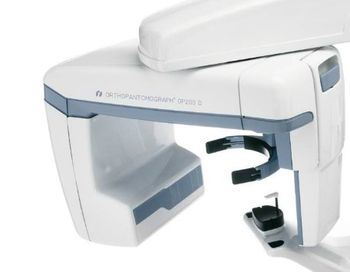
Instrumentarium ORTHOPANTOMOGRAPH OP200 D
 Instrumentarium · Model ORTHOPANTOMOGRAPH OP200 D
A proven leader in panoramic imaging [b]Accurate and stable patient positioning[/b] Correct patient positioning is assured by three positioning laser lights. Frankfurt and midsagittal lights aid finding the correct angulation of the patient's head and the occlusion correction light ensures proper anterior positioning. A rigid 5-point positioning system including forehead support, chin rest and bite fork eliminates patient movement. The open design allows easy viewing and positioning of the patient from either the left or right side. [b]Correct imaging values – automatically[/b] The OP200 D has a patented method for dose-controlled Automatic Exposure Control. The system measures patient bone thickness from the ramus and defines individual exposure values for patients with different sizes. This also enables individual Automatic Spine Compensation values to reduce spinal shadow in the image for each patient. [b] V-shaped beam – clinically proven imaging geometry[/b] The V-shaped X-ray beam adapts to the human anatomy, providing even greater detail and a wider mandibular image layer. The V-shaped X-ray beam also allows for more penetrating power for the thicker maxilla area.
Key tips
- ·Biological-indicator verification applies to dental sterilizers exactly the same as hospital CSSD - no exception for smaller units.
- ·"Sounds different" is often the first real report of handpiece bearing wear, not an outright failure - investigate early rather than waiting.
Typical Failure Modes
Compiled for this model from its own documentation and established engineering knowledge for this equipment class - not from a verified service record. Confirm against the manufacturer's service manual.
No or inconsistent exposure
HighSymptoms: No image, exposure will not trigger, images consistently under- or over-exposed, error code.
Root cause: Tube-head fault, an exposure-switch / timer fault, HV / generator fault, or a sensor / PSP-plate fault.
Sensor / imaging-plate fault (digital)
MediumSymptoms: Dead lines, artefacts, no image from the sensor, PSP plate scratched / fogged.
Root cause: Damaged intraoral sensor / cable, or worn PSP plates.
Pano / CBCT motion or reconstruction fault
MediumSymptoms: Blurred or distorted panoramic image, layer / focal-trough errors, reconstruction fails.
Root cause: Rotation drive / belt / encoder, patient-positioning error, or the reconstruction PC.
Tube-arm / balance fault
MediumSymptoms: Tube head drifts, will not stay positioned, arm joints loose.
Root cause: Worn arm springs / friction joints.
Software / acquisition fault
LowSymptoms: Images will not acquire, save or display in the practice-management software.
Root cause: TWAIN / driver, the acquisition PC, or the software.
Serviceable Parts & Consumables
Serviceable items for this model, compiled from its documentation and engineering knowledge for this equipment class. Service class and relative cost are estimates, not manufacturer figures; no part numbers are given. Confirm intervals and pricing against the manufacturer.
Intraoral sensor & cable / PSP plates
Class Periodic replacementRel. cost $$$R&R Fairly easy
Tube head / HV components
Class Major service partRel. cost $$$$R&R Difficult
Exposure switch / timer board
Class Major service partRel. cost $$R&R Moderate
Pano rotation drive / belt / encoder
Class Major service partRel. cost $$$R&R Difficult
Tube-arm spring / friction-joint kit
Class Major service partRel. cost $$R&R Moderate
| Part | Service class | Relative cost | R&R difficulty |
|---|---|---|---|
| Intraoral sensor & cable / PSP plates | Periodic replacement | $$$ | Fairly easy |
| Tube head / HV components | Major service part | $$$$ | Difficult |
| Exposure switch / timer board | Major service part | $$ | Moderate |
| Pano rotation drive / belt / encoder | Major service part | $$$ | Difficult |
| Tube-arm spring / friction-joint kit | Major service part | $$ | Moderate |
Relative cost: $ lowest · $$$$ highest service-part cost for this equipment class. Not a price.
PM Checklist
Preventive-maintenance tasks typical of this equipment class. Perform to the manufacturer's procedure and your facility's policy - this is general reference, not a schedule for this specific unit.
- ·Daily handpiece lubrication and autoclave cycle verification
- ·Compressor moisture-trap draining
- ·Annual full PM
Error Codes
Extracted directly from this unit's own service manual.
(Pr 62 Err)kV mA s Return rotating unit after exposure (Pr 54 Arn)
(Pr 54 Arn)( ) on ( ) OFF Cassette holder autolifting (FILM) (Pr 55 HUP)
(Pr 55 HUP)( ) on ( ) OFF Cassette holder vertical limit (FILM) (Pr 56 HLI)
(Pr 56 HLI)( ) on ( ) OFF Remote Control Exposure Only (Sr 89 rEO)
(Sr 89 rEO)( ) on ( ) OFF Free Exposures Limit (Sr 71 PAY)
(Sr 71 PAY)( ) OFF ( ) Limit:
Troubleshooting Approach
A starting sequence for this model, compiled from its documentation and engineering knowledge for this equipment class. Follow the manufacturer's service documentation for the actual procedure.
Symptom: No or inconsistent exposure / generator or tube-head error
- Note the exact error code and whether it is a kV / mA / preheat / interface failure.
- Check the mains supply, the dedicated circuit and the fuses.
- Check the tube-head and detector / sensor interface cable connections.
- Confirm the exposure switch is held for the full exposure and the warning light works.
- Escalate a confirmed tube-head / HV / generator fault; verify output with a dental X-ray meter after any repair.
Symptom: Blurred or distorted panoramic image / layer or focal-trough errors
- Confirm patient positioning (bite block, chin rest, light guides).
- Check the rotation drive belt, motor and encoder for wear or slip.
- Run any image-calibration / geometry routine.
- Verify the focal-trough / layer selection.
- Escalate a drive / reconstruction fault to the OEM.
Symptom: Sensor / CCD / CBCT detector fault (dead lines, artefacts, no image)
- Swap in a known-good sensor if available.
- Inspect the sensor cable for kinks or breaks.
- Run the detector calibration / dead-pixel map.
- Expose a phantom and check uniformity.
- Replace or refer the detector as isolated.
Symptom: Software / acquisition fault (image will not acquire, save or display)
- Check the TWAIN / driver and the acquisition PC.
- Restart the acquisition software and the unit.
- Confirm the practice-management link.
- Update to compatible driver / software versions.
- Escalate a persistent acquisition fault to the OEM.
Technical Specs
- X-ray Type
- Digital
Typical Location
Where this class of equipment is typically deployed - general reference, not this unit's own placement record.
- Dental operatory
- Oral surgery suite
- CSSD (dental sterilizers)
Documents & Manuals
Troubleshoot this device with Bio
Describe a symptom or error code. Bio answers from this device's own documented error codes, failure modes, parts, and guides.
Ask Bio