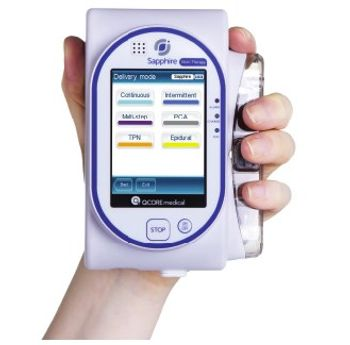
Hospira Q Core Sapphire Infusion System
 Hospira · Model Q Core Sapphire Infusion System
Sapphire is the first touch screen ambulatory infusion pump platform available for use in hospital, ambulatory and home care setting Designed to meet your home infusion needs, the Sapphire™ infusion system helps you deliver exceptional care. Based on a unique, patented technology that delivers precise infusing at ± 2.5% accuracy†, the Sapphire pump also features a touch screen that makes it easy to program, so that only relevant keystroke options are presented on-screen. And, keeping an eye on the future, the software-focused design enables software updates and upgrades via the internet, providing excellent opportunity for growth. The Sapphire infusion system provides the performance, accuracy and configurable settings you need to help meet your patients’ therapy needs – all through a single infusion pump.
Key tips
- ·Free-flow protection must be verified on every PM - a failed anti-free-flow clamp is a direct overdose risk.
- ·Test occlusion alarms in both directions - failing to alarm when it should is more dangerous than a false alarm.
- ·Battery run-time complaints are the most common real-world nuisance call - a full charge/discharge cycle test catches most of them.
Typical Failure Modes
Compiled for this model from its own documentation and established engineering knowledge for this equipment class - not from a verified service record. Confirm against the manufacturer's service manual.
Failure / error message stops delivery
HighSymptoms: The pump alarms and displays an error message / code and stops.
Root cause: A subsystem fault indexed in the service manual - motor / drive, a sensor, set-detection, or a board.
Occlusion alarm / pressure fault
MediumSymptoms: Repeated occlusion alarms, delivery stops, or an occlusion is missed.
Root cause: Kinked or clamped line, a closed roller clamp, a positional patient tube, pressure-sensor drift, or an improperly loaded set.
Air-in-line alarm
MediumSymptoms: Frequent air-in-line alarms, delivery stops.
Root cause: Air in the set, an improperly loaded set, or an ultrasonic air-detector fault.
Flow-rate accuracy drift
MediumSymptoms: Delivered volume outside tolerance on the annual test, especially at low rates.
Root cause: Worn pumping mechanism / plunger drive.
Battery will not hold charge
MediumSymptoms: Short run time, low-battery early after a full charge.
Root cause: Aged battery pack.
Door / plunger / sensor mechanical wear
LowSymptoms: Set will not load, door will not latch, plunger grip poor.
Root cause: Worn door latch, plunger jaws, or anti-free-flow mechanism.
Serviceable Parts & Consumables
Serviceable items for this model, compiled from its documentation and engineering knowledge for this equipment class. Service class and relative cost are estimates, not manufacturer figures; no part numbers are given. Confirm intervals and pricing against the manufacturer.
Battery pack
Class Periodic replacementRel. cost $$R&R Fairly easy
Pumping mechanism / rotor / plunger drive
Class Major service partRel. cost $$$R&R Difficult
Pressure / air-detector sensor assembly
Class Major service partRel. cost $$R&R Moderate
Door / latch / anti-free-flow assembly
Class Major service partRel. cost $$R&R Moderate
Drive motor / gearbox
Class Major service partRel. cost $$$R&R Difficult
| Part | Service class | Relative cost | R&R difficulty |
|---|---|---|---|
| Battery pack | Periodic replacement | $$ | Fairly easy |
| Pumping mechanism / rotor / plunger drive | Major service part | $$$ | Difficult |
| Pressure / air-detector sensor assembly | Major service part | $$ | Moderate |
| Door / latch / anti-free-flow assembly | Major service part | $$ | Moderate |
| Drive motor / gearbox | Major service part | $$$ | Difficult |
Relative cost: $ lowest · $$$$ highest service-part cost for this equipment class. Not a price.
PM Checklist
Preventive-maintenance tasks typical of this equipment class. Perform to the manufacturer's procedure and your facility's policy - this is general reference, not a schedule for this specific unit.
- ·Occlusion pressure and flow-rate accuracy verification
- ·Battery conditioning cycle
- ·Door latch and air-in-line sensor inspection
- ·Post-drop functional check before return to service
- ·Annual PM per manufacturer schedule
Troubleshooting Approach
A starting sequence for this model, compiled from its documentation and engineering knowledge for this equipment class. Follow the manufacturer's service documentation for the actual procedure.
Symptom: Error message or code
- Note the exact error message / code.
- Look it up in the pump's technical service manual troubleshooting section.
- Use the biomed diagnostics / utilities to test the affected subsystem.
- Follow the manual's parts-replacement procedure.
- Run the scheduled-maintenance test set (including flow accuracy) after any repair.
Symptom: Occlusion or delivery problem
- Check the line for kinks, clamps and a closed roller clamp; check the patient site.
- Reload the set correctly, clearing all air.
- Confirm an approved set for this pump.
- Run the pressure / air-detector (or rotor) test in diagnostics.
- Replace the set; refer the pump if a sensor / mechanism fault is indicated.
Typical Location
Where this class of equipment is typically deployed - general reference, not this unit's own placement record.
- Patient care floors
- ICU
- OR
- Oncology / infusion centers
- Home health (portable pumps)
Documents & Manuals
No documents available for this device yet.
Safety & Recalls
Synced live from the FDA openFDA API.
- RECALL
Hospira MedNet 6.1 software, in combination with the SapphirePlus 13.1x infusion pump, may result in incorrect bolus amount calculations for drugs whose concentrations are listed in Million Units.
- RECALL
Potential for the Symbiq pole clamp assemblies to be missing the rubber stop pad.
- RECALL
Hospira MedNet 5.5, 5.8.1, and 5.8.2 contains software defect where the dosing units of "nanog/kg/min" and "milliUnits/min" are not sent to a Plum A+ device (Version 13.40, 13.41, and 13.4.2) via Auto Programming when those dosing units are not properly established in the customized drug library. A dosing unit mismatch of "nanog/kg/min" or "milliUnits/min" on an unmatched medication will produce a
- RECALL
There are two situations that may occur when using the GemStar Docking Station, List Number 13075-XX-XX, in conjunction with the GemStar infusion pump: 1) when the Docking Station is used in conjunction with a GemStar Phase 3 pump (List 13000-XX, 13100-XX, or 13150-XX) the potential exists for the GemStar Phase 3 pump to fail to power up while connected to the Docking Station, and 2) when either a GemStar Phase 3 (List 13000-XX, 13100-XX, or 13150-XX)or GemStar Phase 4 pump (List 13086-XX, 13087-XX, or 13088-XX) is used in conjunction with both a Docking Station and an External Battery Pack accessory (List 13073-XX) there exists a possibility that the GemStar pump will display error code 11/003 and give an audible alarm indicating excessive input voltage from the external sources. If the GemStar pump detects what is perceived to be more than 3.6 Volts measured on the external voltage inp
- RECALL
The GemStar Infusion pump may not receive direct current (DC) power from the power supply. In one instance, smoke was observed and the GemStar pump was operating on battery power while connected to the 3 volt DC power supply.
- RECALL
The connection between the beeper subassembly and the pump may fail. The GemStar infusion pump will identify this failure during the "self-test" while powering up which will result in a Beeper Error ("code 10/001/000"). This Beeper Error (code 10/001/000) is a service alarm that places the pump in an inoperable mode and requires service before it can be returned to service.
- RECALL
Hospira has received customer reports of broken door assemblies on the Hospira/Abbott Acclaim Encore infusion pumps. If the door assembly breaks, it may prevent the door from closing properly and unrestricted flow may occur. If the door cannot be closed, the pump cannot be used which can result in a delay in therapy.
- RECALL
During infusions of 2.0 mL/hr the motor assembly may rotate backwards capturing additional medication resulting in over-infusion.
- RECALL
Some patients are obtaining access to the dosage reset codes required to change the settings on GemStar infusion pumps and are subsequently changing the infusion rate set by their doctors. Patients are obtaining access to these codes via website sponsors by downloading the GemStar User/Service Manual featured on the sponsors' websites. The GemStar User/Service Manual should be removed from these w
- RECALL
Battery level lower then 2.4 volts results in corrupt history log and loss of data for preview therapy's parameters and causes an 11/004 error resulting in the pump not being able to be used.
- RECALL
Pump shutting off during use without warning.
- RECALL
The proximal and distal pressure sensor calibration can drift resulting in the pump failing the Proximal or Distal Occlusion Operational Test, as described in the GemStar Technical Service Manual, or reporting one of the following errors during device setup or infusion: 1) Cassette Check - D; 2) Cassette Check - P; 3) Proximal Occlusion; 4) Distal Occlusion; 5) Pressure Calibration Error; 6) Bad Pressure Sensor Event; 7) Bad Pressure State; 8) Distal Pressure is Out of Range; 9) Proximal Sensor is Out of Range. A pump with this issue may, instead of reporting an error, not detected occlusions or issue false occlusion alarms, which will stop the infusion and invoke visual and audible warnings to the user.
- RECALL
The devices secondary audio signal fails to activate.
- RECALL
The software enables programming of the GemStar device for a Bolus Lower Lockout Limit outside of the hard limits entered into the GemStar SP Infusion Suite Database PC application.
- RECALL
Fire/Shock hazard-- The power cord used in the device may cause sparks/flashes and poses a fire and shock hazard.
- RECALL
Potential delay/underinfusion of critical therapy-- Devices experience increased frequency of alarms that result in temporary pump stoppage.
- RECALL
Hypersensitivity to normal motor friction/drag may cause malfunction errors and alarms that are designed to stop pump operations.
Related calculators
From BioLab, for work done with this kind of equipment.
Troubleshoot this device with Bio
Describe a symptom or error code. Bio answers from this device's own documented error codes, failure modes, parts, and guides.
Ask Bio