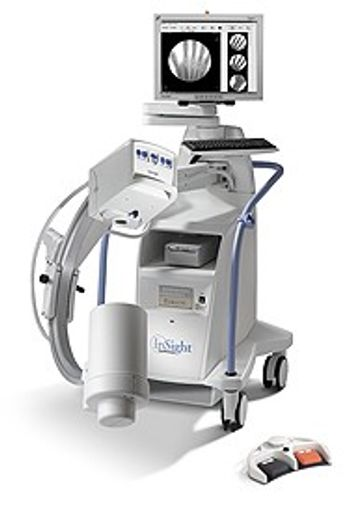
Hologic Insight
 Hologic · Model Insight
Hologic continues to set the bar for high quality fluoroscopy imaging with the smallest x-ray focal point in the industry. The advanced degree of automation incorporated into the InSight mini C-arm means surgeons can stay focused on procedures, rather than instrumentation and adjustments. Unprecedented Flexibility for Comfort and Ease of Visualization The demands of extremity surgery are varied. No matter how challenging the body part or the complexity in the positioning, InSight will accommodate user's needs with extraordinary flexibility. The InSight's lightweight, flat screen monitor can be rotated and positioned with effortless ease. The imaging C-arm moves with unprecedented maneuverability and easily allows users to get the precise angles that users need. The result is greater comfort for users and their patients and improved visualization in all types of extremity surgeries.
Key tips
- ·Never bypass a radiation interlock to "just get the image" - this is one of the few true zero-tolerance rules in BMET work.
- ·Trend image-quality phantom results over time - drift shows up before an outright failure does.
- ·Portable/mobile units take real physical abuse from transport - check wheel locks and cable strain reliefs more often than fixed units.
Typical Failure Modes
Compiled for this model from its own documentation and established engineering knowledge for this equipment class - not from a verified service record. Confirm against the manufacturer's service manual.
No or inconsistent fluoro / exposure
HighSymptoms: No image on boost, exposure inhibited, kV/mA error, image too dark or bright.
Root cause: X-ray tube / monoblock fault, HV generator fault, or the AEC / dose-control loop.
Image-intensifier or flat-panel detector fault
HighSymptoms: Dim, distorted, vignetted or noisy image; dead lines (flat panel); S-distortion (II).
Root cause: Image-intensifier tube ageing / II fault, or a flat-panel detector fault.
C-arm movement / brake fault
MediumSymptoms: Orbital, lateral or vertical motion binds, drifts, or a brake will not hold.
Root cause: Worn friction brakes, bearings, or the counterbalance.
Monitor cart / video fault
MediumSymptoms: No image on one or both monitors, image freeze, no last-image-hold.
Root cause: Monitor, the cart-to-stand cable, or the image-processing PC.
Thermal / duty-cycle lockout
LowSymptoms: Fluoro inhibited after a run, tube-heat warning.
Root cause: Monoblock heat limit reached or a cooling-fan fault.
Serviceable Parts & Consumables
Serviceable items for this model, compiled from its documentation and engineering knowledge for this equipment class. Service class and relative cost are estimates, not manufacturer figures; no part numbers are given. Confirm intervals and pricing against the manufacturer.
X-ray tube / monoblock
Class Major service partRel. cost $$$$R&R Expert-level
Image intensifier tube / camera
Class Major service partRel. cost $$$$R&R Difficult
Flat-panel detector (if fitted)
Class Major service partRel. cost $$$$R&R Difficult
C-arm friction-brake / bearing kit
Class Major service partRel. cost $$R&R Moderate
Monitor / video cable
Class Major service partRel. cost $$R&R Fairly easy
Cooling fan
Class Periodic replacementRel. cost $R&R Moderate
| Part | Service class | Relative cost | R&R difficulty |
|---|---|---|---|
| X-ray tube / monoblock | Major service part | $$$$ | Expert-level |
| Image intensifier tube / camera | Major service part | $$$$ | Difficult |
| Flat-panel detector (if fitted) | Major service part | $$$$ | Difficult |
| C-arm friction-brake / bearing kit | Major service part | $$ | Moderate |
| Monitor / video cable | Major service part | $$ | Fairly easy |
| Cooling fan | Periodic replacement | $ | Moderate |
Relative cost: $ lowest · $$$$ highest service-part cost for this equipment class. Not a price.
PM Checklist
Preventive-maintenance tasks typical of this equipment class. Perform to the manufacturer's procedure and your facility's policy - this is general reference, not a schedule for this specific unit.
- ·Daily QC per modality: image-quality phantom test
- ·Tube and detector inspection
- ·Annual state-required radiation safety survey
- ·Vendor-scheduled preventive maintenance
Error Codes
Extracted directly from this unit's own service manual.
E-3Operation & (Error Type) Description Cause Action Backup/Recover Error reading from %1. Error displayed while reading the disk during backup. %1 indicates the label on the disk Disk may have a problem. Replace the disk. %1 does not contain sufficient space to store the backup.
Disk may have a problem. Replace the disk. %1 does not contain sufficient space to store the backup. Insert a different disk or delete files from the disk.
E-4Operation & (Error Type) Description Cause Action Image Calibration Error communicating with X-ray controller. Error while enabling or disabling x-rays & setting the power level
Restart the application. If still does not work, check the XRC board mode for consistency (both the switch and the jumper should correspond to either calibration mode or regular mode). If the mode settings are correct, check the XRC board and replace if broken.
E-5Operation & (Error Type) Description Cause Action Image Calibration (Cont.) Error initializing X-ray controller. Error while initializing the XRC controller.
Error communicating with a camera. Error while opening the camera port. These errors occur during flat field calibration and warp calibration. Restart the application. If does not help, check the camera, camera connector, and the image board, and replace the broken part.
E-6Operation & (Error Type) Description Cause Action Patient Selection / Update (Errors) No matching patients found. Error displayed when performing a detailed query and we don't get any patients back from the search. The same error is displayed when we query the worklist.
Change the query parameters and run the query.
Troubleshooting Approach
A starting sequence for this model, compiled from its documentation and engineering knowledge for this equipment class. Follow the manufacturer's service documentation for the actual procedure.
Symptom: Image artefacts / poor fluoro or CT image / failed calibration
- Run the daily air / water (fast) calibration; if it fails, run the full calibration set.
- Scan / image a uniform phantom and review uniformity and noise against baseline.
- Check the X-ray tube warm-up and heat-unit / arc status.
- Check the detector / image-intensifier / flat-panel performance via service diagnostics.
- Escalate a confirmed detector-channel, DAS or tube fault to the OEM; re-verify with the phantom after any correction.
Symptom: Exposure aborts / tube-arc errors / kV-mAs fault
- Record the exact error codes and the phase (warm-up vs scan / fluoro vs cine).
- Run extended tube conditioning / seasoning.
- Review the arc-count and heat-unit trend.
- Confirm the chiller / heat-exchanger operates and coolant is at level.
- Plan a tube replacement when arc counts climb or output drifts; verify output after any HV work.
Symptom: Gantry rotation / slip-ring / positioner fault
- Note the axis and any collision-sensor indication.
- Clear obstructions and check the body-contour / collision sensors.
- Inspect the slip-ring brushes (dust, wear) and the drive belt / bearings.
- Run the motion self-test / calibration.
- Replace the brush set / drive component or refer as isolated.
Symptom: Table / cradle drifts, will not index or reach position
- Note the position / geometry error.
- Check for a mechanical obstruction on the table.
- Run the table drive self-test / calibration.
- Inspect the drive, brake and encoder.
- Replace the drive component or refer as isolated.
Symptom: Reconstruction / console / PACS fault
- Note the console / recon error.
- Restart the recon hardware / console per the OEM procedure.
- Check free storage and the database.
- Confirm the network link to PACS.
- Escalate a recon-hardware or host fault to the OEM.
Technical Specs
- Maximum Focal Spot
- 0.45 mm
- X-ray Generator Power Rating
- 75 Kw
- Image Display
- 20 in touch screen, flt panel
Typical Location
Where this class of equipment is typically deployed - general reference, not this unit's own placement record.
- Radiology / Imaging department
- Emergency Department (portable units)
- Operating Room (C-arms)
- Cath lab
- Bedside ICU (portable X-ray)
Documents & Manuals
Troubleshoot this device with Bio
Describe a symptom or error code. Bio answers from this device's own documented error codes, failure modes, parts, and guides.
Ask Bio