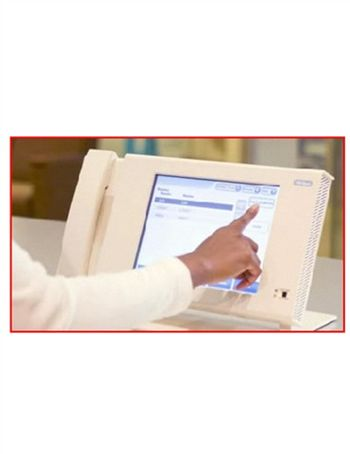
Hillrom NaviCare Nurse Call
 Hillrom · Model NaviCare Nurse Call
Improve Patient Safety Fundamentally changing the game in nurse communications, NaviCare® Nurse Call brings a new approach to nurse call systems, helping to improve patient safety. The NaviCare® platform captures crucial safety data from Hill-Rom® smart beds and sends intelligent alerts directly to the caregiver, only when action is required - helping caregivers protect patients from harm. Drive efficiency at the point of care The NaviCare® Nurse Call station was designed with a passion to enhance caregiver efficiency at the point of care. Innovations such as automated patient surveillance and industry leading real-time locating solutions help improve caregiver adoption of technology while increasing efficiency of workflow and documentation. Hill-Rom’s handwashing compliance solution uses active staff locating technology to help improve hand-hygiene protocol compliance. Improve Patient Satisfaction NaviCare® Nurse call enables a quiet environment and enables direct communication between patients and their caregivers. Patients see improved responsiveness in an environment that is more conducive to improved patient outcomes and a better overall patient experience. Integrate the health care enterprise Unlike traditional nurse call systems, NaviCare® Nurse Call is built from the ground up with a focus on streamlining communications and facilitating integration of the health care enterprise. The NaviCare® Nurse Call station provides a powerful platform for clinical connectivity to help better connect patients, caregivers, beds and IT systems, turning real-time data into informed action at the point of care.
Key tips
- ·When no category-specific guidance fits, default to the manufacturer's own service manual and the general troubleshooting method in the Engineer's Guide.
- ·Run an incoming and annual electrical safety test regardless of how niche the device is.
Typical Failure Modes
Compiled for this model from its own documentation and established engineering knowledge for this equipment class - not from a verified service record. Confirm against the manufacturer's service manual.
Call not registering at the station
HighSymptoms: Patient / staff presses a call button and nothing appears at the console or on the dome light.
Root cause: Room station / call-cord fault, a wiring / connector fault, or a network / server issue.
Dome light / corridor light fault
MediumSymptoms: Dome light does not light or shows the wrong colour for the call type.
Root cause: Failed dome-light LED or its driver / wiring.
Audio / intercom fault
MediumSymptoms: No two-way audio between the room and the console, one-way or noisy audio.
Root cause: Room-station speaker / microphone or the audio path.
Server / integration fault
HighSymptoms: Calls not routing to phones / pagers, locating or reporting down, whole units offline.
Root cause: NaviCare server, network, or a middleware-integration fault.
Pillow-speaker / bed-connection fault
MediumSymptoms: A bed's controls or nurse-call not working through the pillow speaker.
Root cause: Pillow speaker or the 37-pin bed connector / cable.
Serviceable Parts & Consumables
Serviceable items for this model, compiled from its documentation and engineering knowledge for this equipment class. Service class and relative cost are estimates, not manufacturer figures; no part numbers are given. Confirm intervals and pricing against the manufacturer.
Room station / call cord
Class Periodic replacementRel. cost $$R&R Fairly easy
Dome-light LED module
Class Major service partRel. cost $$R&R Fairly easy
Pillow speaker
Class Periodic replacementRel. cost $$R&R Easy
Bed-connector cable
Class Periodic replacementRel. cost $$R&R Fairly easy
Network interface / server components
Class Major service partRel. cost $$$R&R Difficult
| Part | Service class | Relative cost | R&R difficulty |
|---|---|---|---|
| Room station / call cord | Periodic replacement | $$ | Fairly easy |
| Dome-light LED module | Major service part | $$ | Fairly easy |
| Pillow speaker | Periodic replacement | $$ | Easy |
| Bed-connector cable | Periodic replacement | $$ | Fairly easy |
| Network interface / server components | Major service part | $$$ | Difficult |
Relative cost: $ lowest · $$$$ highest service-part cost for this equipment class. Not a price.
PM Checklist
Preventive-maintenance tasks typical of this equipment class. Perform to the manufacturer's procedure and your facility's policy - this is general reference, not a schedule for this specific unit.
- ·Follow the manufacturer's PM schedule
- ·Perform incoming and annual electrical safety testing per facility biomedical program
Troubleshooting Approach
A starting sequence for this model, compiled from its documentation and engineering knowledge for this equipment class. Follow the manufacturer's service documentation for the actual procedure.
Symptom: A call will not register
- Press the call button and watch the dome light and the console together.
- Test with a known-good call cord.
- Check the room-station wiring and connectors.
- Confirm the station is online in the NaviCare console.
- Escalate a whole-unit outage to the NaviCare server / network.
Symptom: No / poor intercom audio
- Test two-way audio from the console.
- Check the room-station speaker and microphone.
- Inspect the station wiring.
- Replace the room station.
- Verify audio and the call-registration path after repair.
Typical Location
Where this class of equipment is typically deployed - general reference, not this unit's own placement record.
- Varies by device - check the unit's own manual for facility placement guidance
Documents & Manuals
No documents available for this device yet.
Troubleshoot this device with Bio
Describe a symptom or error code. Bio answers from this device's own documented error codes, failure modes, parts, and guides.
Ask Bio