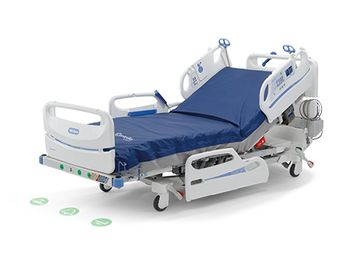
Hillrom Centrella Smart + Bed
 Hillrom · Model Centrella Smart + Bed
Enhanced Patient Satisfaction Features USB Port - Conveniently charges personal devices. Advanced Patient Pendant - Provides personalized patient comfort settings, entertainment controls, and a live nurse call button with visual confirmation of placed calls. Device Storage Area - Holds patient's personal items, including devices and reading material. Auto Contour Feature - Keeps patients comfortable by elevating the knees when the head is elevated. Yourbed. Hill-Rom.com - Informs patients about the benefit of the bed to help optimize their experience. Optimized Patient Safety Features Verbal Safety Alerts - easily understandable verbal prompts that caution caregivers and patients: "Brake not set" "Call light not connected" "Please don't get up" "Your care team has been called" "Function not available" Feature Labeling - Helps caregivers easily identify key features on the bed. Safeview + System - Helps caregivers monitor bed safety status with easy-to-read visual projections. Motion-Activated Nightlight - Illuminates the path to guide patients to and from the bed. Advanced Slideguard Feature - Reduces patient migration when the head-of-bed is raised. Illumiguide Siderail Handgrip - Provides a place to grasp and enhances visibility to safely guide patients back to bed. Enhanced 3-Mode Bed Exit - Includes silence, auto reset and visual/audible safety prompts. Advanced Caregiver-Focused Technology Graphical Caregiver Interface (GCI) Touchscreen - Includes flip-up panel, providing quick access to easy-to-use controls. Centrella Smart+ Bed Therapeutic Surfaces Innovative support surfaces help manage pressure, shear and moisture to deliver optimal wound prevention and healing. Centrella max Surface Advanced technology delivering superior pressure redistribution and microclimate management. Focused Advanced Microclimate Technology Removes up to 4X more heat and 7X more moisture Weight-Based Pressure Redistribution Up to 13% less peak sacral pressure Enhanced Turn Assist More effective turn in 77% less time Centrella pro Surface Targeted and customized non-powered pressure redistribution for optimal patient support and comfort. Targeted Pressure Redistribution Up to 21% less peak sacral pressure Best-In-Class Comfort Rated 5x more comfortable Centrella core Surface Non-powered pressure redistribution designed to enhance patient comfort, Multi-Layer Foam Construction Up to 11% less peak sacral pressure.
Key tips
- ·Mounting and securement hardware takes real fatigue from vibration and road shock - inspect it as carefully as the device itself.
- ·Post-call battery and function checks catch transport-induced faults that a scheduled PM would miss for months.
Typical Failure Modes
Compiled for this model from its own documentation and established engineering knowledge for this equipment class - not from a verified service record. Confirm against the manufacturer's service manual.
A powered bed function will not run
HighSymptoms: Backrest, knee, height, Trendelenburg or the boost / turn assist will not move from the siderail or caregiver controls.
Root cause: Failed linear actuator, a control-board fault, a control-panel fault, or a pinched / damaged control cable.
Brake / castor-lock fault
MediumSymptoms: Bed will not brake or release, drifts, central brake pedal ineffective.
Root cause: Worn central-brake linkage or castor.
Integrated scale / bed-exit fault
MediumSymptoms: Weight reads implausibly or will not zero, bed-exit alarm false-triggers or fails.
Root cause: Load-cell drift or damage, or a scale-control fault.
Battery back-up fault
MediumSymptoms: Functions and alarms do not work during a power interruption, battery-fault indicator.
Root cause: Aged back-up battery or a charger fault.
Siderail / CPR-release / mechanical fault
LowSymptoms: Siderail will not latch, rattles, or the CPR release is slow / stiff.
Root cause: Worn siderail latch or the CPR mechanism.
Serviceable Parts & Consumables
Serviceable items for this model, compiled from its documentation and engineering knowledge for this equipment class. Service class and relative cost are estimates, not manufacturer figures; no part numbers are given. Confirm intervals and pricing against the manufacturer.
Linear actuator (backrest / knee / height)
Class Major service partRel. cost $$$R&R Difficult
Central-brake / castor assembly
Class Major service partRel. cost $$R&R Difficult
Load cell / scale sensor set
Recalibrate the scale after replacement.
Class Major service partRel. cost $$$R&R Difficult
Back-up battery
Class Periodic replacementRel. cost $$R&R Fairly easy
Siderail control panel / control board
Class Major service partRel. cost $$$R&R Moderate
| Part | Service class | Relative cost | R&R difficulty |
|---|---|---|---|
| Linear actuator (backrest / knee / height) | Major service part | $$$ | Difficult |
| Central-brake / castor assembly | Major service part | $$ | Difficult |
| Load cell / scale sensor set Recalibrate the scale after replacement. | Major service part | $$$ | Difficult |
| Back-up battery | Periodic replacement | $$ | Fairly easy |
| Siderail control panel / control board | Major service part | $$$ | Moderate |
Relative cost: $ lowest · $$$$ highest service-part cost for this equipment class. Not a price.
PM Checklist
Preventive-maintenance tasks typical of this equipment class. Perform to the manufacturer's procedure and your facility's policy - this is general reference, not a schedule for this specific unit.
- ·Post-call function and battery check
- ·Mounting / securement inspection
- ·Annual full PM and vibration-tolerance check
Troubleshooting Approach
A starting sequence for this model, compiled from its documentation and engineering knowledge for this equipment class. Follow the manufacturer's service documentation for the actual procedure.
Symptom: A powered function is dead
- Confirm the bed is plugged in and the battery is charged, and any function lock-out is off.
- Try the function from both the siderail and caregiver controls to isolate the control from the actuator.
- Check the control cable / harness for pinch damage along the articulation.
- Replace the actuator or control board as isolated.
- Load-test the function to the rated capacity.
Symptom: Scale or bed-exit inaccurate
- Remove all load and confirm the scale reads zero and can be tared.
- Hang / place a known reference weight and confirm the reading.
- Inspect the load-cell mounts for binding or debris.
- Recalibrate per the service manual.
- Replace the load-cell set if it will not calibrate.
Typical Location
Where this class of equipment is typically deployed - general reference, not this unit's own placement record.
- Ambulance / transport vehicles
- Emergency Department
- Inter-facility transport teams
Documents & Manuals
Troubleshoot this device with Bio
Describe a symptom or error code. Bio answers from this device's own documented error codes, failure modes, parts, and guides.
Ask Bio