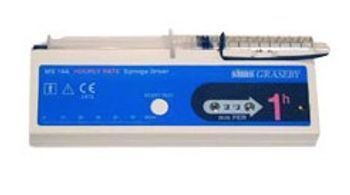
Graseby Medical MS26
 Graseby Medical · Model MS26
It is battery powered using a 9V ‘alkaline’ battery. Please always have a spare one with you. They do last for several weeks but in case one fails an extra should be available. Your Nurse will show you how to change the battery and the instructions are in this booklet on page 9. The rate will be set by your health professional to deliver a set amount of medication(s) over a 24 hour period. The rate will be set in millimeters(mm) per hour so there will only be a very small amount of solution going under your skin each hour and you should be unaware of it eg: 2mm per hour will mean the solution in the syringe will take approximately 24 hours to complete. Up to three medicines can be put into solution in the syringe at any one time. The solution will be measured in the syringe to a volume that measures 48mm - this will not fill the whole syringe. Three different size syringes can be attached to the driver - 5ml, 10ml and a 20ml size. The driver is designed to make your life more comfortable and therefore you should be able to continue with your daily routine. The syringe driver is NOT waterproof and so you must keep it away from water - your nurse will show you how to disconnect the driver for showering or swimming. It is generally quite safe to be off the driver for up to an hour.
Key tips
- ·Free-flow protection must be verified on every PM - a failed anti-free-flow clamp is a direct overdose risk.
- ·Test occlusion alarms in both directions - failing to alarm when it should is more dangerous than a false alarm.
- ·Battery run-time complaints are the most common real-world nuisance call - a full charge/discharge cycle test catches most of them.
Typical Failure Modes
Compiled for this model from its own documentation and established engineering knowledge for this equipment class - not from a verified service record. Confirm against the manufacturer's service manual.
Failure / error message stops delivery
HighSymptoms: The pump alarms and displays an error message / code and stops.
Root cause: A subsystem fault indexed in the service manual - motor / drive, a sensor, set-detection, or a board.
Occlusion alarm / pressure fault
MediumSymptoms: Repeated occlusion alarms, delivery stops, or an occlusion is missed.
Root cause: Kinked or clamped line, a closed roller clamp, a positional patient tube, pressure-sensor drift, or an improperly loaded set.
Air-in-line alarm
MediumSymptoms: Frequent air-in-line alarms, delivery stops.
Root cause: Air in the set, an improperly loaded set, or an ultrasonic air-detector fault.
Flow-rate accuracy drift
MediumSymptoms: Delivered volume outside tolerance on the annual test, especially at low rates.
Root cause: Worn pumping mechanism / plunger drive.
Battery will not hold charge
MediumSymptoms: Short run time, low-battery early after a full charge.
Root cause: Aged battery pack.
Door / plunger / sensor mechanical wear
LowSymptoms: Set will not load, door will not latch, plunger grip poor.
Root cause: Worn door latch, plunger jaws, or anti-free-flow mechanism.
Serviceable Parts & Consumables
Serviceable items for this model, compiled from its documentation and engineering knowledge for this equipment class. Service class and relative cost are estimates, not manufacturer figures; no part numbers are given. Confirm intervals and pricing against the manufacturer.
Battery pack
Class Periodic replacementRel. cost $$R&R Fairly easy
Pumping mechanism / rotor / plunger drive
Class Major service partRel. cost $$$R&R Difficult
Pressure / air-detector sensor assembly
Class Major service partRel. cost $$R&R Moderate
Door / latch / anti-free-flow assembly
Class Major service partRel. cost $$R&R Moderate
Drive motor / gearbox
Class Major service partRel. cost $$$R&R Difficult
| Part | Service class | Relative cost | R&R difficulty |
|---|---|---|---|
| Battery pack | Periodic replacement | $$ | Fairly easy |
| Pumping mechanism / rotor / plunger drive | Major service part | $$$ | Difficult |
| Pressure / air-detector sensor assembly | Major service part | $$ | Moderate |
| Door / latch / anti-free-flow assembly | Major service part | $$ | Moderate |
| Drive motor / gearbox | Major service part | $$$ | Difficult |
Relative cost: $ lowest · $$$$ highest service-part cost for this equipment class. Not a price.
PM Checklist
Preventive-maintenance tasks typical of this equipment class. Perform to the manufacturer's procedure and your facility's policy - this is general reference, not a schedule for this specific unit.
- ·Occlusion pressure and flow-rate accuracy verification
- ·Battery conditioning cycle
- ·Door latch and air-in-line sensor inspection
- ·Post-drop functional check before return to service
- ·Annual PM per manufacturer schedule
Troubleshooting Approach
A starting sequence for this model, compiled from its documentation and engineering knowledge for this equipment class. Follow the manufacturer's service documentation for the actual procedure.
Symptom: Error message or code
- Note the exact error message / code.
- Look it up in the pump's technical service manual troubleshooting section.
- Use the biomed diagnostics / utilities to test the affected subsystem.
- Follow the manual's parts-replacement procedure.
- Run the scheduled-maintenance test set (including flow accuracy) after any repair.
Symptom: Occlusion or delivery problem
- Check the line for kinks, clamps and a closed roller clamp; check the patient site.
- Reload the set correctly, clearing all air.
- Confirm an approved set for this pump.
- Run the pressure / air-detector (or rotor) test in diagnostics.
- Replace the set; refer the pump if a sensor / mechanism fault is indicated.
Technical Specs
- Height
- 2.1 in
- Length
- 0.9 in
- Flow Accuracy
- 5 %
- Infusion Pump Type
- Patient-Controlled Analgesic (PCA)
- Width
- 6.5 in
Typical Location
Where this class of equipment is typically deployed - general reference, not this unit's own placement record.
- Patient care floors
- ICU
- OR
- Oncology / infusion centers
- Home health (portable pumps)
Documents & Manuals
No documents available for this device yet.
Related calculators
From BioLab, for work done with this kind of equipment.
Troubleshoot this device with Bio
Describe a symptom or error code. Bio answers from this device's own documented error codes, failure modes, parts, and guides.
Ask Bio