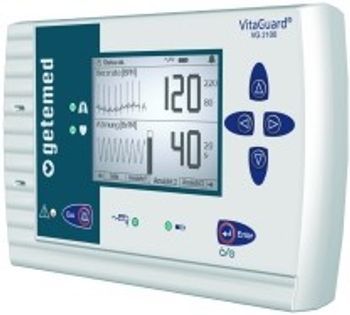
Getemed VITAGUARD VG 2100
 Getemed · Model VITAGUARD VG 2100
The VitaGuard monitors are intuitive to operate and, at the same time, provide a wide range of functionality. Also, due to their compact size and light weight, they offer a high degree of flexibility. Features including storage of silent alarms for all monitored parameters as well as additional manual storage of physiological signals extend the application spectrum of the devices. Measurement functions for basal impedance as well as ECG and respiration amplitudes simplify device operation and, coupled with complex signal processing algorithms, increase the reliability. The high-resolution graphical LCD display enhances intuitive operation and allows simultaneous visual inspection of the measured parameters, alarm settings, waveforms and status messages. Acoustic and visual alarms are generated when the physiological parameters move outside their respective preset alarm limits. When an alarm occurs, the physiological parameters and their associated waveforms are stored in event memory. Parallel to the event driven memory functions, VitaGuard® incorporates a 72-hours trend memory along with an 8-hour full-disclosure memory. getemed's software tool VitaWin® is available to download, visualize and analyze the stored data.
Key tips
- ·A no-signal/flatline alarm gets checked on the patient first, not the monitor - rule out a real clinical event before troubleshooting.
- ·Recalibrate NIBP against a reference manometer, not just a self-test pass.
- ·Reused patient cables (SpO2, ECG leads) are a common source of intermittent-fault complaints - swap the cable before the module.
Typical Failure Modes
Compiled for this model from its own documentation and established engineering knowledge for this equipment class - not from a verified service record. Confirm against the manufacturer's service manual.
Will not power on or unexpected shutdown
HighSymptoms: The patient monitoring is dead, reboots, or shuts down mid-use.
Root cause: Mains lead / fuse, an aged battery, or a power-supply board fault.
Battery will not hold charge
MediumSymptoms: Short run time on battery; low-battery alarm soon after a full charge.
Root cause: Aged rechargeable battery pack or a charger fault.
Display / control-panel fault
MediumSymptoms: Blank, dim or distorted display; unresponsive keys or touchscreen.
Root cause: Display, backlight, or control-board fault.
Fails self-test or calibration
MediumSymptoms: Power-on self-test or the scheduled performance check fails or is out of tolerance.
Root cause: Sensor drift or an internal board fault; recalibration or repair needed.
Serviceable Parts & Consumables
Serviceable items for this model, compiled from its documentation and engineering knowledge for this equipment class. Service class and relative cost are estimates, not manufacturer figures; no part numbers are given. Confirm intervals and pricing against the manufacturer.
Rechargeable battery pack
Class Periodic replacementRel. cost $$R&R Fairly easy
Power supply / mains board
Class Major service partRel. cost $$$R&R Difficult
Display / control-panel assembly
Class Major service partRel. cost $$$R&R Moderate
Cooling fan
Class Major service partRel. cost $R&R Moderate
| Part | Service class | Relative cost | R&R difficulty |
|---|---|---|---|
| Rechargeable battery pack | Periodic replacement | $$ | Fairly easy |
| Power supply / mains board | Major service part | $$$ | Difficult |
| Display / control-panel assembly | Major service part | $$$ | Moderate |
| Cooling fan | Major service part | $ | Moderate |
Relative cost: $ lowest · $$$$ highest service-part cost for this equipment class. Not a price.
PM Checklist
Preventive-maintenance tasks typical of this equipment class. Perform to the manufacturer's procedure and your facility's policy - this is general reference, not a schedule for this specific unit.
- ·Routine cable and lead-wire inspection for fraying/wear
- ·Battery conditioning cycle
- ·NIBP calibration check against a reference manometer
- ·ECG / SpO2 accuracy verification against a patient simulator
- ·Annual electrical safety test
Troubleshooting Approach
A starting sequence for this model, compiled from its documentation and engineering knowledge for this equipment class. Follow the manufacturer's service documentation for the actual procedure.
Symptom: Will not power on
- Confirm the outlet, mains lead and fuse.
- Try on battery, then on mains only, to isolate the supply.
- Look for a power indicator or POST code.
- Replace the fuse / battery / power supply as isolated.
- Run the self-test after any repair.
Symptom: Fails self-test or calibration
- Note the exact failure message / code.
- Power-cycle and repeat the self-test.
- Verify against a reference / simulator where one applies.
- Recalibrate per the service manual.
- Refer the affected board for service if it will not hold calibration.
Typical Location
Where this class of equipment is typically deployed - general reference, not this unit's own placement record.
- ICU / CCU
- Emergency Department
- OR / PACU
- General med-surg floors
- Step-down units
- Telemetry units
Documents & Manuals
Troubleshoot this device with Bio
Describe a symptom or error code. Bio answers from this device's own documented error codes, failure modes, parts, and guides.
Ask Bio