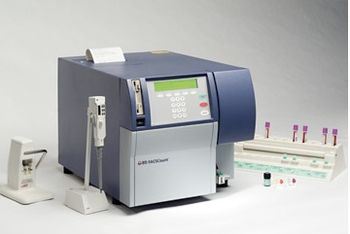
Generic FACSCount
GEGeneric · Model FACSCount
Easy to Install, Set Up, and Run with Confidence The BD FACSCount system is easy to install. The instrument operates from a standard electrical outlet, requiring no hardware adjustments or calibration. Only minimal training is needed to set up the instrument and to run samples. Simple prompts on the display guide operators through testing, from input of patient information to final results. The software automatically identifies the lymphocyte populations of interest and summarizes patients’ results in a printed sample report. Quality controls in the software ensure that reported results are accurate by detecting and flagging error conditions and suppressing results when control limits are exceeded. Results are objective, requiring no interpretation or subjective analysis by the operators. Quality control To validate laboratory practice and methodology, BD FACSCount™ control beads can be added to samples prepared with normal blood. BD FACSCount fluorescent reference beads are included in the reagent tube, and ensure accurate enumeration of lymphocytes of interest with no operator intervention. The control run generates a detailed analysis in a printed report summarizing system performance. The result of the last control run is reported on subsequent sample printouts to help determine linearity and pipetting accuracy. Since absolute counts are calculated from directly measured cell counts and reference bead counts on the BD FACSCount system, no additional analysis on a hematology analyzer is necessary. Simplified sample handling Sample preparation follows an easy three-step process. First, blood is added to a tube that contains pre-measured reagents. Then the sample is vortexed and incubated. In the second step, a fixative is added to the tube, and then it is vortexed and incubated. In step three, the sample is vortexed and run on the instrument. Easy three-step sample preparation Prepare controls and patient samples by adding blood, then fixative solution, to the reagent tubes.
Key tips
- ·Run QC controls before trusting any repair - an analyzer that passes self-test can still report clinically wrong results.
- ·Rule out a reagent lot change before opening the instrument - it can look exactly like a hardware fault.
- ·Centrifuge rotors have a hard retirement age/cycle limit regardless of visible condition - don't eyeball it.
Typical Failure Modes
Compiled for this model from its own documentation and established engineering knowledge for this equipment class - not from a verified service record. Confirm against the manufacturer's service manual.
Poor optical alignment / low signal / high CV
HighSymptoms: Bead CVs out of spec, scatter or fluorescence signal low or noisy, compensation drift.
Root cause: Flow-cell contamination or an air bubble, laser degradation / misalignment, or an optics / PMT fault.
Fluidics / sheath-pressure fault
MediumSymptoms: Unstable event rate, boost / prime failures, sheath or waste alarm, clogs.
Root cause: Sheath / waste tank issue, a peristaltic / vacuum fault, or a partially blocked sample line / flow cell.
Sample probe / SIP clog or crash
MediumSymptoms: No or low event rate, probe-position error, carryover.
Root cause: Clogged or bent sample probe, or a clot.
Laser fault
MediumSymptoms: A laser-line-specific parameter fails, laser-error message.
Root cause: Laser at end of life or a power-supply / interlock fault.
Workstation / software fault
LowSymptoms: Acquisition hangs, data will not export, instrument not recognised.
Root cause: Workstation PC or the acquisition software / link.
Serviceable Parts & Consumables
Serviceable items for this model, compiled from its documentation and engineering knowledge for this equipment class. Service class and relative cost are estimates, not manufacturer figures; no part numbers are given. Confirm intervals and pricing against the manufacturer.
Flow cell
Class Periodic replacementRel. cost $$$R&R Difficult
Sample probe / SIP
Class Periodic replacementRel. cost $$R&R Moderate
Peristaltic pump tubing
Class Frequent wear itemRel. cost $R&R Moderate
Sheath / waste filters
Class Frequent wear itemRel. cost $R&R Easy
Laser
Class Periodic replacementRel. cost $$$$R&R Difficult
| Part | Service class | Relative cost | R&R difficulty |
|---|---|---|---|
| Flow cell | Periodic replacement | $$$ | Difficult |
| Sample probe / SIP | Periodic replacement | $$ | Moderate |
| Peristaltic pump tubing | Frequent wear item | $ | Moderate |
| Sheath / waste filters | Frequent wear item | $ | Easy |
| Laser | Periodic replacement | $$$$ | Difficult |
Relative cost: $ lowest · $$$$ highest service-part cost for this equipment class. Not a price.
PM Checklist
Preventive-maintenance tasks typical of this equipment class. Perform to the manufacturer's procedure and your facility's policy - this is general reference, not a schedule for this specific unit.
- ·Daily QC controls run and reviewed
- ·Calibration verification per assay
- ·Routine cleaning and decontamination
- ·Scheduled reagent-path and pump-tubing maintenance
Troubleshooting Approach
A starting sequence for this model, compiled from its documentation and engineering knowledge for this equipment class. Follow the manufacturer's service documentation for the actual procedure.
Symptom: Poor alignment / low signal / high CV
- Run the daily startup / cleaning and a flow-check bead panel.
- Prime / de-bubble the flow cell and de-gas the sheath.
- Run an unclog / long-clean cycle.
- Verify each laser-line parameter against the beads.
- Escalate a confirmed laser or optics fault to the OEM.
Symptom: Fluidics or probe fault
- Check the sheath and waste tanks and connections.
- Inspect the sample probe for a bend or clog and clear it.
- Replace worn peristaltic pump tubing and the sheath filter.
- Run a boost / prime.
- Confirm a stable event rate on a control.
Typical Location
Where this class of equipment is typically deployed - general reference, not this unit's own placement record.
- Central / core laboratory
- Point-of-care testing stations
- Blood bank
- Microbiology lab
Documents & Manuals
Related calculators
From BioLab, for work done with this kind of equipment.
Troubleshoot this device with Bio
Describe a symptom or error code. Bio answers from this device's own documented error codes, failure modes, parts, and guides.
Ask Bio