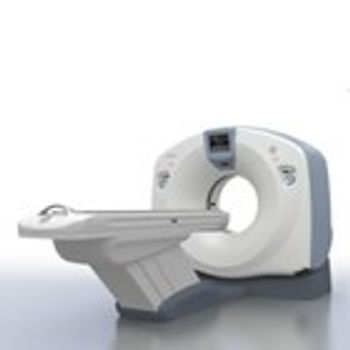
GE HealthCare Optima CT660
 GE HealthCare · Model Optima CT660
Enhanced table The table allows patients as heavy as 227 kg to be imaged through a long scannable range. The bed provides automatic positioning according to the type of exam, reducing manual positioning and streamlining workflow. Users can position the table by selecting the exam type from the touch screen, then pressing the foot pedal. The display shows pictures that help the technologist and patient understand the correct exam position, making exams more personal. User-friendly console The Optima CT660 workspace provides outstanding flexibility and comfort, whether sitting or standing. The console is noticeably quieter than in the past, to provide a better work environment. The graphical user interface, common to all GE CT systems, puts automated processing at your fingertips. Synchronized injection The CAN Cia425 integrated injector interface provides synchronized start of scan and injection from the CT operator console. Synchronization of the start of scan with the start of injection provides increased opportunity for successful contrast bolus timing. It also provides the ability to set the contrast injection parameters and to synchronize the parameters between the scanner and injector as part of the CT scan protocol from the console interface. This provides consistency of user entered parameters and reduction in the opportunity for error. Personalized touches One-Touch set ups allow you to personalize image presentation to individual physician preferences; so that advanced processing, volume-rendering attributes, multi-planar reformats, and image sizing are automatically applied as the patient series opens.
Key tips
- ·Never bypass a radiation interlock to "just get the image" - this is one of the few true zero-tolerance rules in BMET work.
- ·Trend image-quality phantom results over time - drift shows up before an outright failure does.
- ·Portable/mobile units take real physical abuse from transport - check wheel locks and cable strain reliefs more often than fixed units.
Typical Failure Modes
Compiled for this model from its own documentation and established engineering knowledge for this equipment class - not from a verified service record. Confirm against the manufacturer's service manual.
Image artefacts (rings / streaks / noise)
HighSymptoms: Ring or band artefacts, excessive noise, HU non-uniformity, failed daily air/water calibration.
Root cause: Detector-channel drift or a bad detector module, a DAS fault, or air-cal / tube-output drift.
X-ray tube fault / end of life
HighSymptoms: Tube-arc errors, exposure aborts, kV/mA faults, spits, or noisy bearing; tube pulls high heat units.
Root cause: Anode / bearing wear or vacuum degradation - the CT tube is a wear item.
Gantry rotation / slip-ring fault
MediumSymptoms: Rotation faults, comms errors during rotation, brush dust, drive alarms.
Root cause: Worn slip-ring brushes, a drive-belt / bearing fault, or the data-transmission link.
Table / patient-positioning fault
MediumSymptoms: Table drifts, will not index to the correct position, height or cradle errors.
Root cause: Table drive, encoder, or brake fault.
Reconstruction / console / network fault
MediumSymptoms: Recon hangs or is slow, images will not send to PACS, console errors.
Root cause: Recon-hardware or console-PC fault, or the network / storage.
Chiller / cooling fault
MediumSymptoms: Over-temperature warnings, exposures inhibited after a series, coolant alarm.
Root cause: Chiller pump / fan, low coolant, or a blocked heat exchanger.
Serviceable Parts & Consumables
Serviceable items for this model, compiled from its documentation and engineering knowledge for this equipment class. Service class and relative cost are estimates, not manufacturer figures; no part numbers are given. Confirm intervals and pricing against the manufacturer.
CT X-ray tube assembly
Major planned replacement; track heat-unit history.
Class Periodic replacementRel. cost $$$$R&R Expert-level
Detector module / DAS board
Class Major service partRel. cost $$$$R&R Expert-level
Slip-ring brush set
Class Periodic replacementRel. cost $$R&R Moderate
Gantry drive belt / bearings
Class Major service partRel. cost $$$R&R Difficult
Table drive / encoder
Class Major service partRel. cost $$$R&R Difficult
Chiller pump / coolant
Class Periodic replacementRel. cost $$R&R Moderate
| Part | Service class | Relative cost | R&R difficulty |
|---|---|---|---|
| CT X-ray tube assembly Major planned replacement; track heat-unit history. | Periodic replacement | $$$$ | Expert-level |
| Detector module / DAS board | Major service part | $$$$ | Expert-level |
| Slip-ring brush set | Periodic replacement | $$ | Moderate |
| Gantry drive belt / bearings | Major service part | $$$ | Difficult |
| Table drive / encoder | Major service part | $$$ | Difficult |
| Chiller pump / coolant | Periodic replacement | $$ | Moderate |
Relative cost: $ lowest · $$$$ highest service-part cost for this equipment class. Not a price.
PM Checklist
Preventive-maintenance tasks typical of this equipment class. Perform to the manufacturer's procedure and your facility's policy - this is general reference, not a schedule for this specific unit.
- ·Daily QC per modality: image-quality phantom test
- ·Tube and detector inspection
- ·Annual state-required radiation safety survey
- ·Vendor-scheduled preventive maintenance
Error Codes
Extracted directly from this unit's own service manual.
WARNINGASiR has been disabled. Please adjust the mA and Noise Index values to the appropriate pre-ASiR values before using Dose Reduction Guidance. Using Dose Reduction Guidance on already dose reduced scan parameters may cause sub-optimal or non-diagnostic images. Please consult your operator documentation for additional information.
Troubleshooting Approach
A starting sequence for this model, compiled from its documentation and engineering knowledge for this equipment class. Follow the manufacturer's service documentation for the actual procedure.
Symptom: Image artefacts / poor fluoro or CT image / failed calibration
- Run the daily air / water (fast) calibration; if it fails, run the full calibration set.
- Scan / image a uniform phantom and review uniformity and noise against baseline.
- Check the X-ray tube warm-up and heat-unit / arc status.
- Check the detector / image-intensifier / flat-panel performance via service diagnostics.
- Escalate a confirmed detector-channel, DAS or tube fault to the OEM; re-verify with the phantom after any correction.
Symptom: Exposure aborts / tube-arc errors / kV-mAs fault
- Record the exact error codes and the phase (warm-up vs scan / fluoro vs cine).
- Run extended tube conditioning / seasoning.
- Review the arc-count and heat-unit trend.
- Confirm the chiller / heat-exchanger operates and coolant is at level.
- Plan a tube replacement when arc counts climb or output drifts; verify output after any HV work.
Symptom: Gantry rotation / slip-ring / positioner fault
- Note the axis and any collision-sensor indication.
- Clear obstructions and check the body-contour / collision sensors.
- Inspect the slip-ring brushes (dust, wear) and the drive belt / bearings.
- Run the motion self-test / calibration.
- Replace the brush set / drive component or refer as isolated.
Symptom: Table / cradle drifts, will not index or reach position
- Note the position / geometry error.
- Check for a mechanical obstruction on the table.
- Run the table drive self-test / calibration.
- Inspect the drive, brake and encoder.
- Replace the drive component or refer as isolated.
Symptom: Reconstruction / console / PACS fault
- Note the console / recon error.
- Restart the recon hardware / console per the OEM procedure.
- Check free storage and the database.
- Confirm the network link to PACS.
- Escalate a recon-hardware or host fault to the OEM.
Technical Specs
- Image Display
- 12 in
- Patient Weight Capacity
- 500 lbs
Typical Location
Where this class of equipment is typically deployed - general reference, not this unit's own placement record.
- Radiology / Imaging department
- Emergency Department (portable units)
- Operating Room (C-arms)
- Cath lab
- Bedside ICU (portable X-ray)
Documents & Manuals
Troubleshoot this device with Bio
Describe a symptom or error code. Bio answers from this device's own documented error codes, failure modes, parts, and guides.
Ask Bio