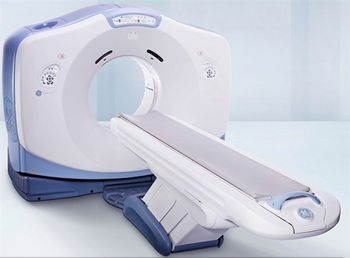
GE HealthCare Optima CT580 W
 GE HealthCare · Model Optima CT580 W
Crystal clarity. Optima CT580 W delivers outstanding images. Lightning fast speed. Helical scans are extremely fast. For shorter breath holds. More comfortable exams. Less potential for patient motion. A wide bore. Position large patients for challenging diagnostic studies and realize flexibility for positioning radiation therapy and trauma patients. State-of-the-art table design. Capable and convenient for patients of all sizes, including larger patients up to 650 lbs. Optional fast image reconstruction. At 16 fps, it streamlines workflow from acquisition to final report. Routine efficiency. Attain a full range of studies, with exceptional image clarity. And with efficiency that may optimize dose for virtually every scan. More productive workflow. Simplify management of large, thin-slice datasets and combine speed with flexibility. Extreme versatility. From routine imaging to radiation oncology, from the ED to the interventional suite, Optima CT580 W provides impressive image quality to support confident diagnoses across a wide range of anatomy and applications.
Key tips
- ·Never bypass a radiation interlock to "just get the image" - this is one of the few true zero-tolerance rules in BMET work.
- ·Trend image-quality phantom results over time - drift shows up before an outright failure does.
- ·Portable/mobile units take real physical abuse from transport - check wheel locks and cable strain reliefs more often than fixed units.
Typical Failure Modes
Compiled for this model from its own documentation and established engineering knowledge for this equipment class - not from a verified service record. Confirm against the manufacturer's service manual.
Image artefacts (rings / streaks / noise)
HighSymptoms: Ring or band artefacts, excessive noise, HU non-uniformity, failed daily air/water calibration.
Root cause: Detector-channel drift or a bad detector module, a DAS fault, or air-cal / tube-output drift.
X-ray tube fault / end of life
HighSymptoms: Tube-arc errors, exposure aborts, kV/mA faults, spits, or noisy bearing; tube pulls high heat units.
Root cause: Anode / bearing wear or vacuum degradation - the CT tube is a wear item.
Gantry rotation / slip-ring fault
MediumSymptoms: Rotation faults, comms errors during rotation, brush dust, drive alarms.
Root cause: Worn slip-ring brushes, a drive-belt / bearing fault, or the data-transmission link.
Table / patient-positioning fault
MediumSymptoms: Table drifts, will not index to the correct position, height or cradle errors.
Root cause: Table drive, encoder, or brake fault.
Reconstruction / console / network fault
MediumSymptoms: Recon hangs or is slow, images will not send to PACS, console errors.
Root cause: Recon-hardware or console-PC fault, or the network / storage.
Chiller / cooling fault
MediumSymptoms: Over-temperature warnings, exposures inhibited after a series, coolant alarm.
Root cause: Chiller pump / fan, low coolant, or a blocked heat exchanger.
Serviceable Parts & Consumables
Serviceable items for this model, compiled from its documentation and engineering knowledge for this equipment class. Service class and relative cost are estimates, not manufacturer figures; no part numbers are given. Confirm intervals and pricing against the manufacturer.
CT X-ray tube assembly
Major planned replacement; track heat-unit history.
Class Periodic replacementRel. cost $$$$R&R Expert-level
Detector module / DAS board
Class Major service partRel. cost $$$$R&R Expert-level
Slip-ring brush set
Class Periodic replacementRel. cost $$R&R Moderate
Gantry drive belt / bearings
Class Major service partRel. cost $$$R&R Difficult
Table drive / encoder
Class Major service partRel. cost $$$R&R Difficult
Chiller pump / coolant
Class Periodic replacementRel. cost $$R&R Moderate
| Part | Service class | Relative cost | R&R difficulty |
|---|---|---|---|
| CT X-ray tube assembly Major planned replacement; track heat-unit history. | Periodic replacement | $$$$ | Expert-level |
| Detector module / DAS board | Major service part | $$$$ | Expert-level |
| Slip-ring brush set | Periodic replacement | $$ | Moderate |
| Gantry drive belt / bearings | Major service part | $$$ | Difficult |
| Table drive / encoder | Major service part | $$$ | Difficult |
| Chiller pump / coolant | Periodic replacement | $$ | Moderate |
Relative cost: $ lowest · $$$$ highest service-part cost for this equipment class. Not a price.
PM Checklist
Preventive-maintenance tasks typical of this equipment class. Perform to the manufacturer's procedure and your facility's policy - this is general reference, not a schedule for this specific unit.
- ·Daily QC per modality: image-quality phantom test
- ·Tube and detector inspection
- ·Annual state-required radiation safety survey
- ·Vendor-scheduled preventive maintenance
Troubleshooting Approach
A starting sequence for this model, compiled from its documentation and engineering knowledge for this equipment class. Follow the manufacturer's service documentation for the actual procedure.
Symptom: Ring or streak artefacts / failed calibration
- Run the daily air (fast) calibration; if it fails, run the full calibration set.
- Scan a uniform water phantom and review HU uniformity and noise.
- Check the tube warm-up and heat-unit status.
- Escalate a confirmed detector-channel or DAS fault to the OEM.
- Re-verify image quality with the phantom after any correction.
Symptom: Exposure aborts / tube-arc errors
- Note the exact error codes and the phase (warm-up vs scan).
- Run extended tube conditioning / seasoning.
- Review the arc-count and heat-unit trend.
- Confirm chiller operation and coolant level.
- Plan a tube replacement when arc counts climb or output drifts.
Typical Location
Where this class of equipment is typically deployed - general reference, not this unit's own placement record.
- Radiology / Imaging department
- Emergency Department (portable units)
- Operating Room (C-arms)
- Cath lab
- Bedside ICU (portable X-ray)
Documents & Manuals
No documents available for this device yet.
Troubleshoot this device with Bio
Describe a symptom or error code. Bio answers from this device's own documented error codes, failure modes, parts, and guides.
Ask Bio