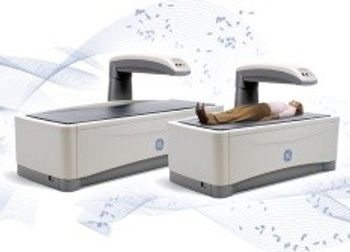
GE HealthCare Lunar Prodigy Advance
 GE HealthCare · Model Lunar Prodigy Advance
ScanCheck - ScanCheck automatically identifies potential acquisition and analysis errors and provides multimedia help. It also alerts of incorrect positioning, unusual anatomy, high-density areas and artifacts, and makes recommendations for correction. PRODIGY: DualFemur - The DualFemur option automatically scans both femurs in one seamless acquisition without repositioning, and identifies the weakest side to enhance confidence in treatment decisions. The trending function enables seamless follow-up of changes. PRODIGY: Total body/body composition - Body composition scans with DXA provide precise and accurate data on bone and tissue composition, including bone mineral density (BMD), lean and fat tissue mass, and %fat. They provide both total body data and regional results. PRODIGY: Dual-energy Vertebral Assessment (DVA) - DVA aids in the identification and assessment of vertebral deformations. DVA provides rapid single- and dual-energy images of the AP and lateral spine, allowing clinicians to visually assess the presence of vertebral deformations. PRODIGY: Composer - Automated physician reporting comes complete with the National Osteoporosis Foundation (NOF) treatment guidelines and World Health Organization (WHO) diagnostic criteria for a complete osteoporosis assessment. Composer™ is designed to follow diagnostic guidelines proposed by the International Society of Clinical Densitometry (ISCD), determining the lowest T-score based on defined regions. Recommendation text is inserted to aid productivity.
Key tips
- ·Never bypass a radiation interlock to "just get the image" - this is one of the few true zero-tolerance rules in BMET work.
- ·Trend image-quality phantom results over time - drift shows up before an outright failure does.
- ·Portable/mobile units take real physical abuse from transport - check wheel locks and cable strain reliefs more often than fixed units.
Typical Failure Modes
Compiled for this model from its own documentation and established engineering knowledge for this equipment class - not from a verified service record. Confirm against the manufacturer's service manual.
QC / calibration phantom out of tolerance
HighSymptoms: Daily spine / block phantom BMD trends out of control limits, or calibration fails.
Root cause: X-ray source output drift, detector degradation, or a calibration-drum / reference fault.
C-arm / table scanning-drive fault
MediumSymptoms: The scanning arm or table will not move smoothly, position error, scan aborts, image geometry wrong.
Root cause: Drive motor, belt, or an encoder / limit-sensor fault.
X-ray generation fault
MediumSymptoms: Exposure inhibited, kV error, no counts / very noisy scan.
Root cause: X-ray tube / HV supply, or the filter-wheel / calibration-drum.
Detector fault
MediumSymptoms: Missing scan lines, non-uniform image, detector-error message.
Root cause: Detector element / electronics degradation.
Workstation / software fault
LowSymptoms: Analysis software hangs, scans will not archive or transfer.
Root cause: Workstation PC or software fault.
Serviceable Parts & Consumables
Serviceable items for this model, compiled from its documentation and engineering knowledge for this equipment class. Service class and relative cost are estimates, not manufacturer figures; no part numbers are given. Confirm intervals and pricing against the manufacturer.
X-ray tube / HV supply
Class Major service partRel. cost $$$$R&R Expert-level
Detector assembly
Class Major service partRel. cost $$$$R&R Difficult
Scanning-drive motor / belt / encoder
Class Major service partRel. cost $$$R&R Difficult
Calibration drum / filter wheel
Class Major service partRel. cost $$$R&R Difficult
Workstation PC
Class Major service partRel. cost $$$R&R Moderate
| Part | Service class | Relative cost | R&R difficulty |
|---|---|---|---|
| X-ray tube / HV supply | Major service part | $$$$ | Expert-level |
| Detector assembly | Major service part | $$$$ | Difficult |
| Scanning-drive motor / belt / encoder | Major service part | $$$ | Difficult |
| Calibration drum / filter wheel | Major service part | $$$ | Difficult |
| Workstation PC | Major service part | $$$ | Moderate |
Relative cost: $ lowest · $$$$ highest service-part cost for this equipment class. Not a price.
PM Checklist
Preventive-maintenance tasks typical of this equipment class. Perform to the manufacturer's procedure and your facility's policy - this is general reference, not a schedule for this specific unit.
- ·Daily QC per modality: image-quality phantom test
- ·Tube and detector inspection
- ·Annual state-required radiation safety survey
- ·Vendor-scheduled preventive maintenance
Troubleshooting Approach
A starting sequence for this model, compiled from its documentation and engineering knowledge for this equipment class. Follow the manufacturer's service documentation for the actual procedure.
Symptom: QC phantom out of tolerance
- Repeat the daily phantom scan and apply the shift / drift rules.
- Confirm the phantom is correct and correctly positioned.
- Run the system calibration.
- Review the source / detector trend.
- Escalate a confirmed source or detector drift to the OEM; do not scan patients until QC is back in control.
Symptom: Scanning-drive / geometry fault
- Note the position / geometry error.
- Check for a mechanical obstruction on the arm / table.
- Run the drive self-test / calibration.
- Inspect the drive belt and encoder.
- Replace the drive component or refer as isolated.
Technical Specs
- Swing Away C-arm Capability
- No
- Bone Density Imaging Mode
- DEXA
Typical Location
Where this class of equipment is typically deployed - general reference, not this unit's own placement record.
- Radiology / Imaging department
- Emergency Department (portable units)
- Operating Room (C-arms)
- Cath lab
- Bedside ICU (portable X-ray)
Documents & Manuals
No documents available for this device yet.
Safety & Recalls
Synced live from the FDA openFDA API.
- RECALL
Aortic Length over-estimated: incorrect measurements when using the Aorta analysis protocol or customized protocols. Until a new software version is installed the aorta analysis protocol or the customized protocols for an aneurysm should NOT BE USED.
Troubleshoot this device with Bio
Describe a symptom or error code. Bio answers from this device's own documented error codes, failure modes, parts, and guides.
Ask Bio