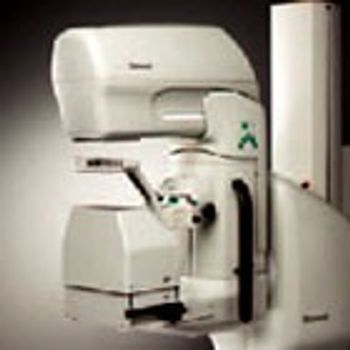
GE HealthCare Diamond
 GE HealthCare · Model Diamond
AutoPoint Helps you Get it Right First Time. Diamond brings new intelligence to breast imaging. AutoPoint digitally analyzes breast composition and structure. PaddleLogic senses which paddle the operator has selected and the detectors used are only those under the compressed part of the breast. AutoPoint analyzes the compressed area of the breast and Diamond collimates automatically to the correct field size for each paddle. Autopoint selects the correct AEC detectors at the beginning of the exposure. Diamond has 8 discrete detectors with optimized sizes, location and shapes for optimal results, especially on the dense parts of the breast. Automatic or manual selections are both possible.
Key tips
- ·Never bypass a radiation interlock to "just get the image" - this is one of the few true zero-tolerance rules in BMET work.
- ·Trend image-quality phantom results over time - drift shows up before an outright failure does.
- ·Portable/mobile units take real physical abuse from transport - check wheel locks and cable strain reliefs more often than fixed units.
Typical Failure Modes
Compiled for this model from its own documentation and established engineering knowledge for this equipment class - not from a verified service record. Confirm against the manufacturer's service manual.
Image quality / detector-calibration fault
HighSymptoms: Fixed-pattern artefacts, non-uniformity, dead lines, failed flat-field calibration, failed ACR / MQSA phantom.
Root cause: Detector degradation, a calibration issue, or a bad pixel map.
Compression / paddle fault
MediumSymptoms: Compression will not apply or hold the set force, paddle not recognised, force readout wrong.
Root cause: Compression drive / motor, the force sensor, or a paddle-detect fault.
Gantry / C-arm rotation or AWS-communication fault
MediumSymptoms: C-arm will not rotate / lock, angle readout wrong, or the acquisition workstation loses the gantry.
Root cause: Rotation drive / brake / encoder, or the gantry-to-AWS link.
X-ray generator / tube fault
HighSymptoms: Exposure inhibited, kV / mAs error, tube-overload interlock, AEC fault.
Root cause: Generator, the mammo tube / filters, or the AEC.
Acquisition workstation / PACS fault
MediumSymptoms: Images will not display, mark-up or send to PACS / review workstation.
Root cause: AWS PC or the DICOM configuration.
Serviceable Parts & Consumables
Serviceable items for this model, compiled from its documentation and engineering knowledge for this equipment class. Service class and relative cost are estimates, not manufacturer figures; no part numbers are given. Confirm intervals and pricing against the manufacturer.
Flat-panel detector (exchange)
Class Major service partRel. cost $$$$R&R Expert-level
Compression drive / force sensor
Class Major service partRel. cost $$$R&R Difficult
C-arm rotation drive / encoder
Class Major service partRel. cost $$$R&R Difficult
Mammo X-ray tube / filter assembly
Class Major service partRel. cost $$$$R&R Expert-level
Acquisition workstation PC
Class Major service partRel. cost $$$R&R Moderate
| Part | Service class | Relative cost | R&R difficulty |
|---|---|---|---|
| Flat-panel detector (exchange) | Major service part | $$$$ | Expert-level |
| Compression drive / force sensor | Major service part | $$$ | Difficult |
| C-arm rotation drive / encoder | Major service part | $$$ | Difficult |
| Mammo X-ray tube / filter assembly | Major service part | $$$$ | Expert-level |
| Acquisition workstation PC | Major service part | $$$ | Moderate |
Relative cost: $ lowest · $$$$ highest service-part cost for this equipment class. Not a price.
PM Checklist
Preventive-maintenance tasks typical of this equipment class. Perform to the manufacturer's procedure and your facility's policy - this is general reference, not a schedule for this specific unit.
- ·Daily QC per modality: image-quality phantom test
- ·Tube and detector inspection
- ·Annual state-required radiation safety survey
- ·Vendor-scheduled preventive maintenance
Troubleshooting Approach
A starting sequence for this model, compiled from its documentation and engineering knowledge for this equipment class. Follow the manufacturer's service documentation for the actual procedure.
Symptom: Image quality or calibration fault
- Run the detector flat-field / gain calibration and the bad-pixel map.
- Perform the daily / weekly QC (ACR phantom, SNR / CNR) and compare to the control chart.
- Inspect for physical detector damage.
- Keep the unit down and escalate anything affecting dose or diagnostic image quality (MQSA).
- Re-run the phantom QC after any correction.
Symptom: Compression or gantry fault
- Test compression apply / release and the force readout against a known weight.
- Check the paddle is recognised and the detect contacts are clean.
- Test C-arm rotation and lock at several angles.
- Confirm the AWS sees the gantry.
- Escalate a drive / encoder / force-sensor fault to the OEM.
Technical Specs
- Mammography Type
- Analog X-ray
Typical Location
Where this class of equipment is typically deployed - general reference, not this unit's own placement record.
- Radiology / Imaging department
- Emergency Department (portable units)
- Operating Room (C-arms)
- Cath lab
- Bedside ICU (portable X-ray)
Documents & Manuals
No documents available for this device yet.
Troubleshoot this device with Bio
Describe a symptom or error code. Bio answers from this device's own documented error codes, failure modes, parts, and guides.
Ask Bio