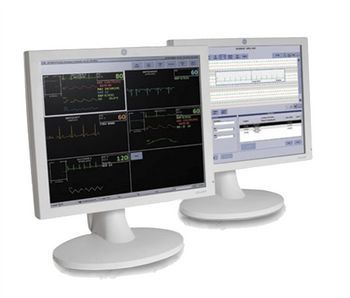
GE HealthCare Carescape Clinical Information Center Pro
 GE HealthCare · Model Carescape Clinical Information Center Pro
Access hospital-wide, Web-based applications such as radiology images or lab results from the CARESCAPE CIC Pro for a more complete picture of the patient. View real-time data, review historical information, print relevant data and sound audible alarms for patients connected to the CARESCAPE Network. The CARESCAPE CIC Pro can be used as a monitoring and patient management solution, enabling you to more readily admit and discharge patients and manage patient alarms. Monitoring technicians can also oversee multiple patients in a centralized monitoring model, leveraging power across multiple care areas. Trend clinical progress on a per-patient basis by displaying a one-hour trending of up to two parameters - including atrial fibrillation trending - in the multi-patient viewer. Review of up to nine recorded patient waveforms and parameter numeric for up to 72 hours. Graphic trends show up to 12 different parameters displayed in up to 12 user-defined groupings. Flexible screen configurations offer quick access to routine applications with a single click, helping to speed the review of patient historical data and pinpoint specific events.
Intended use: Access hospital-wide, Web-based applications such as radiology images or lab results from the CARESCAPE CIC Pro for a more complete picture of the patient. View real-time data, review historical information, print relevant data and sound audible alarms for patients connected to the CARESCAPE Network. The CARESCAPE CIC Pro can be used as a monitoring and patient management solution, enabling you to more readily admit and discharge patients and manage patient alarms. Monitoring technicians can also oversee multiple patients in a centralized monitoring model, leveraging power across multiple care areas. Trend clinical progress on a per-patient basis by displaying a one-hour trending of up to two parameters—including atrial fibrillation trending—in the multi-patient viewer. Review of up to nine recorded patient waveforms and parameter numeric for up to 72 hours. Graphic trends show up to 12 different parameters displayed in up to 12 user-defined groupings. Flexible screen configurations offer quick access to routine applications with a single click, helping to speed the review of patient historical data and pinpoint specific events.
Key tips
- ·A no-signal/flatline alarm gets checked on the patient first, not the monitor - rule out a real clinical event before troubleshooting.
- ·Recalibrate NIBP against a reference manometer, not just a self-test pass.
- ·Reused patient cables (SpO2, ECG leads) are a common source of intermittent-fault complaints - swap the cable before the module.
Typical Failure Modes
Compiled for this model from its own documentation and established engineering knowledge for this equipment class - not from a verified service record. Confirm against the manufacturer's service manual.
A parameter drops out or reads wrong
HighSymptoms: ECG, IBP, SpO2, temperature, CO2 or CO intermittently drops or is implausible.
Root cause: Worn patient cable / sensor, or a parameter-module / input-board fault.
NIBP will not measure or is inaccurate
MediumSymptoms: NIBP times out, cuff will not inflate / hold, readings implausible.
Root cause: Internal NIBP pump or valve, a cuff / hose leak, or a pressure-transducer fault.
Module / parameter not recognised
MediumSymptoms: The host does not display a plugged-in module or a built-in parameter.
Root cause: Docking / connector fault or an internal board fault.
Display / touchscreen fault
MediumSymptoms: Blank, dim or distorted display; unresponsive touchscreen.
Root cause: Display, backlight, or controller fault.
Battery / power fault
MediumSymptoms: Short battery run time, will not hold charge, will not power on.
Root cause: Aged battery pack or a power-supply fault.
Network / central-station connectivity fault
LowSymptoms: Monitor not shown at the central station, admit fails, intermittent drop.
Root cause: Wired / Wi-Fi network configuration or a communication board.
Serviceable Parts & Consumables
Serviceable items for this model, compiled from its documentation and engineering knowledge for this equipment class. Service class and relative cost are estimates, not manufacturer figures; no part numbers are given. Confirm intervals and pricing against the manufacturer.
Patient cable set (ECG / IBP / SpO2 / temp)
Class Frequent wear itemRel. cost $$R&R Easy
NIBP cuff and hose
Class Frequent wear itemRel. cost $R&R Easy
Internal NIBP pump / valve
Class Major service partRel. cost $$$R&R Difficult
Parameter module / input board
Class Major service partRel. cost $$$R&R Difficult
Battery pack
Class Periodic replacementRel. cost $$R&R Fairly easy
Display / touchscreen assembly
Class Major service partRel. cost $$$R&R Moderate
| Part | Service class | Relative cost | R&R difficulty |
|---|---|---|---|
| Patient cable set (ECG / IBP / SpO2 / temp) | Frequent wear item | $$ | Easy |
| NIBP cuff and hose | Frequent wear item | $ | Easy |
| Internal NIBP pump / valve | Major service part | $$$ | Difficult |
| Parameter module / input board | Major service part | $$$ | Difficult |
| Battery pack | Periodic replacement | $$ | Fairly easy |
| Display / touchscreen assembly | Major service part | $$$ | Moderate |
Relative cost: $ lowest · $$$$ highest service-part cost for this equipment class. Not a price.
PM Checklist
Preventive-maintenance tasks typical of this equipment class. Perform to the manufacturer's procedure and your facility's policy - this is general reference, not a schedule for this specific unit.
- ·Routine cable and lead-wire inspection for fraying/wear
- ·Battery conditioning cycle
- ·NIBP calibration check against a reference manometer
- ·ECG / SpO2 accuracy verification against a patient simulator
- ·Annual electrical safety test
Troubleshooting Approach
A starting sequence for this model, compiled from its documentation and engineering knowledge for this equipment class. Follow the manufacturer's service documentation for the actual procedure.
Symptom: A parameter drops out
- Reseat the patient cable at the module / monitor.
- Swap in a known-good cable / sensor for that parameter.
- Dock the module on a different host / slot to isolate module vs host.
- Inspect the docking connector for bent pins.
- Replace the cable, or refer the module / input board if the fault stays with it.
Symptom: NIBP problem
- Leak-test the cuff and hose.
- Run the monitor's NIBP calibration verification.
- Check for a kinked hose or a positional patient limb.
- Verify NIBP against a reference / simulator.
- Refer the monitor for internal pump / valve service if it persists.
Typical Location
Where this class of equipment is typically deployed - general reference, not this unit's own placement record.
- ICU / CCU
- Emergency Department
- OR / PACU
- General med-surg floors
- Step-down units
- Telemetry units
Documents & Manuals
No documents available for this device yet.
Safety & Recalls
Synced live from the FDA openFDA API.
- RECALL
GE Healthcare has recently become aware of a potential safety issue due to a collimator falling off a VG system during a Quality Control check, while the detectors were rotating. No injuries have been reported to date
- RECALL
It has been identified that in a reject image workflow where multiple studies are simultaneously opened on the Centricity PACS RA1000 workstation and images are rejected from the active displayed study, images for the previously displayed study may also be rejected. The issue can occur with a previously displayed study that remains open in the background. If one or more, but not all, images in
- RECALL
Using Merge Exam in single Study Mode may result in Missing Study Record (Cannot Display Exam, Send Exam, etc). Exam merge in Single Study Mode may fail on &
- RECALL
GE Healthcare Precision RXi tilt joystick became stuck in the Trendelenburg direction causing the patient to slide off the table. Also recall conducted to investigate the possibility of accidentally activation of the remote console joystick where a fatal accident occurred on a non-GE Remote R&F System. .
- RECALL
Automatic exposure control (AEC) automatically resets allowing another exposure without requiring manual reset as specified in 21 CFR 1020.31 (a)(3)(iv)
Troubleshoot this device with Bio
Describe a symptom or error code. Bio answers from this device's own documented error codes, failure modes, parts, and guides.
Ask Bio