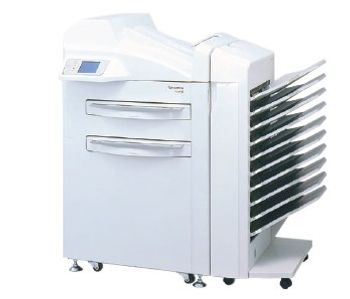
Fujifilm Fuji FM-DP L
 Fujifilm · Model Fuji FM-DP L
Medical Dry Laser Imager Fuji FM-DP L Using semiconductor laser exposure and thermal development, the Fuji FM-DP L processes 130 (14"x17") films per hour, providing extraordinary throughput for centralized imaging applications. The FM-DP L has unrivaled gray scale reproduction, image consistency and image stability due to its 12 bit density resolution, automatic density adjustment and Fuji dry silver film technology. Image quality is also enhanced by using 50 micron scanning pitch and selectable 50 or 100 micron pixel resolution. Fuji's new Advanced Variable Response (A-VR) Spline image interpolation offers ultra-sharp alphanumerics with a wide range of image interpolation from ultra-sharp to ultra-smooth ideally matched to the imaging requirements of each diagnostic application. The optional second film drawer allows you to output dual film sizes automatically. 14"x17", 10"x14" and 8"x10" film sizes can be selected. The optional 10-bin film sorter automatically sorts films from each modality into separate bins, greatly enhancing workflow around the imager. The FM-DP L has extensive network and point-to-point connectivity options for total print redundancy from all your digital imaging modalities.
Key tips
- ·Never bypass a radiation interlock to "just get the image" - this is one of the few true zero-tolerance rules in BMET work.
- ·Trend image-quality phantom results over time - drift shows up before an outright failure does.
- ·Portable/mobile units take real physical abuse from transport - check wheel locks and cable strain reliefs more often than fixed units.
Typical Failure Modes
Compiled for this model from its own documentation and established engineering knowledge for this equipment class - not from a verified service record. Confirm against the manufacturer's service manual.
Print-quality defects
HighSymptoms: Banding, density non-uniformity, streaks, light / dark prints.
Root cause: Thermal print-head wear or contamination, media-type mismatch, or a density-calibration issue.
Media jam / feed fault
MediumSymptoms: Film jams, mis-feeds, media not picked from the magazine.
Root cause: Worn pickup / transport rollers, or damp / wrong media.
DICOM / print-job fault
MediumSymptoms: Jobs stuck in the queue, will not print from a modality / PACS.
Root cause: Network configuration or an AE-title / IP / port mismatch.
Print head at end of life
MediumSymptoms: Persistent fixed-pattern defects that calibration will not clear.
Root cause: Thermal print head worn out.
Serviceable Parts & Consumables
Serviceable items for this model, compiled from its documentation and engineering knowledge for this equipment class. Service class and relative cost are estimates, not manufacturer figures; no part numbers are given. Confirm intervals and pricing against the manufacturer.
Thermal print head
Class Periodic replacementRel. cost $$$R&R Moderate
Pickup / transport roller kit
Class Periodic replacementRel. cost $$R&R Fairly easy
Dry imaging film
Class Frequent wear itemRel. cost $$R&R Easy
Network interface card
Class Major service partRel. cost $R&R Moderate
| Part | Service class | Relative cost | R&R difficulty |
|---|---|---|---|
| Thermal print head | Periodic replacement | $$$ | Moderate |
| Pickup / transport roller kit | Periodic replacement | $$ | Fairly easy |
| Dry imaging film | Frequent wear item | $$ | Easy |
| Network interface card | Major service part | $ | Moderate |
Relative cost: $ lowest · $$$$ highest service-part cost for this equipment class. Not a price.
PM Checklist
Preventive-maintenance tasks typical of this equipment class. Perform to the manufacturer's procedure and your facility's policy - this is general reference, not a schedule for this specific unit.
- ·Daily QC per modality: image-quality phantom test
- ·Tube and detector inspection
- ·Annual state-required radiation safety survey
- ·Vendor-scheduled preventive maintenance
Troubleshooting Approach
A starting sequence for this model, compiled from its documentation and engineering knowledge for this equipment class. Follow the manufacturer's service documentation for the actual procedure.
Symptom: Poor print quality
- Run the imager's density calibration for the loaded film type.
- Confirm the film type matches the imager setting.
- Clean the print head and platen per the manual.
- Print an SMPTE / test pattern.
- Replace the print head if defects repeat after calibration and cleaning.
Symptom: Cannot print from a modality / PACS
- Ping the imager and confirm the local IP / gateway.
- Verify the AE title, IP and port for both ends.
- Send a DICOM echo.
- Check for a recent network change.
- Clear stuck jobs and re-send a test print.
Technical Specs
- Printing Resolustion
- 100 µm / 50 microns
- Height
- 52 in
- Throughput
- 130 samples/hr 14"x17", 10"x14" 180 Films / Hour 8"x10", 180 Films / Hour
- Length
- 29.25 in
- Film Drawers
- Up to 2
- Power Requirements
- 100-120 VAC
- Weight
- 550 lbs
- Width
- 31 in
Typical Location
Where this class of equipment is typically deployed - general reference, not this unit's own placement record.
- Radiology / Imaging department
- Emergency Department (portable units)
- Operating Room (C-arms)
- Cath lab
- Bedside ICU (portable X-ray)
Documents & Manuals
- Film Processor - Maintenance manualService Manual · External
- Fuji FM-DP L BrochureBrochure · External
- DRYPIX1000/DRYPIX3000/FM-DP L DICOM Conformance StatementDocument · External
- Fuji FM-DPL Film Processor - Installation manualDocument · External
- Fuji FM-DPL Film Processor - Spare part listDocument · External
- Film Processor - Installation manualDocument · External
- Film Processor - Spare part listDocument · External
Troubleshoot this device with Bio
Describe a symptom or error code. Bio answers from this device's own documented error codes, failure modes, parts, and guides.
Ask Bio