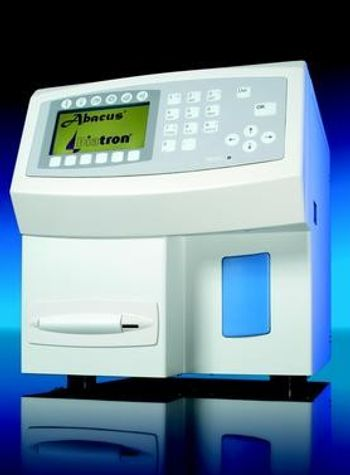
Diatron Abacus+
 Diatron · Model Abacus+
3 part WBC analysis 20 parameters WBC, LYM, MID, GRA (LYM%, MID%, GRA%) RBC, MCV, MCH, MCHC HGB, HCT, RDWc/s, PLT, MPV, PDWc/s, PCT 60 tests/hour urine strip reader (optional) built-in printer internal database, USB ports results stored and displayed with histograms selectable units, languages integrated QC programme fully automated sample-handling, measurement, clog-prevention simple, cost effective operation Diatron reagent system.
Key tips
- ·Run QC controls before trusting any repair - an analyzer that passes self-test can still report clinically wrong results.
- ·Rule out a reagent lot change before opening the instrument - it can look exactly like a hardware fault.
- ·Centrifuge rotors have a hard retirement age/cycle limit regardless of visible condition - don't eyeball it.
Typical Failure Modes
Compiled for this model from its own documentation and established engineering knowledge for this equipment class - not from a verified service record. Confirm against the manufacturer's service manual.
Aperture / flow-cell blockage or partial obstruction
HighSymptoms: Flagged or implausible CBC counts, voteouts, clog alarms, poor precision.
Root cause: Debris or a clot partially blocking a counting aperture or the flow cell.
Sample probe / piercer / valve wear
MediumSymptoms: Short samples, aspiration errors, cap-piercing failures, carryover.
Root cause: Worn or bent sample probe / closed-vial piercer, or a worn shear / segment valve.
Reagent / lyse delivery fault
MediumSymptoms: WBC, HGB or diff results shifted, high background, reagent alarms.
Root cause: Reagent depleted or wrong lot, or a pinch-valve / tubing fault.
Optics / laser fault (diff)
MediumSymptoms: Diff scattergrams abnormal, missing populations, flow-cell or laser alarm.
Root cause: Contaminated or aged flow cell, or the laser / optics.
Vacuum / pressure out of range
MediumSymptoms: Multiple parameter errors, priming failures.
Root cause: Pump or regulator drift.
Serviceable Parts & Consumables
Serviceable items for this model, compiled from its documentation and engineering knowledge for this equipment class. Service class and relative cost are estimates, not manufacturer figures; no part numbers are given. Confirm intervals and pricing against the manufacturer.
Sample probe / closed-vial piercer
Class Periodic replacementRel. cost $$R&R Moderate
Shear / segment valve
Class Periodic replacementRel. cost $$$R&R Difficult
Pinch-valve / peristaltic tubing
Class Frequent wear itemRel. cost $R&R Moderate
Flow cell
Class Periodic replacementRel. cost $$$R&R Difficult
System reagents / controls
Class ConsumableRel. cost $$R&R Easy
| Part | Service class | Relative cost | R&R difficulty |
|---|---|---|---|
| Sample probe / closed-vial piercer | Periodic replacement | $$ | Moderate |
| Shear / segment valve | Periodic replacement | $$$ | Difficult |
| Pinch-valve / peristaltic tubing | Frequent wear item | $ | Moderate |
| Flow cell | Periodic replacement | $$$ | Difficult |
| System reagents / controls | Consumable | $$ | Easy |
Relative cost: $ lowest · $$$$ highest service-part cost for this equipment class. Not a price.
PM Checklist
Preventive-maintenance tasks typical of this equipment class. Perform to the manufacturer's procedure and your facility's policy - this is general reference, not a schedule for this specific unit.
- ·Daily QC controls run and reviewed
- ·Calibration verification per assay
- ·Routine cleaning and decontamination
- ·Scheduled reagent-path and pump-tubing maintenance
Error Codes
Extracted directly from this unit's own service manual.
1001Error %d on opening file
The same as in case of error 1000.
1002Cannot create file %s
Fatal system or program error! The same as in case of error 1000.
1003Data file %s is corrupt, new will be created, all stored measure data will be lost
Stored data file is corrupt or missing! Disk or software error. New stored data file will be created automatically (by User confirmation).
1004Error %d on indexing file %s
Fatal system or program error! The same as in case of error 1000.
1100Fatal pressure error.
Power off the system! Cannot make the measuring vacuum!! Check the pump and the tubes, fittings and valves around the puffer reservoir.
1101Waste is full!
Empty waste container! The system assumes that you will do it before going on!
1102Check Diluent container! Diluent reagent container become empty, or one of the diluent fluid sensor is too sensitive or there are a lot of bubbles in the diluent tubes!
Replace the Diluent reagent container with a filled one. If this error still remains with a filled diluent reagent container, calibrate sensors, and check the tubings and the fittings.
1103Check Lyse container! Lyse reagent containner become empty, or the lyse fluid sensor is too sensitive or there are lot of bubbles in the lyse tubes!
Replace the Lyse reagent container with a filled one. If this error still remains with a filled lyse reagent container, calibrate sensors and check the tubings and the fittings.
1105Vacuum error
Leakage in the pneumatic system (check the pump, fittings, tubings, pressure sensor, puffer reservoir and valves).
1106Pneumatical error occurred! Device: %s Error code: %s Status: %x
Retry? Fatal error in mechanical subsystem. If frequently happens this error check the proper operation of the motor modules (home/end opto switches, ribbon cables and moving of motors).
1107Check Cleaner container! Cleaner reagent container became empty, or the clean fluid sensor is too sensitive or there are lot of bubbles in the cleaner tubes!
Replace the Cleaner reagent container with a filled one. If this error still remains with a filled cleaner reagent container, calibrate sensors and check the tubings and the fittings.
1113Unrecoverable pneumatical error occurred! Device: %s Error code: %s Status: %x Please turn off the instrument and turn it on again!
Fatal error in mechanical subsystem. Possibly mechanical jam. Check the proper operation of the motor modules (home/end opto switches, ribbon cables and the motor moving).
1200Fatal "MeasInit" error.
Power off the system! Fatal electronic error. Call service.
1201Fatal HGB error.
Power off the system! HGB channel did not give a ready signal! Call service.
1400Printer error %d
Printer error! Check the connections between the instrument and the printer and check the printer setup in the Settings/Printer settings sub-menu.
1401Printer is out of paper and error %d
Printer is out of paper and there are some other printer errors! Feed the printer with paper. Check the connections between the instrument and the printer and check the printer setup in the Settings/Printer settings sub-menu.
1402Printer is out of paper
Printer is out of paper! Feed the printer with paper.
1403Printer was not set up correctly
The selected printer type does not match to the printer! Modify the printer setup in the Settings/Printer settings sub-menu.
1404Paper width is too large
Paper width steps over the margin! Modify the paper setup in the Settings/Printer settings sub-menu.
1405Paper height is too large
Paper height steps over the margin! Modify the paper setup in the Settings/Printer settings sub-menu.
1406Paper width is too small
Paper width steps over the margin! Modify the paper setup in the Settings/Printer settings sub-menu.
1407Paper height is too small
Paper height steps over the margin! Modify the paper setup in the Settings/Printer settings sub-menu.
1408Left margin is too large
Left margin is too large! Modify the margin setup in the Settings/Printer settings sub-menu.
1409Top margin is too large
Top margin is too large! Modify the margin setup in the Settings/Printer settings sub-menu.
1410Spacing is too large
The distance between two results is too high! Modify the vertical spacing setup in the Settings/Printer settings submenu.
1411Error #%d in printer initialization!
Printer software error! Check the connections between the instrument and the printer and check the printer setup in the Settings/Printer settings sub-menu. Try to make a software upgrade.
1900You have to add at least one user to use multi user mode!
Multi-user problem Follow the instruction, or change to single user mode in the User settings submenu.
1921%s sensor calibration failed!
The system turned off the %s sensor. Reagent container became empty, or there are lot of bubbles in reagent tubes. Replace the reagent container with a filled one. If this is still a problem with a filled reagent container, turn on the sensor and try recalibrating and check the tubings and the fittings.
5001Remove reagent tubing at rear reagent inputs (Diluent, Lyse, and Cleaner).
First message of preparing for shipment. Remove the reagent tubing and leave waste connected. After pressing the analyzer drains itself.
5002Connect min. 100 ml distilled water to reagent inputs using cleaning tube kit.
Second message of preparing for shipment. Connect cleaning tube kit with at least 100 ml distilled water and press . After this the analyzer will be rinsed with the distilled water.
5003Remove cleaning tube kit. Keep reagent inputs free.
Third message of preparing for shipment. Remove the reagent tubing and leave waste connected. After pressing the analyzer drains itself.
5004You can power off the system!
The preparing for shipment function is finished. Power off the instrument.
5005Apertures are partially clogged. Try cleaning!
During the measurement one or both of the apertures were clogged ("C" for WBC, "c" for RBC aperture). Try cleaning, perform blank measurement. If the problem still persists use the hard cleaning function.
5006Please empty waste container!
The calculated waste volume has reached its maximum level. Check and empty the waste container. Press .
5008There are no accepted blank values.
Measure blank? The last blank measurement was unsuccessful. If you press you will exit from measurement. If you press the blank measurement will start.
5009The blank results are expired!
Measure blank? The reblank time has expired. If you press you will exit from measurement. If you press the blank measurement will start.
5101%u data record(s) is selected.
There are %u data records present in the database which match the selection. Press .
5106No such type of data
There are no %u data records present in the database which match the selection. Press and check the selection.
5108Connect an USB storage device with data!
This message appears at View external function. Connect storage media into the USB port and press .
5109% data record(s) will be saved on an USB storage device.
Insert a storage device into the USB port. The analyzer will save %u number of data records. Insert USB storage media and press .
5200Your previous QC data will be lost.
Are you sure? When you press for accepting new QC target values. If you press the new values will be accepted and all of the measurements on the selected QC level will be deleted. If you press old values remain
5300Some or all of the calibration factors are out of range!
During automatic calibration at least one of the factors are out of the range 0.8
Troubleshooting Approach
A starting sequence for this model, compiled from its documentation and engineering knowledge for this equipment class. Follow the manufacturer's service documentation for the actual procedure.
Symptom: Clog / aperture / flow-cell alarm or flagged CBC counts
- Run the instrument's aperture / flow-cell clear (burn / back-flush) and flush cycles.
- Run a background count and confirm it is within limits.
- Run controls at all levels.
- Clean or replace the aperture bath / flow cell if clogs recur.
- Confirm precision on a replicate sample before releasing results.
Symptom: Short samples / aspiration errors / carryover
- Inspect the sample probe / closed-vial piercer for wear or a bend.
- Check the shear / segment valve and the tubing for leaks or wear.
- Verify vacuum and pressure against the service spec.
- Replace the probe / piercer, valve or tubing as found.
- Re-run controls and a carryover check.
Symptom: WBC / HGB / diff shifted / high background
- Confirm reagents and lyse are in date, primed and the correct lot.
- Check the pinch valves and tubing for wear or air.
- Run the fluidics prime and a background count.
- Recalibrate if the shift is confirmed against controls.
- Escalate an optics / laser fault if scattergrams are abnormal.
Symptom: Autoloader / transport jam
- Clear the jammed tube / rack and note where it hangs up.
- Inspect the autoloader belt, gripper and mixing station.
- Check the rack sensors.
- Cycle several racks.
- Replace the belt / gripper as found.
Typical Location
Where this class of equipment is typically deployed - general reference, not this unit's own placement record.
- Central / core laboratory
- Point-of-care testing stations
- Blood bank
- Microbiology lab
Documents & Manuals
Related calculators
From BioLab, for work done with this kind of equipment.
Troubleshoot this device with Bio
Describe a symptom or error code. Bio answers from this device's own documented error codes, failure modes, parts, and guides.
Ask Bio