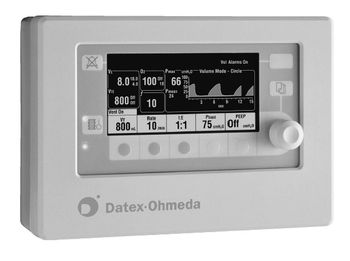
Datex Ohmeda SmartVent 7900
 Datex Ohmeda · Model SmartVent 7900
Greatly expands patient range by providing performance without complexity Microprocessor controlled ventilator with internal monitors for inspired oxygen, airway pressure and exhaled volume Provides two powerful ventilation modes: volume control and pressure control Allows for automatic compensation of compression losses, changes in fresh gas concentration and small leaks within the absorber and bellows with the unique SmartVent tidal volume compensation system Innovative electronic PEEP mechanism is a standard feature of the SmartVent 7900 Ventilator Can be integrated with the Excel SE and Modulus¨ SE Anethesia Machines and comes standard on the Aestiva 3000 Anesthesia Machine.
Key tips
- ·A failed daily leak test takes the machine out of service immediately - there is no acceptable workaround.
- ·Never run an agent-specific vaporizer with the wrong agent, even briefly, during testing.
- ·CO2-absorbent exhaustion mimics several unrelated fault symptoms - rule it out early.
Typical Failure Modes
Compiled for this model from its own documentation and established engineering knowledge for this equipment class - not from a verified service record. Confirm against the manufacturer's service manual.
Fails the pre-use self-test / circuit check
HighSymptoms: Self-test fault, circuit-leak or compliance-check failure, will not be released for use.
Root cause: Patient-circuit / expiratory-valve leak, a flow-sensor fault, an O2-cell fault, or an internal pneumatic fault.
Flow / volume delivery inaccurate
HighSymptoms: Delivered tidal volume or flow does not match the setting, or fails the annual verification.
Root cause: Flow-sensor drift / contamination, an inspiratory / expiratory valve fault, or a blender / proportioning-valve fault.
O2 / air supply or blender fault
MediumSymptoms: Low-supply alarm, FiO2 not matching the setting, O2-cell reads wrong.
Root cause: Wall / cylinder supply issue, an inlet filter / regulator fault, the blender, or an aged O2 cell.
PEEP not held / high circuit pressure
MediumSymptoms: PEEP drifts, auto-PEEP, high-pressure alarms, poor exhalation.
Root cause: Worn or wet expiratory valve / diaphragm, or a blocked exhalation path.
Battery / power fault
MediumSymptoms: Short internal-battery run time, will not charge, transfers to battery unexpectedly.
Root cause: Aged internal battery or a power-supply fault.
Turbine / compressor fault (turbine units)
MediumSymptoms: Noisy operation, cannot meet flow demand, turbine / compressor alarm.
Root cause: Worn turbine / compressor.
Serviceable Parts & Consumables
Serviceable items for this model, compiled from its documentation and engineering knowledge for this equipment class. Service class and relative cost are estimates, not manufacturer figures; no part numbers are given. Confirm intervals and pricing against the manufacturer.
Flow sensor(s)
Class Frequent wear itemRel. cost $$R&R Fairly easy
Expiratory valve / diaphragm
Class Frequent wear itemRel. cost $$R&R Fairly easy
O2 cell / sensor
Class Frequent wear itemRel. cost $$R&R Easy
Internal battery
Class Periodic replacementRel. cost $$R&R Fairly easy
Inlet filters / water traps
Class Frequent wear itemRel. cost $R&R Easy
Turbine / compressor (turbine units)
Class Major service partRel. cost $$$$R&R Difficult
| Part | Service class | Relative cost | R&R difficulty |
|---|---|---|---|
| Flow sensor(s) | Frequent wear item | $$ | Fairly easy |
| Expiratory valve / diaphragm | Frequent wear item | $$ | Fairly easy |
| O2 cell / sensor | Frequent wear item | $$ | Easy |
| Internal battery | Periodic replacement | $$ | Fairly easy |
| Inlet filters / water traps | Frequent wear item | $ | Easy |
| Turbine / compressor (turbine units) | Major service part | $$$$ | Difficult |
Relative cost: $ lowest · $$$$ highest service-part cost for this equipment class. Not a price.
PM Checklist
Preventive-maintenance tasks typical of this equipment class. Perform to the manufacturer's procedure and your facility's policy - this is general reference, not a schedule for this specific unit.
- ·Daily pre-anesthesia machine check: leak test, O2 sensor calibration, per facility protocol
- ·Scheduled vaporizer calibration and agent-specific service
- ·Absorber / CO2 canister replacement
- ·Breathing circuit and hose inspection
- ·Annual full PM and electrical safety test
Error Codes
Extracted directly from this unit's own service manual.
Test CPUThe software tests the CPU integer instructions as well as the CPU register(s). If this test fails, the CPU did not perform an integer instruction correctly, or the CPU register(s) have failed.
Upon FAIL, replace the microcontroller board - See section 6.
Test External RAMThe software tests all of the external RAM memory with a walking bit pattern test. It writes a certain bit pattern to a block of memory and then reads that block of memory. If the bit pattern that it wrote is not the same bit pattern that it reads back the test fails.
Upon FAIL, replace the microcontroller board - See section 6
Test Display RAMThe software tests all of the display RAM memory via a walking bit pattern test. It writes a certain bit pattern to a block of memory and then reads that block of memory. If the bit pattern that was written is not the same bit pattern that it reads back the test fails.
Upon FAIL, replace the microcontroller board.
Test Flash ROMThe software tests the Flash ROM via a CRC check (Cyclic Redundancy Check). A CRC value has been calculated for the Flash ROM memory and this value is stored in the Flash ROM. This test recalculates the CRC for the Flash ROM and compares it to the value stored in Flash ROM. If the value that was calculated does not equal the value that was stored in Flash ROM, the test will fail.
Upon FAIL, replace the microcontroller board software. (a new Flash ROM chip) see section 6.
Test EEPROMThe software tests all of the EEPROM memory via a bit pattern test. It writes a certain pattern to a block of memory and then reads that block of memory. If the bit pattern that was written is not the same as the bit pattern read back, the test fails.
Upon FAIL, replace the microcontroller board.
Test Panel SwitchesThe software will set up the ventilator to receive all button presses and control wheel turns. The test asks the user to press each of the buttons and turn the control wheel one full turn in both directions. Each time a button is pressed the number next to the button is reverse-highlighted. If the button is pressed and the number next to the button does not reverse highlight the test for that butt
If any of the select buttons or the adjustment knob turn test fails, replace the front panel board or the control wheel.
Test Serial PortsThe software performs an internal test on both of the serial ports. The software sets up the serial ports so any data sent out the serial ports is echoed directly back to that serial port. The test fails if the data sent out is not equal to the data received. The status of the test is displayed on the ventilators front screen.
Replace the microcontroller board.
Test Flow ValveTo test the flow valve the software starts off by closing the flow valve. It then opens the flow valve in increments until the flow valve is completely open. At each of the settings of the flow valve the A/D (Analog/Digital) channel for Flow DAC (Digital to Analog Converter) Feedback and Flow Current Sense will be read. If the A/D for the Flow DAC Feedback and Flow Current Sense are not within the
Check the drive circuit. Check the flow valve. To check the drive circuit for proper voltage, set the flow control to output 120 liters per minute. Unplug the connector from the microcontroller board. If error message reappears, replace bad flow sensor.
Insp. VT/VTE volume MismatchVTE greater than VTI (Circle) or VTI greater than V delivered (Bain or Circle)
1. Check system tubing for leakage. Refer to Pressure Sensitivity CAL Fail in Section 4. 2. Check the flow sensor 3. Replace the flow sensor
1. No Insp Flow Sensor1. No inspiratory flow sensor connected
2. No expiratory flow sensor connected 3. Negative flow on inspiratory flow sensor during inspiration 4. Negative flow on expiratory flow sensor 5. Incorrect connection, 0 flow on Insp sensor during inspiration, or 0 flow on Exp sensor in expiration after seeing flow in inspiration 1. Examine check valves, free breathing valve and MOBO 2. Check flow sensor locations and tubing connections 3. Check breathing circuit configuration
2. No Exp Flow Sensor2. No expiratory flow sensor connected
2. No expiratory flow sensor connected 3. Negative flow on expiratory flow sensor 5. Incorrect connection, 0 flow on Insp sensor during inspiration, or 0 flow on Exp sensor in expiration after seeing flow in inspiration 1. Examine check valves, free breathing valve and MOBO 2. Check flow sensor locations and tubing connections 3. Check breathing circuit configuration
3. Inspiratory Reverse Flow3. Negative flow on inspiratory flow sensor during inspiration
2. No expiratory flow sensor connected 3. Negative flow on expiratory flow sensor 5. Incorrect connection, 0 flow on Insp sensor during inspiration, or 0 flow on Exp sensor in expiration after seeing flow in inspiration 1. Examine check valves, free breathing valve and MOBO 2. Check flow sensor locations and tubing connections 3. Check breathing circuit configuration
4. Expiratory Reverse Flow4. Negative flow on expiratory flow sensor
2. No expiratory flow sensor connected 3. Negative flow on expiratory flow sensor 5. Incorrect connection, 0 flow on Insp sensor during inspiration, or 0 flow on Exp sensor in expiration after seeing flow in inspiration 1. Examine check valves, free breathing valve and MOBO 2. Check flow sensor locations and tubing connections 3. Check breathing circuit configuration
5. Check Flow Sensors5. Incorrect connection, 0 flow on Insp sensor during inspiration, or 0 flow on Exp sensor in expiration after seeing flow in inspiration
2. No expiratory flow sensor connected 3. Negative flow on expiratory flow sensor 5. Incorrect connection, 0 flow on Insp sensor during inspiration, or 0 flow on Exp sensor in expiration after seeing flow in inspiration 1. Examine check valves, free breathing valve and MOBO 2. Check flow sensor locations and tubing connections 3. Check breathing circuit configuration
O2 calibration errorO2 not equal to set O2 f± 1% O2 greater than 110%
Calibrate O2 sensor
A/D Converter FailureADC time out, monitoring is not functioning or it is unreliable
Reboot ventilator, if problem continues replace CPU board
Minimum System ShutdownBootup memory CRC failure, monitoring is not functioning or it is unreliable
Reboot ventilator, if problem continues replace CPU board
Bootup Memory FailureBootup memory CRC failure, monitoring is not functioning or it is unreliable
Reboot ventilator, if problem continues replace CPU board
Alarm Message/Symptom Condition/ProbableControl setting input has failed Minimum system monitoring Internal software error has occurred in a control setting change initiated by the user. Monitoring still available Reboot ventilator, if problem continues replace CPU board
CPU FailureALU, register,... test failure. Monitoring is not functioning or it is unreliable
Reboot ventilator, if problem continues replace CPU board
CPU Internal ErrorInternal bus error. Monitoring is not functioning or unreliable
Reboot ventilator, if problem continues replace CPU board
Flow Valve FailureIncorrect feedback. Monitoring is still available
1. Reboot ventilator, if problem persists, continue: 2. Disconnect the connector to flow valve at J7. Refer to service mode Test Flow Valve diagnostic in section 4.
Gas Inlet Valve Circuit FailureIncorrect feedback. Monitoring still available
1. Reboot ventilator, if problem persists, continues 2. Disconnect the connector to GIV at J6. Refer to service mode, Test GIV, Section 4.
Internal Ventilator Clock Too FastClock frequency greater than 110% of expected value. Monitoring is not functioning or unreliable
Reboot ventilator, if problem continues replace CPU board
Internal Ventilator Clock Too SlowClock frequency less than 90% of expected value. Monitoring is not functioning or unreliable
Reboot ventilator, if problem continues replace CPU board
Logical Watchdog FailureTime-out or incorrect code executed. Monitoring is not functioning or unreliable
Reboot ventilator, if problem continues replace CPU board
Memory (flash) FailureCRC failure. Monitoring is not functioning or it is unreliable
Reboot ventilator, if problem continues replace CPU board
Memory (RAM) FailureWalking pattern test failure. Monitoring is not functioning or it is unreliable
Reboot ventilator, if problem continues replace CPU board
Memory (video) FailureRedundant storage test failure. Monitoring is not functioning or it is unreliable
Reboot ventilator, if problem continues replace CPU board
No BatteryBattery voltage less than 7 V while running on machine elect power
1. Check inline batt fuse 2. Measure batt volts 12.5 but <16V 3. Replace battery
Low Battery ChargeVoltage less than 12.5V while running on machine elect power
1. This message should disappear after charging for 12 hours. 2. Measure batt volts 12.5 but <16V. 3. If not the battery may be defective and need replacement
Low BatteryBattery voltage less than 11.35V while running on battery
1. Charge battery. 2. Measure batt volts 12.5 but <16V. If error message doesn't clear, replace battery
System Shutdown Minimum System ShutdownBattery voltage less than 10.9V while running on battery
1. Charge battery. 2. If error message doesn't clear, replace battery
Troubleshooting Approach
A starting sequence for this model, compiled from its documentation and engineering knowledge for this equipment class. Follow the manufacturer's service documentation for the actual procedure.
Symptom: Fails the pre-use self-test / circuit check
- Run the self-test with the exact circuit, filter and humidifier that will be used.
- Leak-test the circuit and the expiratory valve; fit fresh flow sensors and an O2 cell if due.
- Repeat the self-test and note which check fails.
- Calibrate the flow sensors and O2 cell per the manual.
- Remove from service and refer an internal pneumatic fault to the OEM / biomed.
Symptom: Delivered tidal volume / flow or FiO2 inaccurate
- Verify tidal volume and flow with a calibrated gas-flow analyser and FiO2 at the wye with an O2 analyser.
- Calibrate the flow sensors and the O2 cell.
- Inspect the inspiratory and expiratory valves / diaphragms.
- Check the air and O2 supply pressures and the inlet filters / water traps.
- Refer the blender / proportioning valve if the mix is still wrong.
Symptom: PEEP not held / high circuit-pressure or auto-PEEP
- Inspect the expiratory valve / diaphragm for wear or moisture and replace it.
- Check the exhalation path and the expiratory flow sensor.
- Confirm the circuit and water trap are not obstructed.
- Run the valve / compliance calibration.
- Re-verify PEEP against the analyser.
Symptom: Low-supply / O2 alarm or turbine / compressor fault
- Confirm wall / cylinder supply pressure and the inlet hose and filter.
- Check the internal blender / regulator.
- For a turbine unit, listen for turbine noise and check it can meet flow demand.
- Replace the O2 cell if the FiO2 reading is the issue.
- Refer the turbine / compressor for replacement if it cannot meet demand.
Technical Specs
- Height
- 5.9 in (base unit)
- Length
- 15 in (base unit)
- Weight
- 33 lbs (base unit)
- Width
- 9.8 in (base unit)
Typical Location
Where this class of equipment is typically deployed - general reference, not this unit's own placement record.
- Operating rooms
- Procedure / endoscopy suites requiring sedation
- Obstetric delivery rooms
Documents & Manuals
Troubleshoot this device with Bio
Describe a symptom or error code. Bio answers from this device's own documented error codes, failure modes, parts, and guides.
Ask Bio