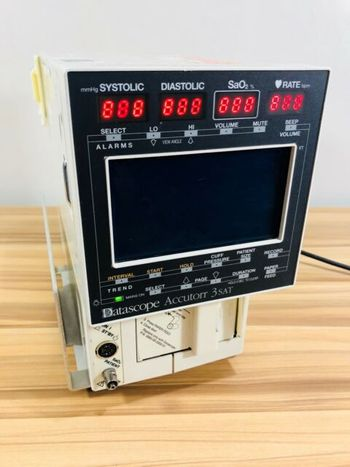
Datascope ACCUTORR 3/4
 Datascope · Model ACCUTORR 3/4
The monitor features large, front panel digital readouts; manually-initiated or automatic NIBP measurement cycles; and an integral liquid crystal display (LCD) for the presen tation of trended data, advisory messages, alarm conditions, elapsed time, a 24-hour clock, and when available a Sa02 waveform. The automatic NIBP measurement cycle uses a continuous timer, permitting automat ic sequential measurements of NIBP. These NIBP measurements, along with heart rate and Sa02 measurements, can be displayed on the LCD as trended data in either a list or graphic format. The LCD also displays advisory messages indicating correct or incorrect monitor /«*% operation, and when necessary, the LCD will also display messages during a measure- / ment cycle or display messages to qualify a completed measurement cycle. The Datascope ACCUTORR 3/4 allows you to select audible and visual alarm limits. All alarm violations are indicated by an audible alarm tone and flashing front panel dis plays. The monitor is available in four configurations. The basic model, the Datascope ACCUTORR 4, is configured for NIBP and heart rate. The Datascope ACCUTORR 4 SAT adds Sa02. The Datascope ACCUTORR 3 is equipped with a recorderfor documenting NIBP and heart rate information. Use the Datascope ACCUTORR 3 SAT if a printout of NIBP, heart rate, and Sa02 is desired. Each printout includes the time and date of each measurement taken and when displayed, patient advisory messages. All four configurations feature battery operation and User-Configuration. When the unit is not in the process of performing an NIBP measurement it continuous ly recalibrates to zero pressure, updating the offset pressure once every second.
Key tips
- ·A no-signal/flatline alarm gets checked on the patient first, not the monitor - rule out a real clinical event before troubleshooting.
- ·Recalibrate NIBP against a reference manometer, not just a self-test pass.
- ·Reused patient cables (SpO2, ECG leads) are a common source of intermittent-fault complaints - swap the cable before the module.
Typical Failure Modes
Compiled for this model from its own documentation and established engineering knowledge for this equipment class - not from a verified service record. Confirm against the manufacturer's service manual.
Will not power on or unexpected shutdown
HighSymptoms: The patient monitoring is dead, reboots, or shuts down mid-use.
Root cause: Mains lead / fuse, an aged battery, or a power-supply board fault.
Battery will not hold charge
MediumSymptoms: Short run time on battery; low-battery alarm soon after a full charge.
Root cause: Aged rechargeable battery pack or a charger fault.
Display / control-panel fault
MediumSymptoms: Blank, dim or distorted display; unresponsive keys or touchscreen.
Root cause: Display, backlight, or control-board fault.
Fails self-test or calibration
MediumSymptoms: Power-on self-test or the scheduled performance check fails or is out of tolerance.
Root cause: Sensor drift or an internal board fault; recalibration or repair needed.
Serviceable Parts & Consumables
Serviceable items for this model, compiled from its documentation and engineering knowledge for this equipment class. Service class and relative cost are estimates, not manufacturer figures; no part numbers are given. Confirm intervals and pricing against the manufacturer.
Rechargeable battery pack
Class Periodic replacementRel. cost $$R&R Fairly easy
Power supply / mains board
Class Major service partRel. cost $$$R&R Difficult
Display / control-panel assembly
Class Major service partRel. cost $$$R&R Moderate
Cooling fan
Class Major service partRel. cost $R&R Moderate
| Part | Service class | Relative cost | R&R difficulty |
|---|---|---|---|
| Rechargeable battery pack | Periodic replacement | $$ | Fairly easy |
| Power supply / mains board | Major service part | $$$ | Difficult |
| Display / control-panel assembly | Major service part | $$$ | Moderate |
| Cooling fan | Major service part | $ | Moderate |
Relative cost: $ lowest · $$$$ highest service-part cost for this equipment class. Not a price.
PM Checklist
Preventive-maintenance tasks typical of this equipment class. Perform to the manufacturer's procedure and your facility's policy - this is general reference, not a schedule for this specific unit.
- ·Routine cable and lead-wire inspection for fraying/wear
- ·Battery conditioning cycle
- ·NIBP calibration check against a reference manometer
- ·ECG / SpO2 accuracy verification against a patient simulator
- ·Annual electrical safety test
Troubleshooting Approach
A starting sequence for this model, compiled from its documentation and engineering knowledge for this equipment class. Follow the manufacturer's service documentation for the actual procedure.
Symptom: A parameter drops out or reads wrong (ECG / IBP / SpO2 / temp / CO2 / CO)
- Reseat the patient cable at the module and at the monitor.
- Swap in a known-good cable / sensor for that parameter and re-test.
- Move the module to another host or slot to tell module from host.
- Inspect the module docking connector for bent or recessed pins.
- Verify against a patient simulator; replace the cable, or refer the parameter module / input board if the fault stays with it.
Symptom: NIBP will not measure or is inaccurate
- Leak-test the cuff and hose (occlude and watch for pressure decay).
- Run the monitor's NIBP calibration-verification against a calibrated manometer.
- Confirm correct cuff size and placement and check for a kinked hose.
- Verify against a NIBP simulator at several pressures.
- Refer the monitor for internal pump / valve service if it still fails.
Symptom: Blank / dim / frozen display or unresponsive touchscreen
- Power-cycle the monitor fully (mains removed, battery out where possible).
- Check the display backlight and the display / touchscreen cable.
- Note any boot or self-test error code.
- Re-calibrate the touchscreen if the touch offset is the issue.
- Replace the display / touchscreen assembly or refer the main board.
Symptom: Not shown at the central station / network dropout
- Confirm the wired drop or Wi-Fi settings and that other monitors on that segment are online.
- Check the monitor's network address / unit-bed assignment and re-admit.
- Reseat the network card / cable.
- Restart the monitor's network interface.
- Escalate a whole-unit outage to the central-station server / IT.
Typical Location
Where this class of equipment is typically deployed - general reference, not this unit's own placement record.
- ICU / CCU
- Emergency Department
- OR / PACU
- General med-surg floors
- Step-down units
- Telemetry units
Documents & Manuals
Troubleshoot this device with Bio
Describe a symptom or error code. Bio answers from this device's own documented error codes, failure modes, parts, and guides.
Ask Bio