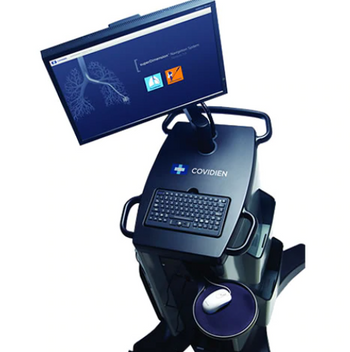
Covidien SuperDimension
 Covidien · Model SuperDimension
Simple planning – superDimension planning software is designed to guide physicians through their planning process. Target to trachea planning - Creating pathways beginning at the target lets physicians identify and select airways that are proximal to the lesion, then follow them back to the trachea. Easy setup – With simple on-screen diagrams and instructions, superDimension procedure software guides users through every step of system setup. Automatic registration – Automatic registration is a simple, three-step process to align patient anatomy with the 3D map. By conducting a quick lung survey using the superDimension locatable guide, registration can by verified before proceeding. Customizable views – The software’s simplified user interface is based on physicians’ workflow. Users can configure screens to their individual preferences at each work stage. Enhanced visualization – With a powerful tool for interpreting CT scan data, superDimension software generates 3D maps. Biopsy guidance – Because physicians can capture, store and display each biopsy location, superDimension software makes it easy to navigate back to previous positions if additional samples are needed. Advanced on-screen support – superDimension software includes on-screen help and troubleshooting. With a button that’s always present, users can just click to get the answers they need. The application will also automatically prompt you if there is a problem with the system. Precise fiducial marker positioning – The superDimension navigation system includes fiducial marker placement technology that generates recommended positions after a survey around the target. The positions are calculated to provide geometric separation around the target in smaller airways to minimize migration.
Typical Failure Modes
Compiled for this model from its own documentation and established engineering knowledge for this equipment class - not from a verified service record. Confirm against the manufacturer's service manual.
Electromagnetic navigation / registration fault
HighSymptoms: Sensor position drifts, registration fails, navigation inaccurate.
Root cause: Location-board / EM-field generator fault, ferrous interference near the field, or patient-sensor / pad placement.
Locatable guide / sensor probe fault
MediumSymptoms: Sensor not detected, erratic tip position.
Root cause: Damaged single-use locatable guide or extended working channel.
Workstation / planning-software fault
MediumSymptoms: CT planning or navigation software hangs, dataset will not load.
Root cause: Workstation PC or software fault.
Display / video-integration fault
LowSymptoms: No navigation view to the room displays.
Root cause: Video output or cabling fault.
Serviceable Parts & Consumables
Serviceable items for this model, compiled from its documentation and engineering knowledge for this equipment class. Service class and relative cost are estimates, not manufacturer figures; no part numbers are given. Confirm intervals and pricing against the manufacturer.
EM field generator / location board
Class Major service partRel. cost $$$$R&R Difficult
Patient sensor pads
Class ConsumableRel. cost $R&R Easy
Single-use locatable guide / working channel
Class ConsumableRel. cost $$R&R Easy
Workstation PC
Class Major service partRel. cost $$$R&R Moderate
Video output hardware
Class Major service partRel. cost $$R&R Moderate
| Part | Service class | Relative cost | R&R difficulty |
|---|---|---|---|
| EM field generator / location board | Major service part | $$$$ | Difficult |
| Patient sensor pads | Consumable | $ | Easy |
| Single-use locatable guide / working channel | Consumable | $$ | Easy |
| Workstation PC | Major service part | $$$ | Moderate |
| Video output hardware | Major service part | $$ | Moderate |
Relative cost: $ lowest · $$$$ highest service-part cost for this equipment class. Not a price.
Troubleshooting Approach
A starting sequence for this model, compiled from its documentation and engineering knowledge for this equipment class. Follow the manufacturer's service documentation for the actual procedure.
Symptom: Navigation inaccurate / registration fails
- Remove ferrous objects and equipment from around the EM field.
- Confirm patient sensor pads are correctly placed and adherent.
- Re-run registration per the workflow.
- Swap in a new locatable guide.
- Escalate a confirmed field-generator / location-board fault to Medtronic.
Symptom: Software / workstation fault
- Restart the workstation.
- Confirm the CT dataset and case licensing.
- Reinstall / repair the software if it will not load.
- Check the video outputs to the room displays.
- Contact Medtronic support with the error.
Documents & Manuals
No documents available for this device yet.
Troubleshoot this device with Bio
Describe a symptom or error code. Bio answers from this device's own documented error codes, failure modes, parts, and guides.
Ask Bio