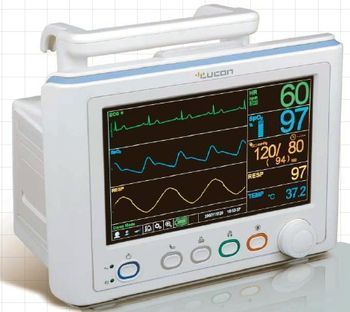
Colin Medical M30
 Colin Medical · Model M30
Multi-parameter patient monitor [*] Compact major parameter monitor for portable environment with ECG/Resp, NIBP, SpO2, 1-chTemp, Main or Side stream EtCO2(option) [*] 8.5"TFT LCD display with 3 traces [*] ECG: Arrhythmia, S-T segment detection [*] 96 hours of Graphic and Tabular trend with 20 sec' recording time interval [*] Large number display available with all parameters [*] Various rechargeable battery options of Li-ion Battery [*] External 12V DC input available [*] Ergonomic design with carry handle and bedrail [*] MEDIANA or Nellcor OXIMAX SpO2 technology [*] USB port for S/W update and Trend download.
Key tips
- ·A no-signal/flatline alarm gets checked on the patient first, not the monitor - rule out a real clinical event before troubleshooting.
- ·Recalibrate NIBP against a reference manometer, not just a self-test pass.
- ·Reused patient cables (SpO2, ECG leads) are a common source of intermittent-fault complaints - swap the cable before the module.
Typical Failure Modes
Compiled for this model from its own documentation and established engineering knowledge for this equipment class - not from a verified service record. Confirm against the manufacturer's service manual.
A parameter drops out or reads wrong
HighSymptoms: ECG, IBP, SpO2, temperature, CO2 or CO intermittently drops or is implausible.
Root cause: Worn patient cable / sensor, or a parameter-module / input-board fault.
NIBP will not measure or is inaccurate
MediumSymptoms: NIBP times out, cuff will not inflate / hold, readings implausible.
Root cause: Internal NIBP pump or valve, a cuff / hose leak, or a pressure-transducer fault.
Module / parameter not recognised
MediumSymptoms: The host does not display a plugged-in module or a built-in parameter.
Root cause: Docking / connector fault or an internal board fault.
Display / touchscreen fault
MediumSymptoms: Blank, dim or distorted display; unresponsive touchscreen.
Root cause: Display, backlight, or controller fault.
Battery / power fault
MediumSymptoms: Short battery run time, will not hold charge, will not power on.
Root cause: Aged battery pack or a power-supply fault.
Network / central-station connectivity fault
LowSymptoms: Monitor not shown at the central station, admit fails, intermittent drop.
Root cause: Wired / Wi-Fi network configuration or a communication board.
Serviceable Parts & Consumables
Serviceable items for this model, compiled from its documentation and engineering knowledge for this equipment class. Service class and relative cost are estimates, not manufacturer figures; no part numbers are given. Confirm intervals and pricing against the manufacturer.
Patient cable set (ECG / IBP / SpO2 / temp)
Class Frequent wear itemRel. cost $$R&R Easy
NIBP cuff and hose
Class Frequent wear itemRel. cost $R&R Easy
Internal NIBP pump / valve
Class Major service partRel. cost $$$R&R Difficult
Parameter module / input board
Class Major service partRel. cost $$$R&R Difficult
Battery pack
Class Periodic replacementRel. cost $$R&R Fairly easy
Display / touchscreen assembly
Class Major service partRel. cost $$$R&R Moderate
| Part | Service class | Relative cost | R&R difficulty |
|---|---|---|---|
| Patient cable set (ECG / IBP / SpO2 / temp) | Frequent wear item | $$ | Easy |
| NIBP cuff and hose | Frequent wear item | $ | Easy |
| Internal NIBP pump / valve | Major service part | $$$ | Difficult |
| Parameter module / input board | Major service part | $$$ | Difficult |
| Battery pack | Periodic replacement | $$ | Fairly easy |
| Display / touchscreen assembly | Major service part | $$$ | Moderate |
Relative cost: $ lowest · $$$$ highest service-part cost for this equipment class. Not a price.
PM Checklist
Preventive-maintenance tasks typical of this equipment class. Perform to the manufacturer's procedure and your facility's policy - this is general reference, not a schedule for this specific unit.
- ·Routine cable and lead-wire inspection for fraying/wear
- ·Battery conditioning cycle
- ·NIBP calibration check against a reference manometer
- ·ECG / SpO2 accuracy verification against a patient simulator
- ·Annual electrical safety test
Error Codes
Extracted directly from this unit's own service manual.
EEE001SpO2 module RAM error
Turn monitor off, then on again. If error code still appears, take monitor out of service and contact Mediana Technical Service Department or your local representative for advice on remedial action.
EEE002SpO2 module ROM/code integrity error
Turn monitor off, then on again. If error code still appears, take monitor out of service and contact Mediana Technical Service Department or your local representative for advice on remedial action.
EEE003SpO2 module bad CRC in communications
Turn monitor off, then on again. If error code still appears, take monitor out of service and contact Mediana Technical Service Department or your local representative for advice on remedial action.
EEE004SpO2 module bad communication message
Turn monitor off, then on again. If error code still appears, take monitor out of service and contact Mediana Technical Service Department or your local representative for advice on remedial action.
EEE005SpO2 module communication error, incorrect value
Turn monitor off, then on again. If error code still appears, take monitor out of service and contact Mediana Technical Service Department or your local representative for advice on remedial action.
EEE006SpO2 module calibration (offset) failure
Turn monitor off, then on again. If error code still appears, take monitor out of service and contact Mediana Technical Service Department or your local representative for advice on remedial action.
EEE009SpO2 module syntax communication error
Turn monitor off, then on again. If error code still appears, take monitor out of service and contact Mediana Technical Service Department or your local representative for advice on remedial action.
EEE010SpO2 module sensor error
Turn monitor off, then on again. If error code still appears, take monitor out of service and contact Mediana Technical Service Department or your local representative for advice on remedial action.
EEE012SpO2 module other hardware problem
Turn monitor off, then on again. If error code still appears, take monitor out of service and contact Mediana Technical Service Department or your local representative for advice on remedial action.
EEE017SpO2 module indicator that sensor appears defective
Turn monitor off, then on again. If error code still appears, take monitor out of service and contact Mediana Technical Service Department or your local representative for advice on remedial action.
EEE050SpO2 module intermittent error
Turn monitor off, then on again. If error code still appears, take monitor out of service and contact Mediana Technical Service Department or your local representative for advice on remedial action.
EEE051SpO2 module DigiCAL communication error
Turn monitor off, then on again. If error code still appears, take monitor out of service and contact Mediana Technical Service Department or your local representative for advice on remedial action.
EEE255SpO2 module invalid jumper selection
Turn monitor off, then on again. If error code still appears, take monitor out of service and contact Mediana Technical Service Department or your local representative for advice on remedial action.
EEE256SpO2 module beginning of packet missing
Turn monitor off, then on again. If error code still appears, take monitor out of service and contact Mediana Technical Service Department or your local representative for advice on remedial action.
EEE257SpO2 module packet start (SID) missing
Turn monitor off, then on again. If error code still appears, take monitor out of service and contact Mediana Technical Service Department or your local representative for advice on remedial action.
EEE258SpO2 module packet length error
Turn monitor off, then on again. If error code still appears, take monitor out of service and contact Mediana Technical Service Department or your local representative for advice on remedial action.
EEE259SpO2 module message length error
Turn monitor off, then on again. If error code still appears, take monitor out of service and contact Mediana Technical Service Department or your local representative for advice on remedial action.
EEE260SpO2 module packet contains unsupported key
Turn monitor off, then on again. If error code still appears, take monitor out of service and contact Mediana Technical Service Department or your local representative for advice on remedial action.
EEE261SpO2 module packet CRC error
Turn monitor off, then on again. If error code still appears, take monitor out of service and contact Mediana Technical Service Department or your local representative for advice on remedial action.
EEE262SpO2 module end of packet missing
Turn monitor off, then on again. If error code still appears, take monitor out of service and contact Mediana Technical Service Department or your local representative for advice on remedial action.
EEE263SpO2 module packet contains undefined key
Turn monitor off, then on again. If error code still appears, take monitor out of service and contact Mediana Technical Service Department or your local representative for advice on remedial action.
EEE264SpO2 module corrupted variable
Turn monitor off, then on again. If error code still appears, take monitor out of service and contact Mediana Technical Service Department or your local representative for advice on remedial action.
EEE265SpO2 module memory overflow
Turn monitor off, then on again. If error code still appears, take monitor out of service and contact Mediana Technical Service Department or your local representative for advice on remedial action.
EEE266SpO2 module bad pointer
Turn monitor off, then on again. If error code still appears, take monitor out of service and contact Mediana Technical Service Department or your local representative for advice on remedial action.
EEE267SpO2 module parameter value out-of-range
Turn monitor off, then on again. If error code still appears, take monitor out of service and contact Mediana Technical Service Department or your local representative for advice on remedial action.
EEE268SpO2 module reset detected
Turn monitor off, then on again. If error code still appears, take monitor out of service and contact Mediana Technical Service Department or your local representative for advice on remedial action.
EEE269SpO2 module unexpected value
Turn monitor off, then on again. If error code still appears, take monitor out of service and contact Mediana Technical Service Department or your local representative for advice on remedial action.
EEE270SpO2 module time out
Turn monitor off, then on again. If error code still appears, take monitor out of service and contact Mediana Technical Service Department or your local representative for advice on remedial action.
EEE271SpO2 module not ready/not initialized
Turn monitor off, then on again. If error code still appears, take monitor out of service and contact Mediana Technical Service Department or your local representative for advice on remedial action.
EEE272SpO2 module double fault
Turn monitor off, then on again. If error code still appears, take monitor out of service and contact Mediana Technical Service Department or your local representative for advice on remedial action.
EEE273SpO2 module data out of range error
Turn monitor off, then on again. If error code still appears, take monitor out of service and contact Mediana Technical Service Department or your local representative for advice on remedial action.
EEE274SpO2 module incompatible digical sensor
Turn monitor off, then on again. If error code still appears, take monitor out of service and contact Mediana Technical Service Department or your local representative for advice on remedial action.
EEE275SpO2 module incorrect registration number
Turn monitor off, then on again. If error code still appears, take monitor out of service and contact Mediana Technical Service Department or your local representative for advice on remedial action.
EEE276SpO2 module sensor read failure
Turn monitor off, then on again. If error code still appears, take monitor out of service and contact Mediana Technical Service Department or your local representative for advice on remedial action.
EEE277SpO2 module sensor signature verification fails
Turn monitor off, then on again. If error code still appears, take monitor out of service and contact Mediana Technical Service Department or your local representative for advice on remedial action.
EEE281SpO2 module overflow/underflow
Turn monitor off, then on again. If error code still appears, take monitor out of service and contact Mediana Technical Service Department or your local representative for advice on remedial action.
EEE282SpO2 module sensor activation failure
Turn monitor off, then on again. If error code still appears, take monitor out of service and contact Mediana Technical Service Department or your local representative for advice on remedial action.
EEE283SpO2 module sensor write failure
Turn monitor off, then on again. If error code still appears, take monitor out of service and contact Mediana Technical Service Department or your local representative for advice on remedial action.
EEE284SpO2 module both HW and SW ECG triggers received
Turn monitor off, then on again. If error code still appears, take monitor out of service and contact Mediana Technical Service Department or your local representative for advice on remedial action.
EEE285SpO2 module host attempted read or close of sensor trend before successful open
Turn monitor off, then on again. If error code still appears, take monitor out of service and contact Mediana Technical Service Department or your local representative for advice on remedial action.
EEE286SpO2 module host attempted redundant open of sensor trend
Turn monitor off, then on again. If error code still appears, take monitor out of service and contact Mediana Technical Service Department or your local representative for advice on remedial action.
EEE287SpO2 module sensor trend data unavailable for reading by host
Turn monitor off, then on again. If error code still appears, take monitor out of service and contact Mediana Technical Service Department or your local representative for advice on remedial action.
EEE288SpO2 module No more sensor trend data available for reading by Host
Turn monitor off, then on again. If error code still appears, take monitor out of service and contact Mediana Technical Service Department or your local representative for advice on remedial action.
EEE289SpO2 module Sensor Private label/Host sensor Key incompatible
Turn monitor off, then on again. If error code still appears, take monitor out of service and contact Mediana Technical Service Department or your local representative for advice on remedial action.
EEE401CO2 Module RAM Error
Turn monitor off, then on again. If error code still appears, take monitor out of service and contact Mediana Technical Service Department or your local representative for advice on remedial action.
EEE402CO2 Module FLASH Error
Turn monitor off, then on again. If error code still appears, take monitor out of service and contact Mediana Technical Service Department or your local representative for advice on remedial action.
EEE403CO2 Module CRC Error
Turn monitor off, then on again. If error code still appears, take monitor out of service and contact Mediana Technical Service Department or your local representative for advice on remedial action.
EEE404CO2 Module Pulse Error
Turn monitor off, then on again. If error code still appears, take monitor out of service and contact Mediana Technical Service Department or your local representative for advice on remedial action.
EEE405CO2 Module Voltage Error
Turn monitor off, then on again. If error code still appears, take monitor out of service and contact Mediana Technical Service Department or your local representative for advice on remedial action.
EEE406CO2 Module Current Error
Turn monitor off, then on again. If error code still appears, take monitor out of service and contact Mediana Technical Service Department or your local representative for advice on remedial action.
EEE407CO2 Module Software Error
Turn monitor off, then on again. If error code still appears, take monitor out of service and contact Mediana Technical Service Department or your local representative for advice on remedial action.
EEE499CO2 Module Error
Turn monitor off, then on again. If error code still appears, take monitor out of service and contact Mediana Technical Service Department or your local representative for advice on remedial action.
EEE700NIBP module RAM error
Turn monitor off, then on again. If error code still appears, take monitor out of service and contact Mediana Technical Service Department or your local representative for advice on remedial action.
EEE701NIBP module ROM error
Turn monitor off, then on again. If error code still appears, take monitor out of service and contact Mediana Technical Service Department or your local representative for advice on remedial action.
EEE702Pressure sensor error
Turn monitor off, then on again. If error code still appears, take monitor out of service and contact Mediana Technical Service Department or your local representative for advice on remedial action.
EEE703Offset error
Turn monitor off, then on again. If error code still appears, take monitor out of service and contact Mediana Technical Service Department or your local representative for advice on remedial action.
EEE704A communication timeout with substitute CPU
Turn monitor off, then on again. If error code still appears, take monitor out of service and contact Mediana Technical Service Department or your local representative for advice on remedial action.
EEE705NIBP internal error
Turn monitor off, then on again. If error code still appears, take monitor out of service and contact Mediana Technical Service Department or your local representative for advice on remedial action.
EEE706NIBP module communication error
Turn monitor off, then on again. If error code still appears, take monitor out of service and contact Mediana Technical Service Department or your local representative for advice on remedial action.
EEE801Analog system ECG & Respiration module error*
Turn monitor off, then on again. If error code still appears, take monitor out of service and contact Mediana Technical Service Department or your local representative for advice on remedial action.
Troubleshooting Approach
A starting sequence for this model, compiled from its documentation and engineering knowledge for this equipment class. Follow the manufacturer's service documentation for the actual procedure.
Symptom: A parameter drops out or reads wrong (ECG / IBP / SpO2 / temp / CO2 / CO)
- Reseat the patient cable at the module and at the monitor.
- Swap in a known-good cable / sensor for that parameter and re-test.
- Move the module to another host or slot to tell module from host.
- Inspect the module docking connector for bent or recessed pins.
- Verify against a patient simulator; replace the cable, or refer the parameter module / input board if the fault stays with it.
Symptom: NIBP will not measure or is inaccurate
- Leak-test the cuff and hose (occlude and watch for pressure decay).
- Run the monitor's NIBP calibration-verification against a calibrated manometer.
- Confirm correct cuff size and placement and check for a kinked hose.
- Verify against a NIBP simulator at several pressures.
- Refer the monitor for internal pump / valve service if it still fails.
Symptom: Blank / dim / frozen display or unresponsive touchscreen
- Power-cycle the monitor fully (mains removed, battery out where possible).
- Check the display backlight and the display / touchscreen cable.
- Note any boot or self-test error code.
- Re-calibrate the touchscreen if the touch offset is the issue.
- Replace the display / touchscreen assembly or refer the main board.
Symptom: Not shown at the central station / network dropout
- Confirm the wired drop or Wi-Fi settings and that other monitors on that segment are online.
- Check the monitor's network address / unit-bed assignment and re-admit.
- Reseat the network card / cable.
- Restart the monitor's network interface.
- Escalate a whole-unit outage to the central-station server / IT.
Technical Specs
- Height
- 210 mm
- Length
- 170 mm
- Pulse Rate Range
- 40-200 BPM
- Weight
- 3.2 kg
- SpO2 Range
- 0-100%
- Printer
- 50mm thermal printer with 2 channels
- Respiration Rate Range
- 0.3 to 120
- Temperature Range
- 0 to 50 °C
- Width
- 250 mm
Typical Location
Where this class of equipment is typically deployed - general reference, not this unit's own placement record.
- ICU / CCU
- Emergency Department
- OR / PACU
- General med-surg floors
- Step-down units
- Telemetry units
Documents & Manuals
Troubleshoot this device with Bio
Describe a symptom or error code. Bio answers from this device's own documented error codes, failure modes, parts, and guides.
Ask Bio