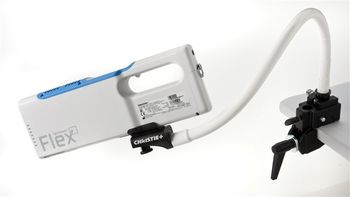
Christie Medical Holdings VeinViewer Flex
 Christie Medical Holdings · Model VeinViewer Flex
Universal - A benefit for all your patients. The brightest and most accurate direct-projection, baseline mode available. Ideal for minimizing surface structures such as hair and wrinkles. Fine detail - Enhances finer structures, ideal for identifying small veins in pediatric or sclerotherapy patients. Inverse - Allows you to switch colors within the image window. This unique feature assists clinicians in customizing the projected image based on factors such as skin tone, density of hair follicles and room brightness. Resize - Allows you to choose one of three window sizes, a valuable feature for pediatric patients or when you need to focus on only one vessel. Image Capture -?Allows the user to take and store up to 200 static images of patient vasculature on the device and transfer them to a PC for integration to HIS/RIS/PACS. No patient data is captured; HIPAA compliant. Excellent for documentation of vascular access site pre and post access, for setting expectations with aesthetics patients, and demonstrating outcomes. MaxBright - Increases our market leading image brightness by another 40% for scenarios where greater than standard ambient lighting.
Key tips
- ·When no category-specific guidance fits, default to the manufacturer's own service manual and the general troubleshooting method in the Engineer's Guide.
- ·Run an incoming and annual electrical safety test regardless of how niche the device is.
Typical Failure Modes
Compiled for this model from its own documentation and established engineering knowledge for this equipment class - not from a verified service record. Confirm against the manufacturer's service manual.
No or dim vein projection
HighSymptoms: Faint or absent projected image, poor contrast on the skin.
Root cause: Near-infrared illumination LED or the projector module at end of life, or a dirty / damaged glass lens.
Projected image out of focus or misaligned
MediumSymptoms: Blurred or offset projection that does not overlay the veins.
Root cause: Optics alignment drift or lens contamination - do not touch or strike the glass lens.
Overheating / thermal shutdown
MediumSymptoms: Unit shuts down after a period of use, hot enclosure.
Root cause: Blocked vents or a cooling-fan fault.
Battery fault
MediumSymptoms: Short cordless run time, will not charge.
Root cause: Aged battery or a charging-dock fault.
Tip-over on the stand (recall)
MediumSymptoms: Unit tips when the mobile stand is moved.
Root cause: Instrument moved incorrectly on the stand - subject of a recall; follow the correct move procedure.
Serviceable Parts & Consumables
Serviceable items for this model, compiled from its documentation and engineering knowledge for this equipment class. Service class and relative cost are estimates, not manufacturer figures; no part numbers are given. Confirm intervals and pricing against the manufacturer.
Near-infrared illumination LED
Class Major service partRel. cost $$$R&R Difficult
Projector / DLP module
Class Major service partRel. cost $$$$R&R Expert-level
Glass lens
Class Major service partRel. cost $$R&R Moderate
Battery
Class Periodic replacementRel. cost $$R&R Fairly easy
Cooling fan
Class Major service partRel. cost $R&R Moderate
| Part | Service class | Relative cost | R&R difficulty |
|---|---|---|---|
| Near-infrared illumination LED | Major service part | $$$ | Difficult |
| Projector / DLP module | Major service part | $$$$ | Expert-level |
| Glass lens | Major service part | $$ | Moderate |
| Battery | Periodic replacement | $$ | Fairly easy |
| Cooling fan | Major service part | $ | Moderate |
Relative cost: $ lowest · $$$$ highest service-part cost for this equipment class. Not a price.
PM Checklist
Preventive-maintenance tasks typical of this equipment class. Perform to the manufacturer's procedure and your facility's policy - this is general reference, not a schedule for this specific unit.
- ·Follow the manufacturer's PM schedule
- ·Perform incoming and annual electrical safety testing per facility biomedical program
Troubleshooting Approach
A starting sequence for this model, compiled from its documentation and engineering knowledge for this equipment class. Follow the manufacturer's service documentation for the actual procedure.
Symptom: No or dim projection
- Clean the glass lens using only the recommended method - do not touch or strike it.
- Check the battery charge or run on the dock.
- Confirm the vents and fan are clear.
- If the image is still dim, the NIR LED or projector module needs service.
- Return to Christie Medical for illumination / projector work.
Symptom: Image blurred or misaligned
- Clean the lens.
- Check the working distance is within the specified range.
- Restart the unit.
- If the overlay is still offset, refer for optics alignment.
- Always confirm veins by palpation as well as by the projected image.
Technical Specs
- Height
- 4 in
- Length
- 11.6 in
- Weight
- 1.6 lbs
- Width
- 1.7 in
Typical Location
Where this class of equipment is typically deployed - general reference, not this unit's own placement record.
- Varies by device - check the unit's own manual for facility placement guidance
Documents & Manuals
Safety & Recalls
Synced live from the FDA openFDA API.
- RECALL
Instrument may tip over if not moved correctly.
Troubleshoot this device with Bio
Describe a symptom or error code. Bio answers from this device's own documented error codes, failure modes, parts, and guides.
Ask Bio