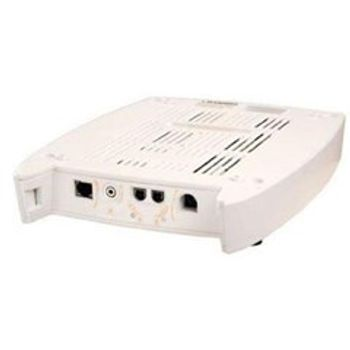
Chattanooga Intelect XT Channel 3 and 4 Electrotherapy Module
 Chattanooga · Model Intelect XT Channel 3 and 4 Electrotherapy Module
The ability to consolidate up to six treatment modalities in one system for a fraction of the cost. A clean design with color-coded front access panel - no excessive lead wires and connections visible. 4 independent channels from 2 channels.
Typical Failure Modes
Compiled for this model from its own documentation and established engineering knowledge for this equipment class - not from a verified service record. Confirm against the manufacturer's service manual.
No stimulation output on a channel
HighSymptoms: Channel 3 or 4 delivers no current, patient feels nothing, output will not ramp.
Root cause: Damaged lead wire, dried or lifted electrodes, an open patient circuit, or an output-stage fault in the module.
Error message 200-399
HighSymptoms: Error code in the 200-299 or 300-399 range.
Root cause: A fault requiring technical assistance - not user-remediable.
Intensity unstable or asymmetric between channels
MediumSymptoms: Output jumps, one channel much weaker, poor dose control.
Root cause: Output-stage or control fault on the module.
Module not recognised by the base
MediumSymptoms: Base does not enable channels 3 and 4.
Root cause: Dirty or damaged module connector.
Serviceable Parts & Consumables
Serviceable items for this model, compiled from its documentation and engineering knowledge for this equipment class. Service class and relative cost are estimates, not manufacturer figures; no part numbers are given. Confirm intervals and pricing against the manufacturer.
Lead wires
Class Frequent wear itemRel. cost $R&R Easy
Electrodes
Class ConsumableRel. cost $R&R Easy
Channel 3/4 electrotherapy module (output board)
Class Major service partRel. cost $$$R&R Moderate
Module connector
Class Major service partRel. cost $R&R Moderate
| Part | Service class | Relative cost | R&R difficulty |
|---|---|---|---|
| Lead wires | Frequent wear item | $ | Easy |
| Electrodes | Consumable | $ | Easy |
| Channel 3/4 electrotherapy module (output board) | Major service part | $$$ | Moderate |
| Module connector | Major service part | $ | Moderate |
Relative cost: $ lowest · $$$$ highest service-part cost for this equipment class. Not a price.
Error Codes
Extracted directly from this unit's own service manual.
100Warning Overcurrent
A. Check Electrodes and Lead Wires. Make certain Lead Wires are not damaged and are properly connected to the system. Make certain Lead Wires are properly connected to the Electrodes and that electrodes are not damaged and are making proper contact with treatment area. B. Replace Lead Wires and Electrodes
101Warning Shorted Lead Wires
A. Check Electrodes and Lead Wires. Make certain Lead Wires are not damaged and are properly connected to the system. Make certain Lead Wires are properly connected to the Electrodes and that electrodes are not damaged and are making proper contact with treatment area. B. Replace Lead Wires and Electrodes
102Warning Bad Contact Quality
A. Make certain Electrodes are making proper contact with the treatment area. B. Make certain Lead Wires are properly connected to Electrodes. C. Replace Electrodes and Lead Wires.
103Warning Blank Patient ID
Properly enter Patient ID. Refer to Therapy System User Manual for Patient Data Card instructions.
104Warning 1. Blank Protocol Name 2. Blank Sequence Name
Properly enter Protocol or Sequence Name. Refer to the appropriate section of the Therapy System User Manual.
106Warning
1. Attempting to delete factory set Sequence.
107Warning
2. Attempting to delete Clinical Protocol. Cannot delete factory set Clinical Protocols or factory set Sequences.
108Warning Attempting to save additional User Protocols or Sequences after system memory has reached the maximum allowed (200)
Delete some User Protocols or Sequences. Refer to appropriate section of the Therapy System User Manual for instructions.
109Warning
Attempting to access protocols or sequences and none are found in the system.
110Warning
A. User Protocols- No protocols have been saved in the system. Refer to Therapy System User Manual to save User Protocols
111Warning
B. Sequences- No User Sequences have been saved in the system. Refer to Therapy System User Manual to save Sequences.
112Warning Ultrasound Applicator disconnected from system during treatment session
A. Connect Ultrasound Applicator to system. B. If Ultrasound Applicator is connected, reset system by turning power switch Off and On. C. If problem persists, connect a known good Ultrasound Applicator. If problem continues, contact dealer or factory for service.
113Warning Attempting to perform Ultrasound treatment with no Applicator connected to the system
A. Connect the desired Ultrasound Applicator to the system. B. If Ultrasound Applicator is connected, reset system by turning power switch Off and On. C. If problem persists, connect a known good Ultrasound Applicator. If problem continues, contact dealer or factory for service.
114Warning Ultrasound Applicator is not calibrated
Attempt to use a known good Applicator. If problem continues, contact dealer or factory for service.
115Warning Ultrasound Applicator is too hot
Allow Ultrasound Applicator Sound Head to cool to ambient temperature.
116Warning
1. No Patient Data Card is inserted into the system. 2. Attempted to use an Invalid Patient Data Card.
117Warning
A. Properly insert the Patient Data Card into the system port. Refer to Therapy System User Manual for new and existing Patient Data Card instructions. B. Attempt to use a known good Patient Data Card. C. Make certain a Patient Data Card and not an sEMG Data Card is being used. D. If problem continues, contact dealer or factory for service.
118Warning Attempting to save additional User Protocols or Sequences after system memory has reached the maximum allowed (200)
Delete some User Protocols or Sequences. Refer to appropriate section of the Therapy System User Manual for instructions.
119Warning
1. Attempted to read a treatment from Patient Data Card that is not a valid treatment for the system
120Warning
2. Attempted to use a Non-Patient Data Card.
121Warning
3. No Patient Data Card inserted into system port.
122Warning
4. Unknown type of smart card inserted into system.
129Warning sEMG Data Card full
A. sEMG Data Card faulty. Insert a known good sEMG Data Card. If problem continues, contact dealer or factory for service.
130Warning Another treatment is running while attempting to set up and perform a Laser Therapy treatment
A. Allow existing treatment to complete before starting Laser Therapy. B. If no other treatment is running, reset Therapy System by turning main power switch Off and On.
131Warning Treatment Room Door Lockout is breached
A. Make certain Treatment Room Door is completely closed. B. Make certain the Lockout cable is connected to the system. C. Replace Lockout to System cable with a known good cable. D. Contact department responsible for installation of the Treatment Room Door Lockout mechanism for maintenance or repair. E. If problem continues, send Laser Module to factory for Service.
132Warning Attempted to start a laser treatment but no Laser Applicator is plugged in
A. Connect desired Laser Applicator to the system. B. If Applicator is connected, reset Therapy System by turning main power switch Off and On. C. Connect a known good Laser Applicator. D. If problem continues, send Laser Module to factory for Service.
133Warning Laser Applicator became unplugged while performing a laser treatment
A. Connect desired Laser Applicator to the system. B. If Laser Applicator is connected, reset Therapy System by turning main power switch Off and On. C. Connect a known good Laser Applicator. D. If problem continues, send Laser Module to factory for Service.
134Warning Entered incorrect laser PIN
A. Enter correct Laser PIN number. B. If problem continues, send Laser Module to factory for Service.
Troubleshooting Approach
A starting sequence for this model, compiled from its documentation and engineering knowledge for this equipment class. Follow the manufacturer's service documentation for the actual procedure.
Symptom: No output on a channel
- Fit fresh electrodes and confirm good skin contact.
- Substitute a known-good lead wire.
- Test the same channel with a load resistor / tester if available.
- Try the module in another XT base to isolate module vs base.
- If output is still absent, replace the module.
Symptom: Error 200-399
- Note the exact code.
- Power-cycle the therapy system.
- Follow any on-screen instruction for user-definable errors (100-range).
- For 200-399, the module needs technical assistance - remove from service.
- Contact Chattanooga / DJO service with the code.
Technical Specs
- Height
- 1.65 in
- Length
- 11.87 in
- Weight
- 1 lbs
- Width
- 8.25 in
Documents & Manuals
Troubleshoot this device with Bio
Describe a symptom or error code. Bio answers from this device's own documented error codes, failure modes, parts, and guides.
Ask Bio