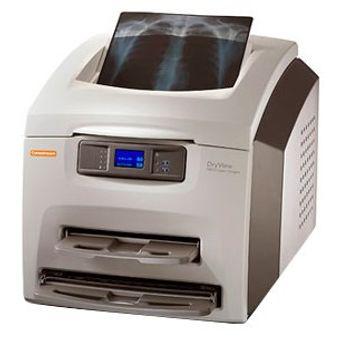
Carestream DryView 5850
 Carestream · Model DryView 5850
Laser image quality. Every image on every film size is printed using true laser technology. Automatic Image Quality Control (AIQC) uses a built-in densitometer to automatically maintain film-to-film consistency. Mammography printing. Print high-quality, high-resolution images from mammography CR systems or FFDM systems. Supported with KODAK DryView DVM. Mammography Laser Imaging Film for mammography images with Dmax? 3.6. Use KODAK DryView DVM+ Mammography Laser Imaging Film for exceptional mammography images with Dmax? 4.0. Mammography test patterns are included. Ease of operation. A simplified user panel. Simply change film sizes by inserting the desired film tray. Load film in full room light. Two film sizes on-line. Minimized maintenance. DryView technology does not use thermal print heads. No daily or weekly maintenance is required on print heads or film transport rollers. Broad printing capability. Print from CR, FFDM, DR, CT, MRI, US, NM, PACS, Digital Fluoroscopy, and other grayscale film applications. Remote data access. A Web Portal enables users to remotely access status and performance information. Data from a networked 5850 Laser Imager can be viewed at any network computer running Microsoft Internet Explorer. Remote access reduces need for user visits, improving efficiency of department and support staff. Advantages at a glance. High resolution printing. Prints from a full range of modalities. Five film sizes for on-demand printing508 ppi, 50 micron. True laser technology. Tabletop convenience.
Key tips
- ·Never bypass a radiation interlock to "just get the image" - this is one of the few true zero-tolerance rules in BMET work.
- ·Trend image-quality phantom results over time - drift shows up before an outright failure does.
- ·Portable/mobile units take real physical abuse from transport - check wheel locks and cable strain reliefs more often than fixed units.
Typical Failure Modes
Compiled for this model from its own documentation and established engineering knowledge for this equipment class - not from a verified service record. Confirm against the manufacturer's service manual.
Poor print quality
HighSymptoms: Density too light / dark, banding, streaks, non-uniform image, blotches.
Root cause: Print head / laser optics contamination, film / cartridge issue, or density-calibration drift.
Film jam / transport fault
MediumSymptoms: Film jams in the pick-up or transport, mis-feeds, or multi-feeds.
Root cause: Worn pick-up rollers, a transport-roller fault, or a mis-loaded film cartridge.
Density / calibration fault
MediumSymptoms: Prints do not match the reference, calibration fails, densitometer error.
Root cause: Internal densitometer or the calibration routine.
DICOM / queue fault
MediumSymptoms: Jobs stuck in the queue, printer offline to modalities, association failures.
Root cause: Network / DICOM configuration or the controller board.
Thermal head / laser fault
MediumSymptoms: Whole-image defect, print-engine error.
Root cause: Thermal print head or the laser / optics module.
Serviceable Parts & Consumables
Serviceable items for this model, compiled from its documentation and engineering knowledge for this equipment class. Service class and relative cost are estimates, not manufacturer figures; no part numbers are given. Confirm intervals and pricing against the manufacturer.
Pick-up / transport rollers
Class Periodic replacementRel. cost $$R&R Moderate
Thermal print head / laser optics
Class Periodic replacementRel. cost $$$R&R Difficult
Internal densitometer
Class Major service partRel. cost $$R&R Moderate
Controller / network board
Class Major service partRel. cost $$R&R Moderate
Film (media)
Class ConsumableRel. cost $$R&R Easy
| Part | Service class | Relative cost | R&R difficulty |
|---|---|---|---|
| Pick-up / transport rollers | Periodic replacement | $$ | Moderate |
| Thermal print head / laser optics | Periodic replacement | $$$ | Difficult |
| Internal densitometer | Major service part | $$ | Moderate |
| Controller / network board | Major service part | $$ | Moderate |
| Film (media) | Consumable | $$ | Easy |
Relative cost: $ lowest · $$$$ highest service-part cost for this equipment class. Not a price.
PM Checklist
Preventive-maintenance tasks typical of this equipment class. Perform to the manufacturer's procedure and your facility's policy - this is general reference, not a schedule for this specific unit.
- ·Daily QC per modality: image-quality phantom test
- ·Tube and detector inspection
- ·Annual state-required radiation safety survey
- ·Vendor-scheduled preventive maintenance
Error Codes
Extracted directly from this unit's own service manual.
20700Service Mode WARNING / PRINTER OFFLINE The service switch is enabled. The imager is not "Ready."
20701Not Ready WARNING / COVER OPEN At least one of the film trays is not inserted and latched into place.
20702Not Ready WARNING / COVER OPEN Ready LED off Display is blanked for open tray
20703Offline Shows how many jobs having this status are queued The imager has queued jobs that can never be printed and should be deleted by the user.
20704Offline WARNING / PRINTER OFFLINE The printer has been disabled and does not have a network connection.
21001Requires Calibration The film tray must be calibrated before the imager can print from it.
21002Manual Mode The film in this film tray does not meet AIQC standards. However, the user has selected "Manual Mode," so it will be used as if it is "Ready."
21003Film Covered Film is Covered Either the film bag or film saver is still on and must be removed before the film tray can be used.
21004Unlock Pending An "Unlock" has been requested but has not started because of one of the following: films are still moving through the imager the film tray contains film but has not been covered with a film saver
23001Requires Calibration The film tray must be calibrated before the imager can print from it.
23002Manual Mode The film in this film tray does not meet AIQC standards. However, the user has selected "Manual Mode," so it will be used as if it is "Ready."
23003Film Covered Film is Covered Either the film bag or film saver is still on and must be removed before the film tray can be used.
23004Unlock Pending An "Unlock" has been requested but has not started because of one of the following: films are still moving through the imager the film tray contains film but has not been covered with a film saver
01004MIM Core: Internal Software Error 1. Shut down the imager, then start the imager. 2. If the error persists, call for service.
1. Shut down the imager, then start the imager. 2. If the error persists, call for service.
04200MIM Core: Disk Full 1. Delete jobs in the "Unprintable jobs" queue. 2. Load requested film type for jobs in the "Waiting for media" queue. 3. If the error persists, call for service.
1. Delete jobs in the "Unprintable jobs" queue. 2. Load requested film type for jobs in the "Waiting for media" queue. 3. If the error persists, call for service.
06400MIM Core: Image Page Error 1. Delete jobs in the "Unprintable jobs" queue. 2. Resend the print job from the image source. 3. If the error persists, call for service.
1. Delete jobs in the "Unprintable jobs" queue. 2. Resend the print job from the image source. 3. If the error persists, call for service.
06410MIM Core: Image Rendering Error 1. Delete jobs in the "Unprintable jobs" queue. 2. Resend the print job from the image source. 3. If t
1. Delete jobs in the "Unprintable jobs" queue. 2. Resend the print job from the image source. 3. If t
Troubleshooting Approach
A starting sequence for this model, compiled from its documentation and engineering knowledge for this equipment class. Follow the manufacturer's service documentation for the actual procedure.
Symptom: Detector not connecting / images not received / link drops
- Check the detector battery charge (wireless) or reseat the tether.
- Confirm the Wi-Fi access point, channel and range.
- Reboot the detector and the acquisition workstation.
- Try a known-good detector if the site has one.
- Escalate a confirmed detector-electronics fault to the OEM.
Symptom: Fixed-pattern artefacts / non-uniformity / dead pixels or lines / failed calibration
- Run the detector gain / offset calibration and the dead-pixel map.
- Inspect the detector for drop / crush damage.
- Expose a uniform phantom and check uniformity.
- Confirm the generator and AEC are within spec with an X-ray analyser.
- Exchange the detector if calibration will not hold.
Symptom: No or inconsistent exposure / generator error / kV-mAs inaccuracy
- Note the exact generator error / fault code.
- Confirm the mains supply is within the generator's spec (line-voltage compensation).
- Check the HT cables and the exposure contactor.
- Confirm the tube is not in a thermal lockout.
- Escalate a confirmed inverter / HV-tank / tube / filament fault; verify output with an analyser after any repair.
Symptom: AEC (phototimer) images consistently over- or under-exposed
- Verify the AEC response with a phantom at two thicknesses.
- Check the AEC chamber connections and the selected chambers / density.
- Recalibrate the AEC per the service procedure.
- Compare against a manual technique.
- Replace the AEC chamber if it will not calibrate.
Symptom: Tube stand / table / wall bucky will not track, detent or auto-position
- Check the drive, brake, detents and counterbalance for that axis.
- Inspect the position encoder / potentiometer.
- Check the auto-positioning interface and cabling.
- Adjust or replace the brake / drive hardware.
- Confirm smooth motion and reliable detents / SID.
Technical Specs
- Height
- 24 in
- Length
- 26 in
- Power Requirements
- 100-240 VAC
- Weight
- 155 lbs
- Time to First Film
- 80 sec
- Width
- 24 in
Typical Location
Where this class of equipment is typically deployed - general reference, not this unit's own placement record.
- Radiology / Imaging department
- Emergency Department (portable units)
- Operating Room (C-arms)
- Cath lab
- Bedside ICU (portable X-ray)
Documents & Manuals
Troubleshoot this device with Bio
Describe a symptom or error code. Bio answers from this device's own documented error codes, failure modes, parts, and guides.
Ask Bio