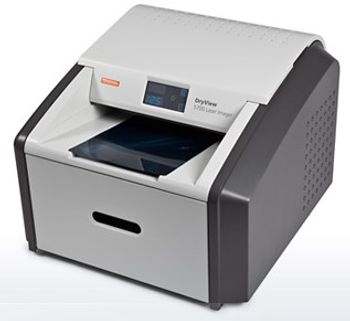
Carestream DryView 5700
 Carestream · Model DryView 5700
Laser image quality Every image on every film size is printed using true laser technology. Automatic Image Quality Control (AIQC) uses a built-in densitometer to maintain film-to-film consistency. Broad printing capabilities Print from CR, DR, CT, MR, PACS Viewers and other grayscale medical film applications. CR & DR compatibility Fully compatible with the CARESTREAM CR and DR Systems, the DRYVIEW 5700 Laser Imager is ideal for dispersed or remote printing applications from computed radiography or digital radiography systems. Ease of operation No daily or weekly preventive maintenance is required on print heads or film transport rollers to optimize image quality. A simplified user interface, room light film loading, and easy film loading further facilitate use. True dry laser imaging We created the new DryView 5700 Laser Imager for healthcare professionals worldwide who thought dry technology was too expensive or too complicated for their operations. In addition to an affordable purchase price and low operating costs, the DryView 5700 Laser Imager offers the simplicity and performance you need to improve productivity and patient care. More affordable by design Because DryView laser imagers do not use thermal print heads, there is no need for daily or weekly maintenance. And with our dry technology, there’s no need to deal with “wet” chemistry and the related environmental issues. All of this contributes to the printing system’s low cost of ownership. Automatic Image Quality Control (AIQC) Our unique AIQC technology uses a built-in densitometer to ensure films are printed according to your imaging standards. AIQC detects image quality and makes any necessary adjustments. This unique feature, combined with the proven advantages of DryView technology, ensure excellent image quality for a wide range of imaging applications. Compact design, quick installation An innovative, ergonomic design and a compact 26 x 24 in. (66 x 61 cm) footprint make the DryView 5700 Laser Imager a convenient addition - even in small workspaces. A simplified installation process ensures the printing system is easily and quickly installed. Minimal training, easy operation The DryView 5700 Laser Imager minimizes total cost of ownership through simplified operation. An intuitive user interface also speeds operation and eliminates the need for training.
Key tips
- ·Never bypass a radiation interlock to "just get the image" - this is one of the few true zero-tolerance rules in BMET work.
- ·Trend image-quality phantom results over time - drift shows up before an outright failure does.
- ·Portable/mobile units take real physical abuse from transport - check wheel locks and cable strain reliefs more often than fixed units.
Typical Failure Modes
Compiled for this model from its own documentation and established engineering knowledge for this equipment class - not from a verified service record. Confirm against the manufacturer's service manual.
Poor print quality
HighSymptoms: Density too light / dark, banding, streaks, non-uniform image, blotches.
Root cause: Print head / laser optics contamination, film / cartridge issue, or density-calibration drift.
Film jam / transport fault
MediumSymptoms: Film jams in the pick-up or transport, mis-feeds, or multi-feeds.
Root cause: Worn pick-up rollers, a transport-roller fault, or a mis-loaded film cartridge.
Density / calibration fault
MediumSymptoms: Prints do not match the reference, calibration fails, densitometer error.
Root cause: Internal densitometer or the calibration routine.
DICOM / queue fault
MediumSymptoms: Jobs stuck in the queue, printer offline to modalities, association failures.
Root cause: Network / DICOM configuration or the controller board.
Thermal head / laser fault
MediumSymptoms: Whole-image defect, print-engine error.
Root cause: Thermal print head or the laser / optics module.
Serviceable Parts & Consumables
Serviceable items for this model, compiled from its documentation and engineering knowledge for this equipment class. Service class and relative cost are estimates, not manufacturer figures; no part numbers are given. Confirm intervals and pricing against the manufacturer.
Pick-up / transport rollers
Class Periodic replacementRel. cost $$R&R Moderate
Thermal print head / laser optics
Class Periodic replacementRel. cost $$$R&R Difficult
Internal densitometer
Class Major service partRel. cost $$R&R Moderate
Controller / network board
Class Major service partRel. cost $$R&R Moderate
Film (media)
Class ConsumableRel. cost $$R&R Easy
| Part | Service class | Relative cost | R&R difficulty |
|---|---|---|---|
| Pick-up / transport rollers | Periodic replacement | $$ | Moderate |
| Thermal print head / laser optics | Periodic replacement | $$$ | Difficult |
| Internal densitometer | Major service part | $$ | Moderate |
| Controller / network board | Major service part | $$ | Moderate |
| Film (media) | Consumable | $$ | Easy |
Relative cost: $ lowest · $$$$ highest service-part cost for this equipment class. Not a price.
PM Checklist
Preventive-maintenance tasks typical of this equipment class. Perform to the manufacturer's procedure and your facility's policy - this is general reference, not a schedule for this specific unit.
- ·Daily QC per modality: image-quality phantom test
- ·Tube and detector inspection
- ·Annual state-required radiation safety survey
- ·Vendor-scheduled preventive maintenance
Troubleshooting Approach
A starting sequence for this model, compiled from its documentation and engineering knowledge for this equipment class. Follow the manufacturer's service documentation for the actual procedure.
Symptom: Poor print quality
- Print the built-in test / SMPTE pattern.
- Run the density calibration.
- Clean the print head / laser optics per the manual.
- Confirm the film type / cartridge matches the printer setting.
- Replace the print head or optics module if a whole-image defect persists.
Symptom: Film jam or jobs stuck
- Clear the jam and note the location.
- Inspect and clean the pick-up and transport rollers.
- For queue problems, check the DICOM association and network.
- Restart the print controller.
- Send a test job from a modality to confirm.
Technical Specs
- Height
- 19 in
- Length
- 26 in
- Weight
- 120 lbs
- Width
- 24 in
Typical Location
Where this class of equipment is typically deployed - general reference, not this unit's own placement record.
- Radiology / Imaging department
- Emergency Department (portable units)
- Operating Room (C-arms)
- Cath lab
- Bedside ICU (portable X-ray)
Documents & Manuals
Troubleshoot this device with Bio
Describe a symptom or error code. Bio answers from this device's own documented error codes, failure modes, parts, and guides.
Ask Bio