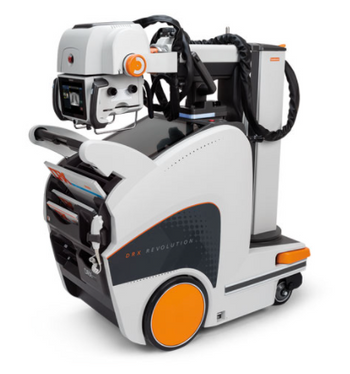
Carestream DRX-Revolution Mobile Imaging System
 Carestream · Model DRX-Revolution Mobile Imaging System
The tube head and collimator are smaller, lighter and better balanced, for easier use and faster positioning. Display screens are more responsive, with enhanced function, and redesigned to better protect against fluid ingress Brakes and drive motors are quieter and less likely to disturb patients. Functional LED lighting provides the technologist with another point of visibility of system status Optional In Bin Charging-Charge your detector without removing the battery (top slot only) ImageView Software, powered by Eclipse, delivers superb diagnostic image quality for unrivaled diagnostic confidence Allows specialized processing algorithms to suit your preferences Offers a wide range of specialized viewing options – Tube & Line Visualization, Pneumothorax, SmartGrid and many more.
Key tips
- ·Never bypass a radiation interlock to "just get the image" - this is one of the few true zero-tolerance rules in BMET work.
- ·Trend image-quality phantom results over time - drift shows up before an outright failure does.
- ·Portable/mobile units take real physical abuse from transport - check wheel locks and cable strain reliefs more often than fixed units.
Typical Failure Modes
Compiled for this model from its own documentation and established engineering knowledge for this equipment class - not from a verified service record. Confirm against the manufacturer's service manual.
No or inconsistent exposure
HighSymptoms: Exposure inhibited, kV / mAs error, images under- or over-exposed.
Root cause: HV generator / capacitor fault, exposure-switch fault, tube fault, or a thermal interlock.
Drive / propulsion fault (motor-driven units)
MediumSymptoms: Unit will not drive, drives weakly, or a drive fault code.
Root cause: Drive battery, drive motor / controller, or the throttle handle.
Battery pack will not hold charge
HighSymptoms: Few exposures per charge, will not reach full charge, unit dies mid-round.
Root cause: Aged exposure / drive battery bank or a charger fault.
Column / arm / brake fault
MediumSymptoms: Tube arm drifts, will not extend / rotate, or a brake will not hold.
Root cause: Worn arm bearings, counterbalance, or brakes.
Detector / console fault (DR units)
MediumSymptoms: Panel not detected, images not received, console errors.
Root cause: Wireless detector, its battery, or the acquisition PC.
Serviceable Parts & Consumables
Serviceable items for this model, compiled from its documentation and engineering knowledge for this equipment class. Service class and relative cost are estimates, not manufacturer figures; no part numbers are given. Confirm intervals and pricing against the manufacturer.
Battery bank (exposure / drive)
Class Periodic replacementRel. cost $$$R&R Moderate
HV generator / capacitor module
Class Major service partRel. cost $$$$R&R Expert-level
Drive motor / controller
Class Major service partRel. cost $$$R&R Difficult
Column arm brake / bearing kit
Class Major service partRel. cost $$R&R Moderate
Wireless detector / battery (DR)
Class Periodic replacementRel. cost $$$$R&R Fairly easy
| Part | Service class | Relative cost | R&R difficulty |
|---|---|---|---|
| Battery bank (exposure / drive) | Periodic replacement | $$$ | Moderate |
| HV generator / capacitor module | Major service part | $$$$ | Expert-level |
| Drive motor / controller | Major service part | $$$ | Difficult |
| Column arm brake / bearing kit | Major service part | $$ | Moderate |
| Wireless detector / battery (DR) | Periodic replacement | $$$$ | Fairly easy |
Relative cost: $ lowest · $$$$ highest service-part cost for this equipment class. Not a price.
PM Checklist
Preventive-maintenance tasks typical of this equipment class. Perform to the manufacturer's procedure and your facility's policy - this is general reference, not a schedule for this specific unit.
- ·Daily QC per modality: image-quality phantom test
- ·Tube and detector inspection
- ·Annual state-required radiation safety survey
- ·Vendor-scheduled preventive maintenance
Troubleshooting Approach
A starting sequence for this model, compiled from its documentation and engineering knowledge for this equipment class. Follow the manufacturer's service documentation for the actual procedure.
Symptom: No or inconsistent exposure
- Note the exact error code.
- Confirm the battery bank is fully charged (exposure energy depends on it).
- Check the exposure switch and cable.
- Confirm the tube is not in a thermal lockout.
- Escalate a confirmed generator / capacitor / tube fault; verify output with an analyser after repair.
Symptom: Will not drive or short battery life
- Check the charge level and that the charger reaches full charge overnight.
- Load-test or check the battery bank voltages against spec.
- For no-drive, check the drive fuse, motor controller and throttle.
- Replace the battery bank when capacity is low.
- Confirm exposure count per charge returns to spec.
Typical Location
Where this class of equipment is typically deployed - general reference, not this unit's own placement record.
- Radiology / Imaging department
- Emergency Department (portable units)
- Operating Room (C-arms)
- Cath lab
- Bedside ICU (portable X-ray)
Documents & Manuals
Troubleshoot this device with Bio
Describe a symptom or error code. Bio answers from this device's own documented error codes, failure modes, parts, and guides.
Ask Bio