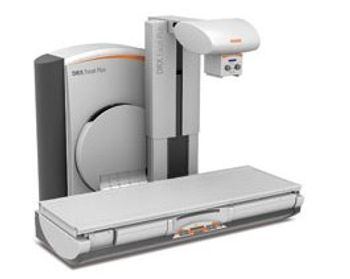
Carestream DRX-Excel Plus
 Carestream · Model DRX-Excel Plus
Extensive SID capability exceeds competitors, acquiring images at any distance between 110 to 180cm Table features a 265kg weight capacity with NO limitations on movements +/- 90 degree tilting to enable all exam types Table lowers to 48cm (19inches) making it easily accessible for wheelchair patients Full system access from every side for easier patient transfer and exam versatility Fully motorized, easy-to-use compression for abdominal and other exams Control system operation remotely, or right at patient’s side Motorized movement of tube and column maximizes speed and convenience Offered with either an Image Intensifier* with high resolution CCD camera that maximizes image quality during fluoroscopy or a Flat Panel Detector that offers high image quality for either fluoroscopy or general radiology images Auto positioning, as a function of extensive anatomical programs, facilitates faster exam set-up times Patient overage of 201cm allows full exploration of even very tall individuals without repositioning Relaxing ambient lighting and selectable music maximize patient comfort DAP measurements allow tracking of the exact radiation dose received by each patient Optional DRX-1 detector offers the power of the X-Factor and allows easy positioning for cross-table and weight-bearing exams.
Key tips
- ·Never bypass a radiation interlock to "just get the image" - this is one of the few true zero-tolerance rules in BMET work.
- ·Trend image-quality phantom results over time - drift shows up before an outright failure does.
- ·Portable/mobile units take real physical abuse from transport - check wheel locks and cable strain reliefs more often than fixed units.
Typical Failure Modes
Compiled for this model from its own documentation and established engineering knowledge for this equipment class - not from a verified service record. Confirm against the manufacturer's service manual.
Fluoro dose-rate / image-brightness fault
HighSymptoms: Fluoro image too dark or bright, dose creep, ABC / ADRC not tracking.
Root cause: Image-intensifier or flat-panel degradation, or the dose-control loop.
No or inconsistent exposure / generator error
HighSymptoms: Exposure inhibited, generator error code, spot images under/over-exposed.
Root cause: HV generator / tank, tube, filament supply, or an interlock.
Table motion / tilt / spot-film device fault
MediumSymptoms: Table will not tilt or move, the spot-film / carriage will not position.
Root cause: Table drive, tilt motor, or the spot-film device drive.
Tube overload / cooling fault
MediumSymptoms: Exposures inhibited after a series, tube-heat alarm.
Root cause: Tube heat limit reached or a heat-exchanger / cooling fault.
Console / image-chain / PACS fault
MediumSymptoms: Console unresponsive, image freeze, images will not archive.
Root cause: Console PC, the image-processing chain, or the network.
Serviceable Parts & Consumables
Serviceable items for this model, compiled from its documentation and engineering knowledge for this equipment class. Service class and relative cost are estimates, not manufacturer figures; no part numbers are given. Confirm intervals and pricing against the manufacturer.
X-ray tube assembly
Class Major service partRel. cost $$$$R&R Expert-level
Image intensifier / flat-panel detector
Class Major service partRel. cost $$$$R&R Expert-level
HV generator / tank components
Class Major service partRel. cost $$$$R&R Expert-level
Table / tilt drive components
Class Major service partRel. cost $$$R&R Difficult
Heat exchanger / cooling components
Class Major service partRel. cost $$$R&R Difficult
| Part | Service class | Relative cost | R&R difficulty |
|---|---|---|---|
| X-ray tube assembly | Major service part | $$$$ | Expert-level |
| Image intensifier / flat-panel detector | Major service part | $$$$ | Expert-level |
| HV generator / tank components | Major service part | $$$$ | Expert-level |
| Table / tilt drive components | Major service part | $$$ | Difficult |
| Heat exchanger / cooling components | Major service part | $$$ | Difficult |
Relative cost: $ lowest · $$$$ highest service-part cost for this equipment class. Not a price.
PM Checklist
Preventive-maintenance tasks typical of this equipment class. Perform to the manufacturer's procedure and your facility's policy - this is general reference, not a schedule for this specific unit.
- ·Daily QC per modality: image-quality phantom test
- ·Tube and detector inspection
- ·Annual state-required radiation safety survey
- ·Vendor-scheduled preventive maintenance
Troubleshooting Approach
A starting sequence for this model, compiled from its documentation and engineering knowledge for this equipment class. Follow the manufacturer's service documentation for the actual procedure.
Symptom: Fluoro too dark/bright or dose creeping
- Image a phantom at a fixed field and distance and compare to baseline.
- Check the image-intensifier / detector performance via service diagnostics.
- Review the dose / ABC trend.
- Escalate an intensifier or detector degradation to the OEM.
- Re-verify dose rate against the room baseline after correction.
Symptom: Generator error / no exposure
- Record the exact generator error code.
- Confirm mains supply is within spec and all room interlocks are satisfied.
- Confirm the tube is not in a thermal lockout.
- Check the HT connections and exposure contactor.
- Escalate a confirmed HV-tank / tube fault; verify output after repair.
Typical Location
Where this class of equipment is typically deployed - general reference, not this unit's own placement record.
- Radiology / Imaging department
- Emergency Department (portable units)
- Operating Room (C-arms)
- Cath lab
- Bedside ICU (portable X-ray)
Documents & Manuals
Troubleshoot this device with Bio
Describe a symptom or error code. Bio answers from this device's own documented error codes, failure modes, parts, and guides.
Ask Bio