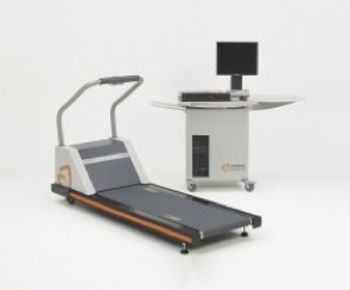
Cardiac Science Quinton Q-Stress
 Cardiac Science · Model Quinton Q-Stress
Robust network connectivity – DICOM or HL7 connects with virtually everything needed for enhanced workflow. compatible with your echo system, nuclear camera, EMR, HIS, PACs and other healthcare IT systems. Full disclosure reports; allows you to save the whole exam and review it at any time by exporting to your electronic medical record (EMR) system or hospital information system (HIS). In-test review of stress testing data that includes "rewind" and "freeze frame" capabilities (both industry firsts) while still viewing the live test. Ectopic capture and display for heartbeats outside the sinoatrial node. Fully customizable panel display, plus the flexibility to add your own user-defined protocols. Risk scoring, procedural re-analysis, and extensive report formatting options. Warranty: 13-Month parts and labor. Connectivity. Bi-directional communications using HL7 or DICOM enables the import of demographics, billing and procedures codes to Q-Stress. Export comprehensive test reports to help minimize documentation errors and lost billings. Ease of use. The system’s Microsoft Windows compatibility (Vista or XP), left-to-right flow, and intuitive controls guide users through the procedure. Tracings are accurate and clear, with clean waveforms even at high speeds and steep grades. Instant replay. The Freeze Frame option allows you to "rewind" and view any section of any lead during the test. Full disclosure. With the full disclosure option, you can save the entire cardiac stress test as a PDF and store it to your electronic records repository. Easy analysis. Built-in analysis tools allow modifications for new patient data or for physiologic changes – resting cardiac data remains constant for comparison. Customizable. You decide how you want your patient's cardiac test data presented. Create custom reports based on physician's preference. Easy reporting. QuikLists enable fast, efficient preparation of your reports.
Key tips
- ·When no category-specific guidance fits, default to the manufacturer's own service manual and the general troubleshooting method in the Engineer's Guide.
- ·Run an incoming and annual electrical safety test regardless of how niche the device is.
Typical Failure Modes
Compiled for this model from its own documentation and established engineering knowledge for this equipment class - not from a verified service record. Confirm against the manufacturer's service manual.
Belt slips, drifts or runs rough
HighSymptoms: Walking belt slips under load, tracks off-centre, jerky or noisy.
Root cause: Worn or stretched belt, a worn deck, loss of drive-belt tension, or worn rollers.
Will not start / no speed or incline response
HighSymptoms: Console dead, belt will not move, incline will not change, error code.
Root cause: Breaker / power, a drive-motor or controller fault, a lift-motor fault, or a console-cable fault.
Speed or incline inaccuracy
MediumSymptoms: Actual speed / grade does not match the display or protocol.
Root cause: Speed-sensor or incline-potentiometer / limit-switch fault - needs calibration.
Drive-motor / controller fault
MediumSymptoms: Motor cuts out under load, burning smell, controller error.
Root cause: Worn motor brushes / bearings or a drive-controller fault.
Emergency-stop / safety-key fault
HighSymptoms: E-stop or safety key does not stop the belt, or stops it unexpectedly.
Root cause: Failed e-stop switch / magnet or its wiring - a safety function.
Serviceable Parts & Consumables
Serviceable items for this model, compiled from its documentation and engineering knowledge for this equipment class. Service class and relative cost are estimates, not manufacturer figures; no part numbers are given. Confirm intervals and pricing against the manufacturer.
Walking belt & deck
Class Periodic replacementRel. cost $$R&R Moderate
Drive belt
Class Periodic replacementRel. cost $R&R Moderate
Drive motor / controller
Class Major service partRel. cost $$$R&R Difficult
Incline (lift) motor / potentiometer
Class Major service partRel. cost $$R&R Moderate
Roller / bearing set
Class Major service partRel. cost $$R&R Moderate
| Part | Service class | Relative cost | R&R difficulty |
|---|---|---|---|
| Walking belt & deck | Periodic replacement | $$ | Moderate |
| Drive belt | Periodic replacement | $ | Moderate |
| Drive motor / controller | Major service part | $$$ | Difficult |
| Incline (lift) motor / potentiometer | Major service part | $$ | Moderate |
| Roller / bearing set | Major service part | $$ | Moderate |
Relative cost: $ lowest · $$$$ highest service-part cost for this equipment class. Not a price.
PM Checklist
Preventive-maintenance tasks typical of this equipment class. Perform to the manufacturer's procedure and your facility's policy - this is general reference, not a schedule for this specific unit.
- ·Follow the manufacturer's PM schedule
- ·Perform incoming and annual electrical safety testing per facility biomedical program
Error Codes
Extracted directly from this unit's own service manual.
MOTOR LED FAULTTreadmill is not at minimum speed and grade
ADJUST SETSCREWS ON SPEED CHANGE YOKE (SECTION 5.3.3). UNPLUG TREADMILL, REMOVE HANDRAIL AND HOOD AND INSPECT SPEED CHANGE MOTOR AND SPINDLE ASSEMBLIES FOR LOOSE PARTS OR DAMAGE.
SPEED FAULTIncrease speed to maximum, decrease speed to minimum
ADJUST SETSCREWS ON SPEED CHANGE YOKE (SECTION 5.3.3). UNPLUG TREADMILL, REMOVE HANDRAIL AND HOOD AND INSPECT SPEED CHANGE MOTOR AND SPINDLE ASSEMBLIES FOR LOOSE PARTS OR DAMAGE.
TACHOMETER FAULTCalibrate speed (Section 5.1.1)
CALIBRATE SPEED (SECTION 5.1.1).
GRADE FAULTIncrease grade to maximum, decrease grade to minimum
UNPLUG TREADMILL AND REMOVE HANDRAIL AND HOOD. REALIGN GRADE MOTOR SPROCKET. ADJUST TORQUE LIMITER (SECTION 5.3.4).
CABLE NOT OKCable connection break detected
ELIMINATE OTHER LOADS SO THAT TREADMILL IS ON A DEDICATED CIRCUIT. REFER TO DRAWING #13677 FOR WIRING TO TRANSFORMER 2Tl. WITH TREADMILL UNPLUGGED, REWIRE TRANSFORMER, THEN ADJUST TRIP LEVEL POTENTIOMETER 2A1R23 (SECTION 5.4.3).
OVERLOAD CAUSEStop walking belt
STOP WALKING BELT.
Troubleshooting Approach
A starting sequence for this model, compiled from its documentation and engineering knowledge for this equipment class. Follow the manufacturer's service documentation for the actual procedure.
Symptom: Console dead / no data / will not start
- Confirm mains / the safety key and the breaker.
- Replace the console batteries or check the power feed.
- Reseat the sensor / generator cables.
- Read any console error code.
- Replace the console board or the drive controller as isolated.
Symptom: Resistance / brake / belt fault
- Check the resistance changes through the full range and the belt tracks and grips.
- Inspect the eddy-current brake / resistance motor (bike) or the walking belt and deck (treadmill).
- Check the drive belt tension.
- Verify speed / resistance against known targets with a tachometer / power meter.
- Replace the brake / motor or the belt & deck as a set.
Symptom: Speed / cadence / incline sensor inaccuracy
- Check the reed / optical sensor and its magnet alignment.
- Calibrate speed and incline per the manual.
- Verify against an independent measurement.
- Replace the sensor if it reads erratically.
- Confirm the e-stop / safety key stops the machine.
Typical Location
Where this class of equipment is typically deployed - general reference, not this unit's own placement record.
- Varies by device - check the unit's own manual for facility placement guidance
Documents & Manuals
Troubleshoot this device with Bio
Describe a symptom or error code. Bio answers from this device's own documented error codes, failure modes, parts, and guides.
Ask Bio