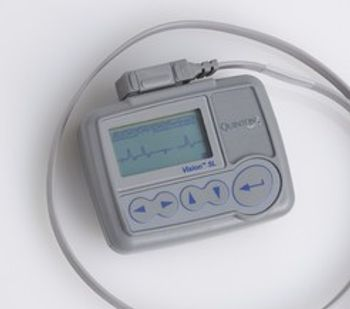
Burdick Vision 5L & 5LR
 Burdick · Model Vision 5L & 5LR
Features. 5- or 7-lead, 3-channel recordings on a straightforward screen. Streamlined five-button keypad. “Event button” to let patients capture and mark episodes that concern them. Downloadable directly to Vision or Vision Premier analysis software. LCD screen to confirm the electrode contacts are properly functioning. Patient ECG capture at 200 samples per second over a period up to 48 hours (5L). Integrated pacemaker detection. Benefits. Real-time ECG display. LCD displays real time ECG hook-up eliminating the need for test jacks and repeat tests. Ease of use. Easy-to-use five-button keypad to enter patient and test parameters. Convenience. The removable compact flash card lets you send out the Holter recorder right away, without having to wait to download previous patient results. Speed. Fast data transfer to Burdick Vision or Burdick Vision Premier Holter analysis software for quick turnaround. Versatility. Integrated pacemaker detection lets you use the Holter recorder even on patients with pacemakers. Accuracy. An ECG sampling rate of up to 1,000 samples per second (5LR only) captures even the smallest changes.
Key tips
- ·A no-signal/flatline alarm gets checked on the patient first, not the monitor - rule out a real clinical event before troubleshooting.
- ·Recalibrate NIBP against a reference manometer, not just a self-test pass.
- ·Reused patient cables (SpO2, ECG leads) are a common source of intermittent-fault complaints - swap the cable before the module.
Typical Failure Modes
Compiled for this model from its own documentation and established engineering knowledge for this equipment class - not from a verified service record. Confirm against the manufacturer's service manual.
Noisy ECG / lead-off
HighSymptoms: Baseline wander, muscle or AC noise, "lead fail", poor 12-lead quality.
Root cause: Poor skin prep, dried or lifting electrodes, or a worn patient cable / lead set.
Will not acquire or analyse
MediumSymptoms: Acquisition hangs, no interpretation, or a self-test failure.
Root cause: Acquisition-module fault or a software issue.
Printer / recorder fault
MediumSymptoms: No or faint report, paper jam, misregistered grid.
Root cause: Thermal print head, paper handling, or (older units) the stylus.
Battery / power fault
MediumSymptoms: Short battery run time, will not hold charge, will not power on.
Root cause: Aged battery pack.
Connectivity fault
LowSymptoms: ECGs will not transmit to the ECG-management system / EMR.
Root cause: Network / Wi-Fi / modem configuration or the communication module.
Serviceable Parts & Consumables
Serviceable items for this model, compiled from its documentation and engineering knowledge for this equipment class. Service class and relative cost are estimates, not manufacturer figures; no part numbers are given. Confirm intervals and pricing against the manufacturer.
Patient cable / 10-lead set
Class Frequent wear itemRel. cost $$R&R Easy
Acquisition module
Class Major service partRel. cost $$$R&R Moderate
Thermal print head / paper
Class Periodic replacementRel. cost $R&R Fairly easy
Battery pack
Class Periodic replacementRel. cost $$R&R Fairly easy
Communication / modem module
Class Major service partRel. cost $$R&R Moderate
| Part | Service class | Relative cost | R&R difficulty |
|---|---|---|---|
| Patient cable / 10-lead set | Frequent wear item | $$ | Easy |
| Acquisition module | Major service part | $$$ | Moderate |
| Thermal print head / paper | Periodic replacement | $ | Fairly easy |
| Battery pack | Periodic replacement | $$ | Fairly easy |
| Communication / modem module | Major service part | $$ | Moderate |
Relative cost: $ lowest · $$$$ highest service-part cost for this equipment class. Not a price.
PM Checklist
Preventive-maintenance tasks typical of this equipment class. Perform to the manufacturer's procedure and your facility's policy - this is general reference, not a schedule for this specific unit.
- ·Routine cable and lead-wire inspection for fraying/wear
- ·Battery conditioning cycle
- ·NIBP calibration check against a reference manometer
- ·ECG / SpO2 accuracy verification against a patient simulator
- ·Annual electrical safety test
Troubleshooting Approach
A starting sequence for this model, compiled from its documentation and engineering knowledge for this equipment class. Follow the manufacturer's service documentation for the actual procedure.
Symptom: Noisy ECG / baseline wander / lead-fail
- Re-prep the skin (abrade, degrease) and fit fresh electrodes.
- Secure the lead wires and route them away from mains cables and other equipment.
- Swap in a known-good patient cable / 10-lead set.
- Check the acquisition-module connection at the cart.
- Confirm a clean 12-lead on an ECG simulator; replace the cable or refer the acquisition module.
Symptom: Will not acquire, analyse or print
- Confirm a lead set is connected and all leads are on.
- Check the thermal paper is loaded correctly and clean the print head.
- Print the internal test pattern / grid.
- Reboot the cart; note any self-test error.
- Refer the acquisition module or the writer / print head as isolated.
Symptom: ECGs will not transmit to the management system / EMR
- Confirm the Wi-Fi / LAN / modem settings and the destination address.
- Send a test ECG and read the error.
- Reseat the communication module / SIM.
- Confirm the ECG-management system is receiving from other carts.
- Escalate a server-side or account issue to IT / the vendor.
Symptom: Short battery run time / will not power on
- Charge fully and run a capacity test if supported.
- Check the charger and DC input.
- Replace the battery pack when below the service limit.
- Confirm run time and a full print cycle on battery after replacement.
- Refer the power supply if it will not power on with a good battery.
Typical Location
Where this class of equipment is typically deployed - general reference, not this unit's own placement record.
- ICU / CCU
- Emergency Department
- OR / PACU
- General med-surg floors
- Step-down units
- Telemetry units
Documents & Manuals
Related calculators
From BioLab, for work done with this kind of equipment.
Troubleshoot this device with Bio
Describe a symptom or error code. Bio answers from this device's own documented error codes, failure modes, parts, and guides.
Ask Bio