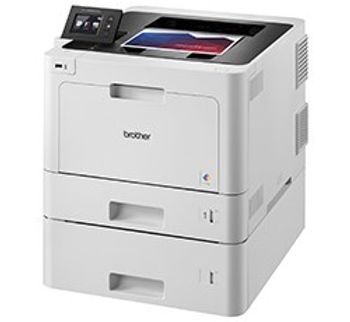
Brother HL-L8360CDWT
 Brother · Model HL-L8360CDWT
Fast, high-quality business printing - With print speeds up to 33 pages per minute in both color and black and up to 2400 x 600 dpi class resolution, you no longer have to wait for high-impact business documents. 800-sheet paper capacity - Dual paper trays (250-sheet and 500-sheet capacity) are adjustable for letter or legal size paper. Plus, a 50-sheet capacity multi-purpose tray for printing letterhead and alternative media. Add optional 250-sheet or 500-sheet paper tray and configure the printer in a way that best meets your requirements - up to 1,300 sheet total capacity. Flexible network connectivity - Built-in wireless 802.11b/g/n and Gigabit Ethernet network interfaces to easily setup and share on your wireless or wired network. Convenient mobile device printing - Print from your mobile device via‡: AirPrint®, Google Cloud Print™ 2.0, Mopria®, Brother iPrint&Scan, Wi-Fi Direct®, and NFC. Easily print two-sided documents - Use the automatic duplex print feature to help reduce your printing costs and produce professional two-sided documents, presentations, brochures, and booklets. Advanced security features - Includes an integrated NFC card reader and Active Directory® support for network user authentication. Advanced features help protect against unauthorized device access and help control costs by restricting printing on a per user or group basis. Adjustable, 2.7" color Touchscreen display - Offers easy menu navigation and printing from popular business cloud services‡ including: DROPBOX, GOOGLE DRIVE™, ONEDRIVE®, and more.
Typical Failure Modes
Compiled for this model from its own documentation and established engineering knowledge for this equipment class - not from a verified service record. Confirm against the manufacturer's service manual.
Paper jams
MediumSymptoms: Repeated jams, "Jam Tray" / "Jam Inside" / "Jam Rear", wrinkled or multi-fed sheets.
Root cause: Worn pickup / separation rollers, a foreign object in the path, or damp / wrong-weight media.
Print-quality defects
MediumSymptoms: Faint print, vertical streaks, repeating spots, toner smears or ghosting.
Root cause: Low or empty toner in one colour, a worn drum unit, or a dirty corona wire.
Wireless / network connectivity drops
MediumSymptoms: Printer goes offline, will not be found, prints only over USB.
Root cause: Wi-Fi signal or credential change, an IP change, or the network interface.
Fuser error / permanent paper marking
MediumSymptoms: Machine error requiring a power-cycle, poor toner fusing (rubs off), paper curl.
Root cause: Fuser unit at end of life.
Toner / drum replacement or count errors
LowSymptoms: "Replace Toner" / "Replace Drum" or the machine stops even with life remaining.
Root cause: Consumable at end of count, a non-genuine cartridge, or a dirty new-toner sensor / drum-reset needed.
Serviceable Parts & Consumables
Serviceable items for this model, compiled from its documentation and engineering knowledge for this equipment class. Service class and relative cost are estimates, not manufacturer figures; no part numbers are given. Confirm intervals and pricing against the manufacturer.
Toner cartridges (BK/C/M/Y)
Replace the reported colour; reset the counter if needed.
Class Frequent wear itemRel. cost $$R&R Easy
Drum unit (4-colour or per-colour)
Class Periodic replacementRel. cost $$$R&R Fairly easy
Pickup / separation roller kit
Class Periodic replacementRel. cost $R&R Fairly easy
Fuser unit
Class Periodic replacementRel. cost $$$R&R Moderate
Belt unit / transfer belt
Class Periodic replacementRel. cost $$$R&R Moderate
| Part | Service class | Relative cost | R&R difficulty |
|---|---|---|---|
| Toner cartridges (BK/C/M/Y) Replace the reported colour; reset the counter if needed. | Frequent wear item | $$ | Easy |
| Drum unit (4-colour or per-colour) | Periodic replacement | $$$ | Fairly easy |
| Pickup / separation roller kit | Periodic replacement | $ | Fairly easy |
| Fuser unit | Periodic replacement | $$$ | Moderate |
| Belt unit / transfer belt | Periodic replacement | $$$ | Moderate |
Relative cost: $ lowest · $$$$ highest service-part cost for this equipment class. Not a price.
Troubleshooting Approach
A starting sequence for this model, compiled from its documentation and engineering knowledge for this equipment class. Follow the manufacturer's service documentation for the actual procedure.
Symptom: Repeated paper jams
- Remove all trapped paper following the jam-location message; check for torn scraps.
- Fan a fresh ream of the correct weight and reload, adjusting the tray guides.
- Inspect and clean or replace the pickup and separation rollers.
- Clean the paper-dust sensors in the path.
- Run several test pages to confirm.
Symptom: Poor print quality
- Run the printer's colour-calibration and registration routines.
- Replace a low or empty toner cartridge.
- Clean the corona wire (slide the green tab) and reseat the drum unit.
- Replace the drum unit if defects repeat at the drum interval.
- Replace the fuser if toner does not bond to the page.
Symptom: Printer offline on the network
- Print the network configuration page and confirm the IP address.
- Re-run the Wi-Fi setup or connect Ethernet.
- Set a DHCP reservation or static IP so it does not change.
- Update the print queue / driver port to the current IP.
- Confirm printing from two clients.
Technical Specs
- Height
- 17.5 in
- Length
- 19.5 in
- Weight
- 62.7 lbs
- Width
- 17.4 in
Documents & Manuals
Troubleshoot this device with Bio
Describe a symptom or error code. Bio answers from this device's own documented error codes, failure modes, parts, and guides.
Ask Bio