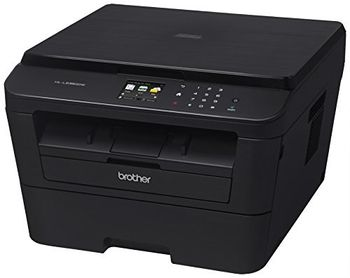
Brother HL-L2380DW
 Brother · Model HL-L2380DW
Flexible connectivity - Built-in wireless 802.11b/g/n and Ethernet interfaces to share with others on your network. Eliminate extra cables and conveniently place your printer with wireless networking or connect locally to a single computer via its Hi-Speed USB 2.0 interface. Flatbed copying and scanning - Use the document glass for convenience copying or high-quality color scanning. Offers an up a 19200 x 19200 dpi (interpolated) resolution and a variety of "scan-to" features. 2.7" Color TouchScreen Display - Intuitive navigation and easy scanning to popular web services‡ including DROPBOX, GOOGLE DRIVE™, EVERNOTE®, ONENOTE and more. Easily print two-sided documents - Produce professional two-sided documents, brochures and booklets using automatic duplex printing. This feature can reduce your paper use and help save money. Convenient mobile device printing & scanning - Print from your mobile device via‡: AirPrint™ Google Cloud Print™ Brother™ iPrint&Scan, Cortado Workplace and Wi-Fi Direct®. Plus, wirelessly scan to your mobile device with the Brother™ iPrint&Scan app. Convenient paper handling - The HL-L2380DW can meet all of your printing needs via an adjustable, 250-sheet capacity paper tray‡ that handles letter or legal size paper and a manual feed slot for printing envelopes and letterhead. Fast, high-quality output - Help improve your productivity with a print speed of up to 32ppm and produce professional output at up to 2400 x 600 dpi.
Typical Failure Modes
Compiled for this model from its own documentation and established engineering knowledge for this equipment class - not from a verified service record. Confirm against the manufacturer's service manual.
Poor print quality
HighSymptoms: Density too light / dark, banding, streaks, non-uniform image, blotches.
Root cause: Print head / laser optics contamination, film / cartridge issue, or density-calibration drift.
Film jam / transport fault
MediumSymptoms: Film jams in the pick-up or transport, mis-feeds, or multi-feeds.
Root cause: Worn pick-up rollers, a transport-roller fault, or a mis-loaded film cartridge.
Density / calibration fault
MediumSymptoms: Prints do not match the reference, calibration fails, densitometer error.
Root cause: Internal densitometer or the calibration routine.
DICOM / queue fault
MediumSymptoms: Jobs stuck in the queue, printer offline to modalities, association failures.
Root cause: Network / DICOM configuration or the controller board.
Thermal head / laser fault
MediumSymptoms: Whole-image defect, print-engine error.
Root cause: Thermal print head or the laser / optics module.
Serviceable Parts & Consumables
Serviceable items for this model, compiled from its documentation and engineering knowledge for this equipment class. Service class and relative cost are estimates, not manufacturer figures; no part numbers are given. Confirm intervals and pricing against the manufacturer.
Pick-up / transport rollers
Class Periodic replacementRel. cost $$R&R Moderate
Thermal print head / laser optics
Class Periodic replacementRel. cost $$$R&R Difficult
Internal densitometer
Class Major service partRel. cost $$R&R Moderate
Controller / network board
Class Major service partRel. cost $$R&R Moderate
Film (media)
Class ConsumableRel. cost $$R&R Easy
| Part | Service class | Relative cost | R&R difficulty |
|---|---|---|---|
| Pick-up / transport rollers | Periodic replacement | $$ | Moderate |
| Thermal print head / laser optics | Periodic replacement | $$$ | Difficult |
| Internal densitometer | Major service part | $$ | Moderate |
| Controller / network board | Major service part | $$ | Moderate |
| Film (media) | Consumable | $$ | Easy |
Relative cost: $ lowest · $$$$ highest service-part cost for this equipment class. Not a price.
Troubleshooting Approach
A starting sequence for this model, compiled from its documentation and engineering knowledge for this equipment class. Follow the manufacturer's service documentation for the actual procedure.
Symptom: Poor print quality
- Print the built-in test / SMPTE pattern.
- Run the density calibration.
- Clean the print head / laser optics per the manual.
- Confirm the film type / cartridge matches the printer setting.
- Replace the print head or optics module if a whole-image defect persists.
Symptom: Film jam or jobs stuck
- Clear the jam and note the location.
- Inspect and clean the pick-up and transport rollers.
- For queue problems, check the DICOM association and network.
- Restart the print controller.
- Send a test job from a modality to confirm.
Technical Specs
- Height
- 10.5 in
- Length
- 15.7 in
- Weight
- 21.6 lbs
- Width
- 16.1 in
Documents & Manuals
Troubleshoot this device with Bio
Describe a symptom or error code. Bio answers from this device's own documented error codes, failure modes, parts, and guides.
Ask Bio