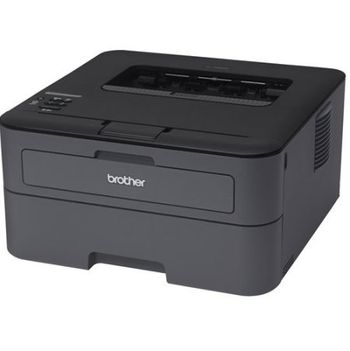
Brother HL-L2305W
 Brother · Model HL-L2305W
Compact size - The HL-L2305W's small footprint will help conserve valuable workspace. Fast laser printing - Helps improve your productivity with a print speed of up to 24ppm. Flexible connectivity - Provides built-in wireless 802.11b/g/n, and Wi Fi Direct® to share with others on your network. Eliminate extra cables and conveniently place your printer with wireless networking or connect locally to a single user via its Hi-Speed USB 2.0 interface. Convenient mobile device printing & scanning - Print from your mobile device via‡: AirPrint™, Google Cloud Print™, Brother™ iPrint&Scan, Cortado Workplace and Wi-Fi Direct®. Plus, wirelessly scan to your mobile device with the Brother™ iPrint&Scan app. High-quality output - With a print resolution up to 2400 x 600 dpi, the HL-L2305W produces professional output with crisp text and excellent graphics. Straight-through paper path - A manual feed slot and rear paper exit provide a straight-through paper path to ensure that all of your printed materials always look their best. Convenient paper handling - The Brother HL-L2305W can meet all of your printing needs via an adjustable, 250-sheet capacity paper tray‡ that handles letter or legal size paper and a manual feed slot for printing envelopes and letterhead. Toner Save mode - Use less toner and save money by using Toner Save mode for your less critical business documents.
Typical Failure Modes
Compiled for this model from its own documentation and established engineering knowledge for this equipment class - not from a verified service record. Confirm against the manufacturer's service manual.
Paper jams
MediumSymptoms: Repeated jams, wrinkled sheets, no pickup.
Root cause: Worn pickup / separation rollers or damp / wrong-weight media.
Print-quality defects
MediumSymptoms: Faint print, streaks, repeating spots, toner smears.
Root cause: Low toner, a worn drum unit, or a dirty corona wire.
Wireless connectivity drops
MediumSymptoms: Printer goes offline, prints only over USB.
Root cause: Wi-Fi signal / credential change or an IP change.
Fuser error / poor fusing
MediumSymptoms: Power-cycle error, toner rubs off, paper curl.
Root cause: Fuser unit at end of life.
Serviceable Parts & Consumables
Serviceable items for this model, compiled from its documentation and engineering knowledge for this equipment class. Service class and relative cost are estimates, not manufacturer figures; no part numbers are given. Confirm intervals and pricing against the manufacturer.
Toner cartridge
Class Frequent wear itemRel. cost $R&R Easy
Drum unit
Class Periodic replacementRel. cost $$R&R Fairly easy
Pickup / separation roller kit
Class Periodic replacementRel. cost $R&R Fairly easy
Fuser unit
Class Periodic replacementRel. cost $$$R&R Moderate
| Part | Service class | Relative cost | R&R difficulty |
|---|---|---|---|
| Toner cartridge | Frequent wear item | $ | Easy |
| Drum unit | Periodic replacement | $$ | Fairly easy |
| Pickup / separation roller kit | Periodic replacement | $ | Fairly easy |
| Fuser unit | Periodic replacement | $$$ | Moderate |
Relative cost: $ lowest · $$$$ highest service-part cost for this equipment class. Not a price.
Troubleshooting Approach
A starting sequence for this model, compiled from its documentation and engineering knowledge for this equipment class. Follow the manufacturer's service documentation for the actual procedure.
Symptom: Repeated paper jams
- Remove all trapped paper and check for scraps.
- Fan a fresh ream of the correct weight and reload.
- Inspect and clean or replace the pickup and separation rollers.
- Clean the paper-dust sensors.
- Run several test pages.
Symptom: Poor print quality
- Print the drum-check page to locate the defect.
- Replace low toner.
- Clean the corona wire and reseat the drum unit.
- Replace the drum unit if defects repeat at the drum interval.
- Replace the fuser if toner does not bond.
Technical Specs
- Height
- 7.2 in
- Length
- 14.2 in
- Weight
- 15 lbs
- Width
- 14 in
Documents & Manuals
No documents available for this device yet.
Troubleshoot this device with Bio
Describe a symptom or error code. Bio answers from this device's own documented error codes, failure modes, parts, and guides.
Ask Bio