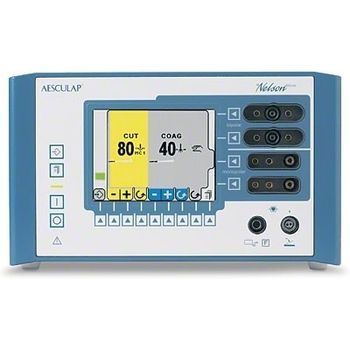
Braun Nelson Deluxe
 Braun · Model Nelson Deluxe
Safety first For B. Braun Aesculap, safety has always been a number one priority. Our safety technology protects both user and patient. Product line Nelson deluxe is equipped with a comprehensive selection of coagulation and cutting options that leave nothing to be desired. Information centre The new color display shows all essential information. Plain as day The easy-to-understand symbols on the display promote ease of use. Name it! A global first! With Nelson deluxe you can choose whatever name you wish for each of the 14 program memories. Four separate outputs The Nelson deluxe is equipped with two monopolar and two bipolar outputs. Power play 300 watts of monopolar output power. Automatic functions Helpful AutoStart / AutoStop functions are available for both monopolar and bipolar procedures. Identification software Adapted special instruments are automatically recognized by the electrosurgical device. All parameters are defined independently. Teamwork Nelson deluxe can be directly connected to the B. Braun Aesculap Argon device with the aid of an interface. All the information you need is available at a glance. Time is money Should a malfuction occur, the integrated diagnostic help program ensures quick an efficient on-site service.
Key tips
- ·Never defeat or bypass a return-electrode monitoring (REM) alarm to finish a case - it's a direct burn risk.
- ·Verify OR table battery backup - a table that loses power mid-procedure is a real, documented incident type.
- ·Track surgical light lamp-hours rather than waiting for failure - a sudden failure mid-case is avoidable.
Typical Failure Modes
Compiled for this model from its own documentation and established engineering knowledge for this equipment class - not from a verified service record. Confirm against the manufacturer's service manual.
No or low RF output / high-impedance cut-out
HighSymptoms: No cut / coag effect, "high impedance" or output-error message, output shuts down.
Root cause: Poor electrode contact or a dry field, a damaged handpiece / cable, a return-electrode (REM/NESSY) fault, or an output-stage fault.
Return-electrode (patient-plate) contact-quality alarm
MediumSymptoms: REM / NESSY / plate alarm, monopolar output inhibited.
Root cause: Poorly applied or dried split dispersive pad, a pad-cable fault, or the contact-quality-monitor circuit.
Bipolar / vessel-sealing output fault
MediumSymptoms: Bipolar or sealing output weak, seal cycle will not complete, instrument not recognised.
Root cause: Bipolar cable / instrument fault or the sealing output stage.
Fails calibration / output drifts after a repair
MediumSymptoms: Output power or the REM circuit outside tolerance on the analyser.
Root cause: Output board or REM circuit needs recalibration - anti-static handling required.
Footswitch / handswitch fault
MediumSymptoms: Output will not activate from the pedal or the handpiece.
Root cause: Footswitch or handswitch / cable fault.
Touchscreen / display / boot fault
LowSymptoms: Unresponsive touchscreen, will not power on or boot, fan / thermal alarm.
Root cause: Display, power supply, control board, or a cooling-fan fault.
Serviceable Parts & Consumables
Serviceable items for this model, compiled from its documentation and engineering knowledge for this equipment class. Service class and relative cost are estimates, not manufacturer figures; no part numbers are given. Confirm intervals and pricing against the manufacturer.
Reusable instrument / handpiece cables
Class Periodic replacementRel. cost $$R&R Easy
Split dispersive (return) pads
Class ConsumableRel. cost $R&R Easy
Footswitch
Class Periodic replacementRel. cost $$R&R Fairly easy
Bipolar / sealing cable
Class Periodic replacementRel. cost $$R&R Easy
RF output board
Recalibration required after replacement; anti-static handling.
Class Major service partRel. cost $$$$R&R Difficult
Cooling fan
Class Major service partRel. cost $R&R Moderate
| Part | Service class | Relative cost | R&R difficulty |
|---|---|---|---|
| Reusable instrument / handpiece cables | Periodic replacement | $$ | Easy |
| Split dispersive (return) pads | Consumable | $ | Easy |
| Footswitch | Periodic replacement | $$ | Fairly easy |
| Bipolar / sealing cable | Periodic replacement | $$ | Easy |
| RF output board Recalibration required after replacement; anti-static handling. | Major service part | $$$$ | Difficult |
| Cooling fan | Major service part | $ | Moderate |
Relative cost: $ lowest · $$$$ highest service-part cost for this equipment class. Not a price.
PM Checklist
Preventive-maintenance tasks typical of this equipment class. Perform to the manufacturer's procedure and your facility's policy - this is general reference, not a schedule for this specific unit.
- ·Pre-case functional check
- ·Electrosurgical return-electrode cable inspection
- ·Table hydraulic / mechanical inspection
- ·Annual electrical safety test and full PM
Troubleshooting Approach
A starting sequence for this model, compiled from its documentation and engineering knowledge for this equipment class. Follow the manufacturer's service documentation for the actual procedure.
Symptom: No or low RF output / high impedance
- Confirm good electrode-tissue contact and an adequately wetted field.
- Inspect the handpiece / instrument and cable for damage; substitute known-good.
- Check the split dispersive pad is well applied with full skin contact and a good cable.
- Verify output into a resistive test load with an electrosurgical analyser.
- Replace the output board and recalibrate if output is confirmed absent (anti-static workplace).
Symptom: Return-electrode / plate alarm
- Re-apply a fresh split dispersive pad with full skin contact over well-perfused muscle.
- Check the pad cable and connector.
- Try a known-good pad.
- Run the contact-quality-monitor calibration if it still alarms with a good pad.
- Do calibration on a non-conductive surface.
Typical Location
Where this class of equipment is typically deployed - general reference, not this unit's own placement record.
- Operating rooms
- Procedure rooms
- Interventional suites
Documents & Manuals
Troubleshoot this device with Bio
Describe a symptom or error code. Bio answers from this device's own documented error codes, failure modes, parts, and guides.
Ask Bio