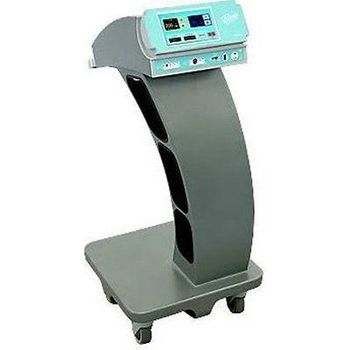
Bovie Icon Gi
 Bovie · Model Icon Gi
Easy to Use: - Touch-Screen Interface with high resolution TFT color display. No buttons or knobs. - Swivel bezel allows the screen to be viewed from almost any angle - Intuitive graphical user interface allows easy setup and quick settings adjustments. - Physician Preference database provides a quick changeover between cases. Safety: - Bovie NEM™, the most advanced technology available to fight pad burns. - Increases patient safety by requiring the use of only split pads. - Common Sense error messaging prevents misinterpretation and allows for quicker troubleshooting. - Special audible tones alert users of improper cable connections. Upgradeable: - Digitally controlled outputs and user interface means that new modes can be added so that your unit is never outdated - Multiple communication ports (i.e. USB and Ethernet) allow the ICON Gi to link up with other equipment in the GI suite. Reliability: - The ICON Gi is backed by the Bovie name, the most recognized name in electrosurgery. Clinical Benefits: - Safe Cut - Mode specifically tailored for polypectomy and ERCP procedures - Gentle Coag - a gentler mode without carbonization - Bovie FSDS™ - senses tissue changes over 5 million times per second for the most consistent energy delivery available.
Key tips
- ·Never defeat or bypass a return-electrode monitoring (REM) alarm to finish a case - it's a direct burn risk.
- ·Verify OR table battery backup - a table that loses power mid-procedure is a real, documented incident type.
- ·Track surgical light lamp-hours rather than waiting for failure - a sudden failure mid-case is avoidable.
Typical Failure Modes
Compiled for this model from its own documentation and established engineering knowledge for this equipment class - not from a verified service record. Confirm against the manufacturer's service manual.
No or low RF output / high-impedance cut-out
HighSymptoms: No cut / coag effect, "high impedance" or output-error message, output shuts down.
Root cause: Poor electrode contact or a dry field, a damaged handpiece / cable, a return-electrode (REM/NESSY) fault, or an output-stage fault.
Return-electrode (patient-plate) contact-quality alarm
MediumSymptoms: REM / NESSY / plate alarm, monopolar output inhibited.
Root cause: Poorly applied or dried split dispersive pad, a pad-cable fault, or the contact-quality-monitor circuit.
Bipolar / vessel-sealing output fault
MediumSymptoms: Bipolar or sealing output weak, seal cycle will not complete, instrument not recognised.
Root cause: Bipolar cable / instrument fault or the sealing output stage.
Fails calibration / output drifts after a repair
MediumSymptoms: Output power or the REM circuit outside tolerance on the analyser.
Root cause: Output board or REM circuit needs recalibration - anti-static handling required.
Footswitch / handswitch fault
MediumSymptoms: Output will not activate from the pedal or the handpiece.
Root cause: Footswitch or handswitch / cable fault.
Touchscreen / display / boot fault
LowSymptoms: Unresponsive touchscreen, will not power on or boot, fan / thermal alarm.
Root cause: Display, power supply, control board, or a cooling-fan fault.
Serviceable Parts & Consumables
Serviceable items for this model, compiled from its documentation and engineering knowledge for this equipment class. Service class and relative cost are estimates, not manufacturer figures; no part numbers are given. Confirm intervals and pricing against the manufacturer.
Reusable instrument / handpiece cables
Class Periodic replacementRel. cost $$R&R Easy
Split dispersive (return) pads
Class ConsumableRel. cost $R&R Easy
Footswitch
Class Periodic replacementRel. cost $$R&R Fairly easy
Bipolar / sealing cable
Class Periodic replacementRel. cost $$R&R Easy
RF output board
Recalibration required after replacement; anti-static handling.
Class Major service partRel. cost $$$$R&R Difficult
Cooling fan
Class Major service partRel. cost $R&R Moderate
| Part | Service class | Relative cost | R&R difficulty |
|---|---|---|---|
| Reusable instrument / handpiece cables | Periodic replacement | $$ | Easy |
| Split dispersive (return) pads | Consumable | $ | Easy |
| Footswitch | Periodic replacement | $$ | Fairly easy |
| Bipolar / sealing cable | Periodic replacement | $$ | Easy |
| RF output board Recalibration required after replacement; anti-static handling. | Major service part | $$$$ | Difficult |
| Cooling fan | Major service part | $ | Moderate |
Relative cost: $ lowest · $$$$ highest service-part cost for this equipment class. Not a price.
PM Checklist
Preventive-maintenance tasks typical of this equipment class. Perform to the manufacturer's procedure and your facility's policy - this is general reference, not a schedule for this specific unit.
- ·Pre-case functional check
- ·Electrosurgical return-electrode cable inspection
- ·Table hydraulic / mechanical inspection
- ·Annual electrical safety test and full PM
Troubleshooting Approach
A starting sequence for this model, compiled from its documentation and engineering knowledge for this equipment class. Follow the manufacturer's service documentation for the actual procedure.
Symptom: No or low RF output / high impedance
- Confirm good electrode-tissue contact and an adequately wetted field.
- Inspect the handpiece / instrument and cable for damage; substitute known-good.
- Check the split dispersive pad is well applied with full skin contact and a good cable.
- Verify output into a resistive test load with an electrosurgical analyser.
- Replace the output board and recalibrate if output is confirmed absent (anti-static workplace).
Symptom: Return-electrode / plate alarm
- Re-apply a fresh split dispersive pad with full skin contact over well-perfused muscle.
- Check the pad cable and connector.
- Try a known-good pad.
- Run the contact-quality-monitor calibration if it still alarms with a good pad.
- Do calibration on a non-conductive surface.
Technical Specs
- Height
- 16.87 cm
- Length
- 44.47 cm
- Weight
- 6.36 lbs
- OutPut Frequency
- 492 kHz +/- 5
- Width
- 28.23 cm
Typical Location
Where this class of equipment is typically deployed - general reference, not this unit's own placement record.
- Operating rooms
- Procedure rooms
- Interventional suites
Documents & Manuals
Troubleshoot this device with Bio
Describe a symptom or error code. Bio answers from this device's own documented error codes, failure modes, parts, and guides.
Ask Bio