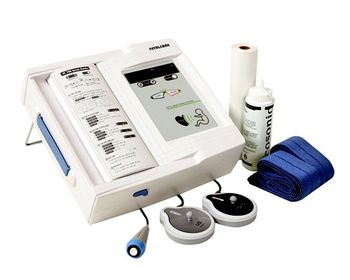
Bionet FC 700
 Bionet · Model FC 700
Accurate FHR detection High sensitivity (1 MHz) Automatic fetal movement detection A4 size wide chart paper Uses inexpensive fax paper Intuitive user interface Easy to upgrade PC interface through RS-232C.
Key tips
- ·A no-signal/flatline alarm gets checked on the patient first, not the monitor - rule out a real clinical event before troubleshooting.
- ·Recalibrate NIBP against a reference manometer, not just a self-test pass.
- ·Reused patient cables (SpO2, ECG leads) are a common source of intermittent-fault complaints - swap the cable before the module.
Typical Failure Modes
Compiled for this model from its own documentation and established engineering knowledge for this equipment class - not from a verified service record. Confirm against the manufacturer's service manual.
Poor or lost FHR trace
HighSymptoms: Fetal heart rate drops out, doubles / halves, or is noisy; hard to keep a trace.
Root cause: Worn ultrasound (Doppler) transducer, low gel, or a transducer-cable fault.
Toco / contraction channel fault
MediumSymptoms: Contraction trace flat, drifting, or will not zero.
Root cause: Worn toco transducer or its cable.
Printer / recorder fault
MediumSymptoms: No trace, faint print, paper jam, wrong speed.
Root cause: Thermal print head, paper handling, or the paper-speed setting.
Display / battery / power fault
MediumSymptoms: Blank display, short battery run time, will not power on.
Root cause: Display, an aged battery, or the power supply.
Central-link fault
LowSymptoms: Not shown on the OB surveillance / central system.
Root cause: Network / surveillance link.
Serviceable Parts & Consumables
Serviceable items for this model, compiled from its documentation and engineering knowledge for this equipment class. Service class and relative cost are estimates, not manufacturer figures; no part numbers are given. Confirm intervals and pricing against the manufacturer.
Ultrasound (Doppler) transducer
Class Periodic replacementRel. cost $$R&R Easy
Toco transducer
Class Periodic replacementRel. cost $$R&R Easy
Thermal print head / paper
Class Periodic replacementRel. cost $R&R Fairly easy
Transducer belts
Class Frequent wear itemRel. cost $R&R Easy
Battery / power supply
Class Periodic replacementRel. cost $$R&R Moderate
| Part | Service class | Relative cost | R&R difficulty |
|---|---|---|---|
| Ultrasound (Doppler) transducer | Periodic replacement | $$ | Easy |
| Toco transducer | Periodic replacement | $$ | Easy |
| Thermal print head / paper | Periodic replacement | $ | Fairly easy |
| Transducer belts | Frequent wear item | $ | Easy |
| Battery / power supply | Periodic replacement | $$ | Moderate |
Relative cost: $ lowest · $$$$ highest service-part cost for this equipment class. Not a price.
PM Checklist
Preventive-maintenance tasks typical of this equipment class. Perform to the manufacturer's procedure and your facility's policy - this is general reference, not a schedule for this specific unit.
- ·Routine cable and lead-wire inspection for fraying/wear
- ·Battery conditioning cycle
- ·NIBP calibration check against a reference manometer
- ·ECG / SpO2 accuracy verification against a patient simulator
- ·Annual electrical safety test
Troubleshooting Approach
A starting sequence for this model, compiled from its documentation and engineering knowledge for this equipment class. Follow the manufacturer's service documentation for the actual procedure.
Symptom: Losing the fetal heart rate trace
- Apply fresh gel and reposition the ultrasound transducer for the strongest tone.
- Swap in a known-good ultrasound transducer.
- Flex the transducer cable while watching for dropout.
- Confirm the FHR against a handheld Doppler.
- Replace the transducer if a good one holds the trace.
Symptom: No or poor paper trace
- Confirm the correct paper is loaded the right way up.
- Clean the thermal print head.
- Check the paper-speed setting.
- Print a test pattern.
- Replace the print head if output stays faint.
Typical Location
Where this class of equipment is typically deployed - general reference, not this unit's own placement record.
- ICU / CCU
- Emergency Department
- OR / PACU
- General med-surg floors
- Step-down units
- Telemetry units
Documents & Manuals
Troubleshoot this device with Bio
Describe a symptom or error code. Bio answers from this device's own documented error codes, failure modes, parts, and guides.
Ask Bio