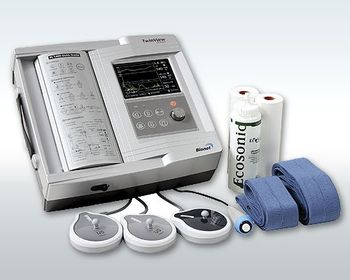
Bionet FC 1400-Twin View
 Bionet · Model FC 1400-Twin View
320 x 240 color LCD viewer. Twin capability and automatic fetal movement. 12 hours of memory capacity. High-accuracy and wide detection area. Easy on-screen access with scrolling function. Durable watertight probes. Easy-to-read A4 size chart paper. High speed printout of stored data. Uses inexpensive fax paper. S/w upgrade via internet through RS-232C.
Key tips
- ·A no-signal/flatline alarm gets checked on the patient first, not the monitor - rule out a real clinical event before troubleshooting.
- ·Recalibrate NIBP against a reference manometer, not just a self-test pass.
- ·Reused patient cables (SpO2, ECG leads) are a common source of intermittent-fault complaints - swap the cable before the module.
Typical Failure Modes
Compiled for this model from its own documentation and established engineering knowledge for this equipment class - not from a verified service record. Confirm against the manufacturer's service manual.
Poor or lost FHR trace
HighSymptoms: Fetal heart rate drops out, doubles / halves, or is noisy; hard to keep a trace.
Root cause: Worn ultrasound (Doppler) transducer, low gel, or a transducer-cable fault.
Toco / contraction channel fault
MediumSymptoms: Contraction trace flat, drifting, or will not zero.
Root cause: Worn toco transducer or its cable.
Printer / recorder fault
MediumSymptoms: No trace, faint print, paper jam, wrong speed.
Root cause: Thermal print head, paper handling, or the paper-speed setting.
Display / battery / power fault
MediumSymptoms: Blank display, short battery run time, will not power on.
Root cause: Display, an aged battery, or the power supply.
Central-link fault
LowSymptoms: Not shown on the OB surveillance / central system.
Root cause: Network / surveillance link.
Serviceable Parts & Consumables
Serviceable items for this model, compiled from its documentation and engineering knowledge for this equipment class. Service class and relative cost are estimates, not manufacturer figures; no part numbers are given. Confirm intervals and pricing against the manufacturer.
Ultrasound (Doppler) transducer
Class Periodic replacementRel. cost $$R&R Easy
Toco transducer
Class Periodic replacementRel. cost $$R&R Easy
Thermal print head / paper
Class Periodic replacementRel. cost $R&R Fairly easy
Transducer belts
Class Frequent wear itemRel. cost $R&R Easy
Battery / power supply
Class Periodic replacementRel. cost $$R&R Moderate
| Part | Service class | Relative cost | R&R difficulty |
|---|---|---|---|
| Ultrasound (Doppler) transducer | Periodic replacement | $$ | Easy |
| Toco transducer | Periodic replacement | $$ | Easy |
| Thermal print head / paper | Periodic replacement | $ | Fairly easy |
| Transducer belts | Frequent wear item | $ | Easy |
| Battery / power supply | Periodic replacement | $$ | Moderate |
Relative cost: $ lowest · $$$$ highest service-part cost for this equipment class. Not a price.
PM Checklist
Preventive-maintenance tasks typical of this equipment class. Perform to the manufacturer's procedure and your facility's policy - this is general reference, not a schedule for this specific unit.
- ·Routine cable and lead-wire inspection for fraying/wear
- ·Battery conditioning cycle
- ·NIBP calibration check against a reference manometer
- ·ECG / SpO2 accuracy verification against a patient simulator
- ·Annual electrical safety test
Troubleshooting Approach
A starting sequence for this model, compiled from its documentation and engineering knowledge for this equipment class. Follow the manufacturer's service documentation for the actual procedure.
Symptom: Losing the fetal heart rate trace
- Apply fresh gel and reposition the ultrasound transducer for the strongest tone.
- Swap in a known-good ultrasound transducer.
- Flex the transducer cable while watching for dropout.
- Confirm the FHR against a handheld Doppler.
- Replace the transducer if a good one holds the trace.
Symptom: No or poor paper trace
- Confirm the correct paper is loaded the right way up.
- Clean the thermal print head.
- Check the paper-speed setting.
- Print a test pattern.
- Replace the print head if output stays faint.
Typical Location
Where this class of equipment is typically deployed - general reference, not this unit's own placement record.
- ICU / CCU
- Emergency Department
- OR / PACU
- General med-surg floors
- Step-down units
- Telemetry units
Documents & Manuals
Troubleshoot this device with Bio
Describe a symptom or error code. Bio answers from this device's own documented error codes, failure modes, parts, and guides.
Ask Bio