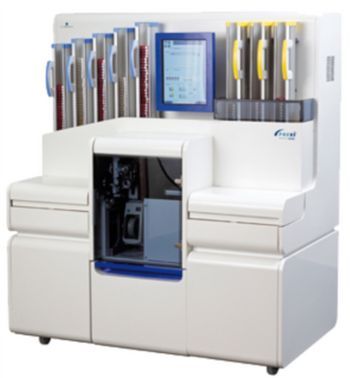
Biomerieux PREVI Isola
 Biomerieux · Model PREVI Isola
Clear, easy-to-read results Optimized colony isolation Eliminates risk of cross-contamination Decrease need for re-streaking Maximum agar surface inoculated Optimum, pressure-controlled contact with the agar while inoculating Standard quantity of inoculum used every time.
Key tips
- ·When no category-specific guidance fits, default to the manufacturer's own service manual and the general troubleshooting method in the Engineer's Guide.
- ·Run an incoming and annual electrical safety test regardless of how niche the device is.
PM Checklist
Preventive-maintenance tasks typical of this equipment class. Perform to the manufacturer's procedure and your facility's policy - this is general reference, not a schedule for this specific unit.
- ·Follow the manufacturer's PM schedule
- ·Perform incoming and annual electrical safety testing per facility biomedical program
Error Codes
Extracted directly from this unit's own service manual.
666Unknown error code.
• Shut down (power off) the instrument and then restart it. If the problem persists after restarting: • Contact bioMérieux Technical Assistance.
10000Consumables needed.
• Check relevant consumable types and refill as required. Remove processed plates from output cassettes or empty waste bin if required.
10001More pipette tips needed.
• Load tips and resume processing once complete.
10002More input plates needed.
• Load input plates at least to above the level of the sensor hole in the cassette.
10003More applicators needed.
• Load applicator cartridges. • Remove any failed plates and resume processing.
10004More labels needed.
• Check labels. • Replace the label roll if necessary, and resume processing.
10005Output cassettes full.
• Remove some or all of the completed plates in the output cassettes and continue.
10006Waste Bin is full.
• Empty the Waste Bin. • Touch the Waste button and resume processing once complete.
10007More pipette tips needed.
• Load tips and resume processing. If the tip trays were full of tips and the user had not accidentally indicated the wrong tip tray as full then contact bioMérieux Technical Assistance.
11000Failed to pause processing owing to instrument state.
• Restart the instrument software. If the problem persists, • Shut down and restart the instrument. If the problem persists after restarting, • Contact bioMérieux Technical Assistance.
11001Failed to resume processing owing to instrument state.
• Restart the instrument software. If the problem persists, • Shut down and restart the instrument. If the problem persists after restarting, • Contact bioMérieux Technical Assistance.
11002Unable to start workflow. There may be an incorrect version of configuration files installed.
• Shut down and restart the instrument. If the problem persists after restarting, • Contact bioMérieux Technical Assistance.
12000A sample has reported using more than one tip and will therefore be marked as failed. This may be due to an earlier processing error.
• Please report repeated occurrences to bioMérieux Technical Assistance.
12001A plate has reported using more than one label and will therefore be marked as failed. This may be due to an earlier processing error.
• Please report repeated occurrences to bioMérieux Technical Assistance.
12002A plate has reported using more than one applicator and will therefore be marked as failed. This may be due to an earlier processing error.
• Please report repeated occurrences to bioMérieux Technical Assistance.
12003Internal software error (number of input plates used). One or more plates will be marked as failed. This may be due to an earlier processing error.
• Please report repeated occurrences to bioMérieux Technical Assistance.
12004Internal software error (number of output cassette slots used). One or more plates will be marked as failed. This may be due to an earlier processing error.
• Please report repeated occurrences to bioMérieux Technical Assistance.
12100Lost communications with Data Server. The Data Server may have terminated or the connection may have failed.
• Check that the Workstation application is operating correctly. If so then the problem is likely to be the connection from the instrument to the Data Server. If not, • Restart the PC on which the Data Server is running.
12112The version of the Data Server does not match the version of the instrument.
• Please report this problem to bioMérieux Technical Assistance.
12125The Data Server is currently undergoing maintenance. The current run will be paused until the maintenance is complete.
• Wait until the maintenance is complete and then continue the processing run.
12150Plate Cassettes Configuration is out of date with the Data Server.
• Select a new Plate Cassettes Configuration and ensure all input and output cassettes contain the new types.
12500The instrument was not properly shut down. This could be due to abnormal software termination or power failure. Some robots may have fallen down and therefore could become tangled, leading to initialisation problems
• Inspect the flipper robots, pipettor, sample tray and consumable tray and clean if required.
13000Consumable lid opened during processing. The Consumable lid should not be opened while the instrument is processing.
• Please ensure that the consumable lid (left hand side) is closed properly, re-initialise the software and start processing the samples again.
13001Sample lid is open. The Sample lid should not be opened while the instrument is processing.
• Please ensure that the sample lid (right hand side) is closed properly, re-initialise the software and start processing the samples again.
13002Processing door or lid is open. The Processing door and lid should not be opened while the instrument is processing.
• Please ensure the door to the processing area (printers) is closed and the lid is sealed correctly. • Then re-initialise the software and start processing the samples again.
13003Input cassette removed during processing. The plate cassettes should not be removed while the instrument is processing.
• Please ensure that all input cassettes are seated correctly, re-initialise the software and start processing the samples again.
13004Output cassette removed during processing. The plate cassettes should not be removed while the instrument is processing.
• Please ensure that all output cassettes are seated correctly, re-initialise the software and start processing the samples again.
13005Input cassette removed. The instrument cannot continue until all input plate cassettes are firmly in place.
• Please ensure that all input cassettes are seated correctly to continue processing.
13006Output cassette removed. The instrument cannot continue until all output plate cassettes are firmly in place and the guard is raised.
• Please ensure that all output cassettes are seated correctly and that the guard is raised to continue processing.
13007Fault detected with the printer motor.
• Please ensure that the labels are fed through properly. • Re-initialise the software and start processing the samples again. If the problem persist
Typical Location
Where this class of equipment is typically deployed - general reference, not this unit's own placement record.
- Varies by device - check the unit's own manual for facility placement guidance
Documents & Manuals
Safety & Recalls
Synced live from the FDA openFDA API.
- RECALL
The recall has been initiated due to potential for overheating or a fire hazard associated with the Zebra LP2824 Plus printer PSU (power supply unit) located within the PREVI Isola instrument.
- RECALL
The firm has determined the product may fail to dispense the sample to the agar plate resulting in a "failure to dispense" in conjunction with urine specimens. This could lead to a "false" negative growth result.
- RECALL
The instrument may not dispense the specimen onto the pre-poured media resulting in a false negative result.
Troubleshoot this device with Bio
Describe a symptom or error code. Bio answers from this device's own documented error codes, failure modes, parts, and guides.
Ask Bio