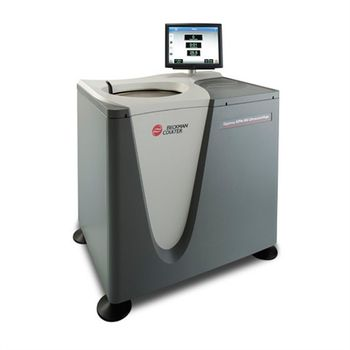
Beckman Coulter Optima XPN
 Beckman Coulter · Model Optima XPN
Large Touch-screen Display - Easy to read and navigate. Viewable from across the lab. Intuitive graphical interface with on-screen help. Multilingual software for error-free operation. Improved Power Tolerance - Maintains runs during power fluctuations. Handles a wider tolerated range of 180 VAC to 264 VAC. Tracks power interruption data to convey if parameters remained within an acceptable range. Security and tracking features - Manage rotor life by serial number. Track detailed usage history. Password protection and electronic signatures help you maintain chain of custody and compliance. Remote Monitoring and Control - Saves time. Start, stop, and monitor from computer or smart phone. Receive diagnostic alerts via e-mail. Energy Efficient - Regenerative braking returns energy to local circuit reducing utility costs. Highly efficient thermoelectric cooling results in lower power consumption. Uses the same amount of power as a 60-watt light bulb while idling. Quiet-drive Technology - Designed for lowest drive noise – this is the quietest floor model on the market. Operates at less than 51dBA. Total System Design - The Optima XPN, its rotors and its labware are designed, manufactured, and tested as an integrated system to ensure optimal performance and safety for your lab. Real-time Run Graphing. Plots speed and temperature over time, allowing you to track and record progress. Powerful On-board Simulation and Calculation Tools. Saves time and samples. Proprietary software optimizes protocols before running to ensure maximum efficiency. Quickly perform common calculations and conversions.
Key tips
- ·Run QC controls before trusting any repair - an analyzer that passes self-test can still report clinically wrong results.
- ·Rule out a reagent lot change before opening the instrument - it can look exactly like a hardware fault.
- ·Centrifuge rotors have a hard retirement age/cycle limit regardless of visible condition - don't eyeball it.
Typical Failure Modes
Compiled for this model from its own documentation and established engineering knowledge for this equipment class - not from a verified service record. Confirm against the manufacturer's service manual.
Will not start / error at start
HighSymptoms: Error code, run will not begin, or aborts shortly after start.
Root cause: Set speed exceeds the rotor maximum, an imbalanced load, the lid / door not locked, an unapproved rotor, or a drive / control fault.
Will not reach speed / excessive noise or vibration
MediumSymptoms: Slow spin-up, rumble, or vibration during a run.
Root cause: Load imbalance, worn drive / motor bearings, a worn drive coupling, or (older units) worn motor brushes.
Vacuum will not be achieved
HighSymptoms: Vacuum-fault alarm, long pump-down, run aborts.
Root cause: Vacuum-pump wear (low oil / worn vanes), a chamber / feed-through seal leak, or a valve fault.
Lid / door will not open or lock
MediumSymptoms: Lid-lock error, will not open after a run, or will not lock to start.
Root cause: Lid-lock solenoid / switch fault, or a run still winding down.
Rotor / bucket wear or corrosion
MediumSymptoms: Visible corrosion, cracks, or a bucket that will not swing; imbalance trips.
Root cause: Rotor / bucket ageing - a safety-critical wear item with a use-life limit.
Serviceable Parts & Consumables
Serviceable items for this model, compiled from its documentation and engineering knowledge for this equipment class. Service class and relative cost are estimates, not manufacturer figures; no part numbers are given. Confirm intervals and pricing against the manufacturer.
Drive / motor bearings & coupling
Class Major service partRel. cost $$$R&R Difficult
Lid-lock solenoid / switch
Class Major service partRel. cost $$R&R Moderate
Speed sensor / control board
Class Major service partRel. cost $$R&R Moderate
Vacuum pump oil & O-ring kit
Class Periodic replacementRel. cost $$R&R Moderate
Rotor / bucket set & O-rings
Log rotor runs; retire per the manufacturer's rotor-life programme.
Class Major service partRel. cost $$$R&R Easy
| Part | Service class | Relative cost | R&R difficulty |
|---|---|---|---|
| Drive / motor bearings & coupling | Major service part | $$$ | Difficult |
| Lid-lock solenoid / switch | Major service part | $$ | Moderate |
| Speed sensor / control board | Major service part | $$ | Moderate |
| Vacuum pump oil & O-ring kit | Periodic replacement | $$ | Moderate |
| Rotor / bucket set & O-rings Log rotor runs; retire per the manufacturer's rotor-life programme. | Major service part | $$$ | Easy |
Relative cost: $ lowest · $$$$ highest service-part cost for this equipment class. Not a price.
PM Checklist
Preventive-maintenance tasks typical of this equipment class. Perform to the manufacturer's procedure and your facility's policy - this is general reference, not a schedule for this specific unit.
- ·Daily QC controls run and reviewed
- ·Calibration verification per assay
- ·Routine cleaning and decontamination
- ·Scheduled reagent-path and pump-tubing maintenance
Troubleshooting Approach
A starting sequence for this model, compiled from its documentation and engineering knowledge for this equipment class. Follow the manufacturer's service documentation for the actual procedure.
Symptom: Will not start or errors at start
- Confirm the set speed does not exceed the fitted rotor's maximum and the rotor is approved and seated.
- Rebalance the load - opposing positions evenly loaded and paired.
- Confirm the lid / door latches and the lock engages.
- Look the fault code up in the manual and follow the remedy.
- Functional-check speed and timer after any repair.
Symptom: Noisy / vibrates / will not reach speed
- Rebalance and re-run empty to confirm.
- Spin the rotor by hand and feel for bearing roughness.
- Inspect the drive coupling and (older units) the motor brushes.
- Replace the worn component.
- Verify speed with a tachometer and confirm smooth running.
Technical Specs
- Height
- 49.5 in
- Length
- 26.8 in
- Orientation
- Floor Standing
- Weight
- 1068 lbs
- Centrifuge Type
- Ultraspeed
- Maximum Speed
- 90000 rpm
- Width
- 37 in
Typical Location
Where this class of equipment is typically deployed - general reference, not this unit's own placement record.
- Central / core laboratory
- Point-of-care testing stations
- Blood bank
- Microbiology lab
Documents & Manuals
Related calculators
From BioLab, for work done with this kind of equipment.
Troubleshoot this device with Bio
Describe a symptom or error code. Bio answers from this device's own documented error codes, failure modes, parts, and guides.
Ask Bio