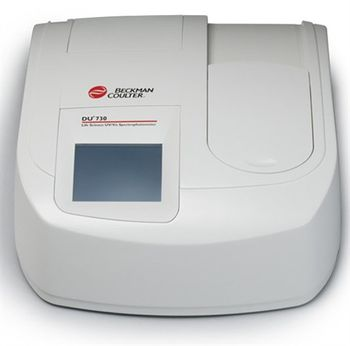
Beckman Coulter DU-730
 Beckman Coulter · Model DU-730
CSV File Format for Data Transfer USB Ports Spectral Bandwidth of 3.0 nm Touch-Screen User Interface Operator and Sample ID's Wavelength Range from 190 to 1100 nm Focused Beam Design Quick Interchange of Cell Holders & Modules Password Protection with Security List Automatic Lamp Turn-Off.
Typical Failure Modes
Compiled for this model from its own documentation and established engineering knowledge for this equipment class - not from a verified service record. Confirm against the manufacturer's service manual.
Power-up lamp error (LAMP OUT / LAMP ALIGNMENT / LAMPS OVERHEATED)
HighSymptoms: "LAMP OUT" or "LAMP ALIGNMENT" (replace the visible lamp); "LAMPS OVERHEATED" (clear the vents).
Root cause: Visible (tungsten-halogen) or UV (deuterium) lamp at end of life, or blocked cooling airflow near the source compartment.
BEAM BLOCKED / LID OPEN / MODULE REQUIRED
MediumSymptoms: Instrument will not start a read.
Root cause: Object in the sampling module beam, sampling-module lid open, or the module not inserted / locked.
Baseline / photometric drift
MediumSymptoms: High or noisy blank, poor reproducibility.
Root cause: Contaminated cell holder or optics, or a cell inserted in the wrong orientation.
Touchscreen / USB data fault
LowSymptoms: Unresponsive touchscreen, CSV export or USB not working.
Root cause: Display or USB-port fault.
Serviceable Parts & Consumables
Serviceable items for this model, compiled from its documentation and engineering knowledge for this equipment class. Service class and relative cost are estimates, not manufacturer figures; no part numbers are given. Confirm intervals and pricing against the manufacturer.
Visible (tungsten-halogen) lamp
Class Periodic replacementRel. cost $$R&R Moderate
Deuterium (UV) lamp
Class Frequent wear itemRel. cost $$$R&R Moderate
Sampling module
Class Major service partRel. cost $$$R&R Fairly easy
Touchscreen assembly
Class Major service partRel. cost $$$R&R Moderate
Cuvettes
Class Periodic replacementRel. cost $R&R Easy
| Part | Service class | Relative cost | R&R difficulty |
|---|---|---|---|
| Visible (tungsten-halogen) lamp | Periodic replacement | $$ | Moderate |
| Deuterium (UV) lamp | Frequent wear item | $$$ | Moderate |
| Sampling module | Major service part | $$$ | Fairly easy |
| Touchscreen assembly | Major service part | $$$ | Moderate |
| Cuvettes | Periodic replacement | $ | Easy |
Relative cost: $ lowest · $$$$ highest service-part cost for this equipment class. Not a price.
Error Codes
Extracted directly from this unit's own service manual.
BEAM BLOCKED?Remove whatever is blocking the beam in the sampling module and press the [START] soft key.
Remove whatever is blocking the beam in the sampling module and press the [START] soft key.
LAMP ALIGNMENTReplace the visible lamp (see CHAPTER 15, Changing Lamps).
Replace the visible lamp (see CHAPTER 15, Changing Lamps).
LAMP OUTReplace the visible lamp (see CHAPTER 15, Changing Lamps).
Replace the visible lamp (see CHAPTER 15, Changing Lamps).
LAMPS OVERHEATEDNot enough air is allowed to flow near the source compartment. Remove papers or other debris that are near the air vents on the back and underside of the instrument. Press the [START] soft key.
Not enough air is allowed to flow near the source compartment. Remove papers or other debris that are near the air vents on the back and underside of the instrument. Press the [START] soft key.
LID OPEN?Close sampling module lid and press the [START] soft key.
Close sampling module lid and press the [START] soft key.
MODULE REQUIREDInsert sampling module and secure with module lock.
Insert sampling module and secure with module lock.
OFFSET CORRECTIONClose sampling module lid and press the
Close sampling module lid and press the
Troubleshooting Approach
A starting sequence for this model, compiled from its documentation and engineering knowledge for this equipment class. Follow the manufacturer's service documentation for the actual procedure.
Symptom: Lamp error at power-up
- For LAMP OUT / LAMP ALIGNMENT, replace the visible lamp per the manual's Changing Lamps chapter.
- For LAMPS OVERHEATED, remove papers/debris from the rear and underside air vents and press START.
- Let the source compartment cool before restarting.
- Re-run the Self Check and confirm all lamp tests pass.
- Verify a stable baseline.
Symptom: Will not start a read
- Remove anything blocking the beam in the sampling module and press START.
- Close the sampling-module lid.
- Insert the sampling module and secure it with the module lock.
- If an error persists with no message, power the instrument off and on.
- Confirm the cell is inserted with light through the optical windows.
Technical Specs
- Height
- 200 mm
- Length
- 200 mm
- Weight
- 15.5 kg
- Width
- 500 mm
Documents & Manuals
Related calculators
From BioLab, for work done with this kind of equipment.
Troubleshoot this device with Bio
Describe a symptom or error code. Bio answers from this device's own documented error codes, failure modes, parts, and guides.
Ask Bio