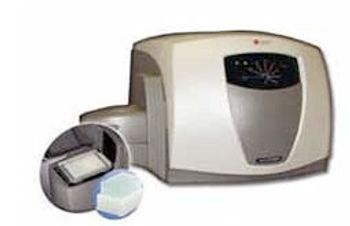
Beckman Coulter Cytomics FC 500 MPL
 Beckman Coulter · Model Cytomics FC 500 MPL
FC 500 Series. More Flexibility for Your Cytometry Research, the FC 500 Series is a sophisticated product family equipped with the most advanced technologies available. More Flexibility for Your Cytometry Applications. The Cytomics FC 500 Series is a sophisticated product family equipped with the most advanced technologies available. The FC 500 Series delivers flexible testing, powerful software and a user-friendly interface - features that help scientists optimize their overall workflow efficiency while maintaining true cost effectiveness. Plus, each FC 500 Series system is backed by Beckman Coulter's unsurpassed reputation for quality and service. Precise, Flexible Analysis Every Time. Designed for powerful performance and unmatched simplicity Conducts 5-color analysis from either single or dual laser excitation Improves efficiency by enabling scientists to analyze more antibodies per tube than ever before on an automated system Gives investigators the power to expertly manage every aspect of their flow cytometry studies with the revolutionary CXP software Increased Flexibility with Two Lasers and Multiple Fluorochromes. Equipped with a collinear second laser that maintains a stable alignment with a single beam path and allows greater versatility in antibody and fluorochrome choices. Provides versatility to use either PC5 or APC as the fluorochrome for FL4 in multicolor immunophenotyping applications. Eliminates the need for time delay calculations and the challenges associated with spacially-separated beams. Wavelength independent detectors facilitate application development Simplified Multicolor Analysis with Advanced Digital Compensation (ADC. Beckman Coulter's ADC technology provides superior correction of spectral overlap and more accurate results. With ADC technology, biological samples can be used for automated color compensation, without the limitations of latex beads. Only Beckman Coulter flow cytometers offer patented Digital Signal Processing (DSP) for excellent linearity, drift-free amplification and color compensation. The FC 500 with ADC also enables investigators to: Perform digital signal processing with 20-bit data in real-time. Obtain fast, intuitive compensation feedback to set or fine-tune compensation manually with the QuickCOMP feature. Increase the visualization of low intensity fluorescence populations To accommodate numerous configurations, the FC 500's user changeable filters provide fluorochrome selection flexibility. Customized Photomultiplier Tubes (PMTs) detect a broad range of wavelength emissions, which can be used for virtually any dye excited by 488 or 635 nm lasers. Five-Color Analysis From A Single Laser Has Never Been Easier. Only the FC 500 can be used with a variety of fluorochromes to analyze five colors (FITC, PE, ECD, PC5 or APC and PC7) using either one or two lasers. Investigators could also use Beckman Coulter's IOTest multicolor reagents and drop in their choice of additional conjugated antibodies to make their own combinations. Performs five-dimensional automated phenotyping analysis with Prism, a unique data reduction display allowing analysis of up to 32 individual phenotypes in a single plot. Extends multicolor analysis to utilize the full visible emission spectra, which further boosts the level of flexibility that can be achieved.
Key tips
- ·Run QC controls before trusting any repair - an analyzer that passes self-test can still report clinically wrong results.
- ·Rule out a reagent lot change before opening the instrument - it can look exactly like a hardware fault.
- ·Centrifuge rotors have a hard retirement age/cycle limit regardless of visible condition - don't eyeball it.
Typical Failure Modes
Compiled for this model from its own documentation and established engineering knowledge for this equipment class - not from a verified service record. Confirm against the manufacturer's service manual.
Poor optical alignment / low signal / high CV
HighSymptoms: Bead CVs out of spec, scatter or fluorescence signal low or noisy, compensation drift.
Root cause: Flow-cell contamination or an air bubble, laser degradation / misalignment, or an optics / PMT fault.
Fluidics / sheath-pressure fault
MediumSymptoms: Unstable event rate, boost / prime failures, sheath or waste alarm, clogs.
Root cause: Sheath / waste tank issue, a peristaltic / vacuum fault, or a partially blocked sample line / flow cell.
Sample probe / SIP clog or crash
MediumSymptoms: No or low event rate, probe-position error, carryover.
Root cause: Clogged or bent sample probe, or a clot.
Laser fault
MediumSymptoms: A laser-line-specific parameter fails, laser-error message.
Root cause: Laser at end of life or a power-supply / interlock fault.
Workstation / software fault
LowSymptoms: Acquisition hangs, data will not export, instrument not recognised.
Root cause: Workstation PC or the acquisition software / link.
Serviceable Parts & Consumables
Serviceable items for this model, compiled from its documentation and engineering knowledge for this equipment class. Service class and relative cost are estimates, not manufacturer figures; no part numbers are given. Confirm intervals and pricing against the manufacturer.
Flow cell
Class Periodic replacementRel. cost $$$R&R Difficult
Sample probe / SIP
Class Periodic replacementRel. cost $$R&R Moderate
Peristaltic pump tubing
Class Frequent wear itemRel. cost $R&R Moderate
Sheath / waste filters
Class Frequent wear itemRel. cost $R&R Easy
Laser
Class Periodic replacementRel. cost $$$$R&R Difficult
| Part | Service class | Relative cost | R&R difficulty |
|---|---|---|---|
| Flow cell | Periodic replacement | $$$ | Difficult |
| Sample probe / SIP | Periodic replacement | $$ | Moderate |
| Peristaltic pump tubing | Frequent wear item | $ | Moderate |
| Sheath / waste filters | Frequent wear item | $ | Easy |
| Laser | Periodic replacement | $$$$ | Difficult |
Relative cost: $ lowest · $$$$ highest service-part cost for this equipment class. Not a price.
PM Checklist
Preventive-maintenance tasks typical of this equipment class. Perform to the manufacturer's procedure and your facility's policy - this is general reference, not a schedule for this specific unit.
- ·Daily QC controls run and reviewed
- ·Calibration verification per assay
- ·Routine cleaning and decontamination
- ·Scheduled reagent-path and pump-tubing maintenance
Troubleshooting Approach
A starting sequence for this model, compiled from its documentation and engineering knowledge for this equipment class. Follow the manufacturer's service documentation for the actual procedure.
Symptom: Poor alignment / low signal / high CV
- Run the daily startup / cleaning and a flow-check bead panel.
- Prime / de-bubble the flow cell and de-gas the sheath.
- Run an unclog / long-clean cycle.
- Verify each laser-line parameter against the beads.
- Escalate a confirmed laser or optics fault to the OEM.
Symptom: Fluidics or probe fault
- Check the sheath and waste tanks and connections.
- Inspect the sample probe for a bend or clog and clear it.
- Replace worn peristaltic pump tubing and the sheath filter.
- Run a boost / prime.
- Confirm a stable event rate on a control.
Typical Location
Where this class of equipment is typically deployed - general reference, not this unit's own placement record.
- Central / core laboratory
- Point-of-care testing stations
- Blood bank
- Microbiology lab
Documents & Manuals
Safety & Recalls
Synced live from the FDA openFDA API.
- RECALL
A manufacturing defect on the amplifier board of the Flow Cytometers my cause signal loss and/or signal drifting resulting in absence of data or a population shift in the data plots. This can impact patient results for any application.
- RECALL
Software error: This field action was initiated after Beckman Coulter determined that the CXP software does not refresh the dataset automatically under certain circumstances. The User documentation does not clearly state that the user should refresh the dataset after changes are made.
- RECALL
Labeling provided by two integrated software systems are not clear enough to avoid potential demographic and sample type mismatches under certain conditions.
- RECALL
Software error: The recall was initiated after Beckman Coulter identified that the CXP User documentation does not adequately characterize the use of the Live Gate feature. The primary use of a Live Gate is for the international removal of unwanted events, such as debris. The data outside of the Live Gate will not be stored to the final listmode file, this reducing the data set size. The softwa
- RECALL
Data generation error: If the cytosettings is not refreshed or restarted during data importation, the output will include old and new data.
- RECALL
Incorrect Display: In certain modes, the protocol will not initially display the correct data in some plots. In addition, when running EWL files, any edited SampleID1 is not automatically updated in all tubes in the panel.
- RECALL
The ratio parameter assignments (numerator and denominator) of a protocol may inadvertently change after the Parameter Selection Dialog box is accessed. Issue limited only to protocols utilizing the Ratio parameter such as LeukoSure and DNA Cell Cycle.
- RECALL
Two workflow scenarios associated with renaming regions may produce incorrect results.
- RECALL
Mis-identification-If a panel or protocol is added to an existing worklist but the tube location is not specified, the CXP Acquisition software will run the last specified tube through the remaining protocols and will generate results and printouts of these runs leading to a Mis-Identification condition.
- RECALL
Beckman Coulter has determined that under certain conditions a system error generated during a Pause and Rotate routine may result in a sample misidentification with a risk of reporting erroneous results.
- RECALL
Under certain conditions an incorrect Tube ID (Barcode) can be displayed and printed on the Runtime Panel Report in CXP Cytometer Software Version 2.0
- RECALL
Software anomally. If the laser is shutdown or fluctuates outside of the specification limits, the software continues to run and will not indicate a laser failure, and could therefore cause erroneous results.
- RECALL
Incorrect sample identification can be displayed and printed on the Runtime Panel Report due to a software defect.
- RECALL
Software anomaly.
- RECALL
Software anomaly. Sample ID and the Run Date may become fixed within a header on the FlowPAGE printout. All samples subsequently run, with results printed using the FlowPAGE print format, will have the fixed Sample ID and Run Date, rather than the correct Sample ID and Run Date.
Related calculators
From BioLab, for work done with this kind of equipment.
Troubleshoot this device with Bio
Describe a symptom or error code. Bio answers from this device's own documented error codes, failure modes, parts, and guides.
Ask Bio