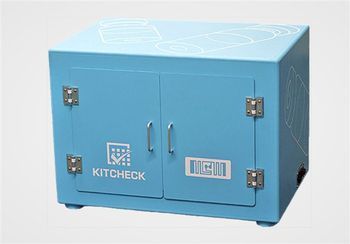
BD Kit Check
 BD · Model Kit Check
Kit processing - Scanning pharmacy kits in seconds reveals what medications were consumed or are nearing expiration and need restocking. Shortage management - Streamlined medication shortage management allows alternate designations to reduce task time and errors. Recall management - More efficient recall management with kit medication searches by NDC and lot number helps quickly identify impacted kits. Enhanced reporting - Comprehensive reports include kit medications, expiration dates, recalls, inventory status, kit usage and user task execution. Eliminated manual paperwork - Kit Check automatically prints charge sheets when restocking is complete, eliminating manual inventory checklists. Expiring-inventory management - Reports enable pharmacies to reduce waste by reallocating kit medications nearing expiration for immediate patient use.
Key tips
- ·When no category-specific guidance fits, default to the manufacturer's own service manual and the general troubleshooting method in the Engineer's Guide.
- ·Run an incoming and annual electrical safety test regardless of how niche the device is.
Typical Failure Modes
Compiled for this model from its own documentation and established engineering knowledge for this equipment class - not from a verified service record. Confirm against the manufacturer's service manual.
Drawer / carousel / storage location will not open or jams
HighSymptoms: Commanded location does not release, carousel does not rotate to position, or a bin jams.
Root cause: Drive motor or solenoid, a jammed mechanism, or a position-sensor fault.
Touchscreen unresponsive or miscalibrated
MediumSymptoms: No response or offset touches.
Root cause: Touchscreen controller or calibration fault.
Network / server communication loss
HighSymptoms: Station offline, cannot log in, inventory not syncing.
Root cause: Network path, the station NIC, or the Pyxis / pharmacy server.
Barcode scanner / RFID reader fault
MediumSymptoms: Items will not scan or the RFID kit check misreads.
Root cause: Scanner window / cable or the RFID antenna / reader.
UPS battery fault
MediumSymptoms: Station does not ride through a brief outage.
Root cause: Aged internal UPS battery.
Serviceable Parts & Consumables
Serviceable items for this model, compiled from its documentation and engineering knowledge for this equipment class. Service class and relative cost are estimates, not manufacturer figures; no part numbers are given. Confirm intervals and pricing against the manufacturer.
Drive motor / solenoid
Class Major service partRel. cost $$R&R Moderate
Touchscreen assembly
Class Major service partRel. cost $$$R&R Moderate
Barcode scanner / RFID reader
Class Major service partRel. cost $$R&R Fairly easy
Position sensor
Class Periodic replacementRel. cost $R&R Moderate
UPS battery
Class Periodic replacementRel. cost $$R&R Fairly easy
| Part | Service class | Relative cost | R&R difficulty |
|---|---|---|---|
| Drive motor / solenoid | Major service part | $$ | Moderate |
| Touchscreen assembly | Major service part | $$$ | Moderate |
| Barcode scanner / RFID reader | Major service part | $$ | Fairly easy |
| Position sensor | Periodic replacement | $ | Moderate |
| UPS battery | Periodic replacement | $$ | Fairly easy |
Relative cost: $ lowest · $$$$ highest service-part cost for this equipment class. Not a price.
PM Checklist
Preventive-maintenance tasks typical of this equipment class. Perform to the manufacturer's procedure and your facility's policy - this is general reference, not a schedule for this specific unit.
- ·Follow the manufacturer's PM schedule
- ·Perform incoming and annual electrical safety testing per facility biomedical program
Troubleshooting Approach
A starting sequence for this model, compiled from its documentation and engineering knowledge for this equipment class. Follow the manufacturer's service documentation for the actual procedure.
Symptom: A location will not open / carousel will not index
- Note whether one location or all are affected.
- Check for a physical jam and clear it.
- Listen for the motor / solenoid on the command.
- Check the position sensor is clean and seated.
- Replace the motor / solenoid or sensor for that location.
Symptom: Station offline
- Check the network cable and switch port.
- Confirm other devices on that drop have connectivity.
- Verify the Pyxis / pharmacy server is up.
- Reboot the station if the network is confirmed good.
- Escalate to pharmacy IT / BD if it will not rejoin.
Typical Location
Where this class of equipment is typically deployed - general reference, not this unit's own placement record.
- Varies by device - check the unit's own manual for facility placement guidance
Documents & Manuals
No documents available for this device yet.
Troubleshoot this device with Bio
Describe a symptom or error code. Bio answers from this device's own documented error codes, failure modes, parts, and guides.
Ask Bio