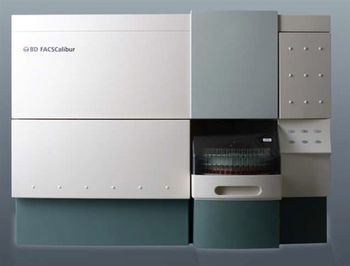
BD FACSCalibur
 BD · Model FACSCalibur
The BD FACSCalibur was the first system to provide standard multicolor analysis capabilities by incorporating an alignment free optical design, interbeam compensation, and dual-laser technology. Dual laser design for multicolor analysis. A dual-laser design provides the flexibility and sensitivity needed for multicolor analysis on the BD FACSCalibur system. Two lasers, an air-cooled argon laser and a red diode laser, are spatially separated for high sensitivity, minimal need for compensation, and flexibility in fluorochrome selection. BD High Throughput Sampler (HTS) option The BD™ High Throughput Sampler (HTS) option provides flexible, easy-to-use automation. For those who prefer to work with multiwell plates, BD Biosciences offers the first walkaway sample introduction device for 96- and 384-well plates. The HTS option allows users to rapidly acquire samples with the BD FACSCalibur™ flow cytometer in a microtiter plate. As a modular option for new or existing BD FACSCalibur flow cytometers, the HTS option is designed to speed through a variety of microtiter plates in less than 15 minutes* and support a wide range of applications including the BD™ Cytometric Bead Array (CBA) assay. The HTS option supports 96 U-, V-, and flat-bottom plates as well as 384-well microtiter plates. BD™ Plate Manager software allows you to create customized protocols with user-defined mixing, wash, and analysis parameters that can be reused. BD FACS Loader Option The BD FACS™ Loader option available for the BD FACSCalibur system provides walkaway automation for routine applications. Featuring a removable 40-tube carousel, on-board mixing, and BD™ Worklist Manager software, the BD FACS Loader option offers superior flexibility to efficiently address the workflow demands of the busy laboratory. Unique easy-to-use sorting technology (optional) The BD FACSCalibur cell sorting option allows users to identify and isolate a population of interest. Sorting on the BD FACSCalibur occurs in a completely enclosed, aerosol-free environment for enhanced safety which is especially important when processing biohazardous samples. The sorting process is designed to be straightforward. After the population of interest is gated, simply click Acquire to begin the sort. After the sample is acquired and cells pass through the laser, a unique catcher tube mechanism moves in and out of the sample core stream at a rate of roughly 300 times per second to capture designated cells and direct them to a collection tube or to an optional cell concentrator module for further processing. The BD FACSCalibur™ system is appreciated for its user-friendly design, high sample throughput, improved workflow management through automation, and simple yet sophisticated software applications that enhance routine analyses. While performing any of a wide range of supported applications, the BD FACSCalibur system provides the tools to obtain results quickly, easily, and accurately. The ease of use of the BD FACSCalibur system is enhanced by the BD FACStation™ data management system, which has become one of the most popular, user-friendly data management systems in flow cytometry. The BD FACStation system automates many software functions and delivers high-performance acquisition and analysis tools for creating plots, gating, statistical analysis, and reporting. The BD FACStation workstation takes advantage of the intuitive Mac® environment by using simple pull-down menus and icons. It performs all the computing tasks required for fast, accurate results, including instrument setup, data collection, analysis, and management. A comprehensive quality assurance system BD Biosciences offers a complete family of products designed to ensure the highest quality clinical results from the BD FACSCalibur system. BD FACSComp™ software, in conjunction with BD Calibrite™ beads, provides a comprehensive system to set up the instrument, assess sensitivity, and set compensation for immunofluorescence applications. For clinical applications, BD Biosciences offers a wide variety of cellular controls to verify performance for immunophenotyping, reticulocyte analysis, stem cell enumeration, and rWBC applications.
Key tips
- ·Run QC controls before trusting any repair - an analyzer that passes self-test can still report clinically wrong results.
- ·Rule out a reagent lot change before opening the instrument - it can look exactly like a hardware fault.
- ·Centrifuge rotors have a hard retirement age/cycle limit regardless of visible condition - don't eyeball it.
Typical Failure Modes
Compiled for this model from its own documentation and established engineering knowledge for this equipment class - not from a verified service record. Confirm against the manufacturer's service manual.
Poor optical alignment / low signal / high CV
HighSymptoms: Bead CVs out of spec, scatter or fluorescence signal low or noisy, compensation drift.
Root cause: Flow-cell contamination or an air bubble, laser degradation / misalignment, or an optics / PMT fault.
Fluidics / sheath-pressure fault
MediumSymptoms: Unstable event rate, boost / prime failures, sheath or waste alarm, clogs.
Root cause: Sheath / waste tank issue, a peristaltic / vacuum fault, or a partially blocked sample line / flow cell.
Sample probe / SIP clog or crash
MediumSymptoms: No or low event rate, probe-position error, carryover.
Root cause: Clogged or bent sample probe, or a clot.
Laser fault
MediumSymptoms: A laser-line-specific parameter fails, laser-error message.
Root cause: Laser at end of life or a power-supply / interlock fault.
Workstation / software fault
LowSymptoms: Acquisition hangs, data will not export, instrument not recognised.
Root cause: Workstation PC or the acquisition software / link.
Serviceable Parts & Consumables
Serviceable items for this model, compiled from its documentation and engineering knowledge for this equipment class. Service class and relative cost are estimates, not manufacturer figures; no part numbers are given. Confirm intervals and pricing against the manufacturer.
Flow cell
Class Periodic replacementRel. cost $$$R&R Difficult
Sample probe / SIP
Class Periodic replacementRel. cost $$R&R Moderate
Peristaltic pump tubing
Class Frequent wear itemRel. cost $R&R Moderate
Sheath / waste filters
Class Frequent wear itemRel. cost $R&R Easy
Laser
Class Periodic replacementRel. cost $$$$R&R Difficult
| Part | Service class | Relative cost | R&R difficulty |
|---|---|---|---|
| Flow cell | Periodic replacement | $$$ | Difficult |
| Sample probe / SIP | Periodic replacement | $$ | Moderate |
| Peristaltic pump tubing | Frequent wear item | $ | Moderate |
| Sheath / waste filters | Frequent wear item | $ | Easy |
| Laser | Periodic replacement | $$$$ | Difficult |
Relative cost: $ lowest · $$$$ highest service-part cost for this equipment class. Not a price.
PM Checklist
Preventive-maintenance tasks typical of this equipment class. Perform to the manufacturer's procedure and your facility's policy - this is general reference, not a schedule for this specific unit.
- ·Daily QC controls run and reviewed
- ·Calibration verification per assay
- ·Routine cleaning and decontamination
- ·Scheduled reagent-path and pump-tubing maintenance
Troubleshooting Approach
A starting sequence for this model, compiled from its documentation and engineering knowledge for this equipment class. Follow the manufacturer's service documentation for the actual procedure.
Symptom: Poor alignment / low signal / high CV
- Run the daily startup / cleaning and a flow-check bead panel.
- Prime / de-bubble the flow cell and de-gas the sheath.
- Run an unclog / long-clean cycle.
- Verify each laser-line parameter against the beads.
- Escalate a confirmed laser or optics fault to the OEM.
Symptom: Fluidics or probe fault
- Check the sheath and waste tanks and connections.
- Inspect the sample probe for a bend or clog and clear it.
- Replace worn peristaltic pump tubing and the sheath filter.
- Run a boost / prime.
- Confirm a stable event rate on a control.
Typical Location
Where this class of equipment is typically deployed - general reference, not this unit's own placement record.
- Central / core laboratory
- Point-of-care testing stations
- Blood bank
- Microbiology lab
Documents & Manuals
Related calculators
From BioLab, for work done with this kind of equipment.
Troubleshoot this device with Bio
Describe a symptom or error code. Bio answers from this device's own documented error codes, failure modes, parts, and guides.
Ask Bio