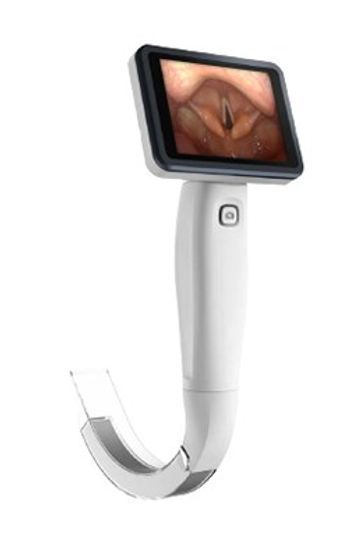
Axia Surgical HDView
 Axia Surgical · Model HDView
Lightweight - unit is less than 350g Vacuum Packed Disposable Blades Quick installation and removal of blades Quick Shot Camera Button for recording Screen is reinforced with anti-shatter protection Lightweight long-lasting rechargeable Li-ion battery.
Typical Failure Modes
Compiled for this model from its own documentation and established engineering knowledge for this equipment class - not from a verified service record. Confirm against the manufacturer's service manual.
No or poor image on the screen
HighSymptoms: Black screen, snow, distorted or dim image during intubation.
Root cause: Failed camera module or its cable, a disposable blade not seated, or condensation/contamination on the optics.
Battery will not hold charge
HighSymptoms: Short run time, unit powers off mid-use, will not power on.
Root cause: Aged Li-ion battery past its cycle life.
Blade will not seat / recognise
MediumSymptoms: Blade clicks in but image or power does not come up, loose fit.
Root cause: Worn blade-mount contacts or latch on the handle.
Screen damage
LowSymptoms: Cracked or delaminating display, dead pixels, touch/record button unresponsive.
Root cause: Drop or impact despite anti-shatter protection; worn Quick Shot button.
Serviceable Parts & Consumables
Serviceable items for this model, compiled from its documentation and engineering knowledge for this equipment class. Service class and relative cost are estimates, not manufacturer figures; no part numbers are given. Confirm intervals and pricing against the manufacturer.
Rechargeable Li-ion battery
Class Periodic replacementRel. cost $$R&R Fairly easy
Camera / optics module
Class Periodic replacementRel. cost $$$R&R Difficult
Blade-mount contact / latch assembly
Class Periodic replacementRel. cost $$R&R Moderate
Display assembly
Class Periodic replacementRel. cost $$$R&R Difficult
Disposable vacuum-packed blade
Single-patient consumable.
Class ConsumableRel. cost $R&R Easy
| Part | Service class | Relative cost | R&R difficulty |
|---|---|---|---|
| Rechargeable Li-ion battery | Periodic replacement | $$ | Fairly easy |
| Camera / optics module | Periodic replacement | $$$ | Difficult |
| Blade-mount contact / latch assembly | Periodic replacement | $$ | Moderate |
| Display assembly | Periodic replacement | $$$ | Difficult |
| Disposable vacuum-packed blade Single-patient consumable. | Consumable | $ | Easy |
Relative cost: $ lowest · $$$$ highest service-part cost for this equipment class. Not a price.
Troubleshooting Approach
A starting sequence for this model, compiled from its documentation and engineering knowledge for this equipment class. Follow the manufacturer's service documentation for the actual procedure.
Symptom: No usable image
- Fit a fresh disposable blade and confirm it clicks fully home.
- Inspect the distal optics for fog, fluid or debris; clean per the manufacturer.
- Check the image with the blade removed to isolate blade vs handle camera.
- Confirm the battery is charged.
- If the handle camera output is bad with a good blade, replace the camera module.
Symptom: Runs only briefly on battery
- Fully charge and note the run time from a full charge.
- Compare to the rated run time; a large shortfall means the battery is spent.
- Inspect the charge contacts on the handle and dock.
- Replace the Li-ion battery.
- Verify a full-charge run time meets spec before returning it to the airway cart.