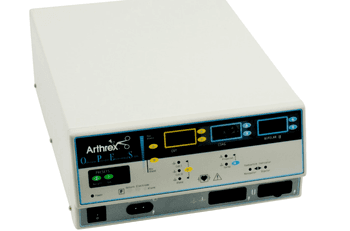
Arthrex AR-9600
 Arthrex · Model AR-9600
Two Cut Modes, Cut I & Cut II Two cut modes give the surgeon flexibility to cut all types of tissue without losing performance. Cut I generates constant output power over a wide range of impedances. Blend with 10 Settings The Blend mode is a combination of Cutting and Hemostasis. The Arthrex O.P.E.S. Electrosurgical Generator gives the surgeon freedom to adjust the desired level of blend. A setting of 1 is minimal hemostasis with maximum cutting effect. A setting of 10 is maximum hemostasis with minimal cutting effect. This adjustment is easily achieved by an incremental adjustment. Presets The surgeon can store 10 user-defined presets for easy recall of frequently used settings. A selection of 10 factory set presets can be reset to your preferred settings. Two levels of coagulation: Pinpoint and Spray Pinpoint provides precise control of bleeding in localized areas. Spray provides greater control of bleeding in highly vascular tissue over broad surface areas. Return electrode sensing and contact quality monitoring The Arthrex O.P.E.S. Electrosurgical Generator incorporates a return electrode contact quality monitoring system (Bovie NEM™). This system detects the type of return electrode: solid or split. The system also continually monitors the contact quality between the patient and the split return electrode. This feature is designed to minimize patient burns at the return electrode site. FDFS™ (Fast Digital Feedback System) The FDFS™ (Fast Digital Feedback System) measures voltage and current at 5,000 times a second and immediately adjusts the power to varying impedance during the electrosurgical procedure. The unit’s digital technology senses and responds to changes in tissue and density. Unlike analog, this feature reduces the need to adjust power settings manually.
Key tips
- ·Never defeat or bypass a return-electrode monitoring (REM) alarm to finish a case - it's a direct burn risk.
- ·Verify OR table battery backup - a table that loses power mid-procedure is a real, documented incident type.
- ·Track surgical light lamp-hours rather than waiting for failure - a sudden failure mid-case is avoidable.
Typical Failure Modes
Compiled for this model from its own documentation and established engineering knowledge for this equipment class - not from a verified service record. Confirm against the manufacturer's service manual.
No or low RF output / high-impedance cut-out
HighSymptoms: No cut / coag effect, "high impedance" or output-error message, output shuts down.
Root cause: Poor electrode contact or a dry field, a damaged handpiece / cable, a return-electrode (REM/NESSY) fault, or an output-stage fault.
Return-electrode (patient-plate) contact-quality alarm
MediumSymptoms: REM / NESSY / plate alarm, monopolar output inhibited.
Root cause: Poorly applied or dried split dispersive pad, a pad-cable fault, or the contact-quality-monitor circuit.
Bipolar / vessel-sealing output fault
MediumSymptoms: Bipolar or sealing output weak, seal cycle will not complete, instrument not recognised.
Root cause: Bipolar cable / instrument fault or the sealing output stage.
Fails calibration / output drifts after a repair
MediumSymptoms: Output power or the REM circuit outside tolerance on the analyser.
Root cause: Output board or REM circuit needs recalibration - anti-static handling required.
Footswitch / handswitch fault
MediumSymptoms: Output will not activate from the pedal or the handpiece.
Root cause: Footswitch or handswitch / cable fault.
Touchscreen / display / boot fault
LowSymptoms: Unresponsive touchscreen, will not power on or boot, fan / thermal alarm.
Root cause: Display, power supply, control board, or a cooling-fan fault.
Serviceable Parts & Consumables
Serviceable items for this model, compiled from its documentation and engineering knowledge for this equipment class. Service class and relative cost are estimates, not manufacturer figures; no part numbers are given. Confirm intervals and pricing against the manufacturer.
Reusable instrument / handpiece cables
Class Periodic replacementRel. cost $$R&R Easy
Split dispersive (return) pads
Class ConsumableRel. cost $R&R Easy
Footswitch
Class Periodic replacementRel. cost $$R&R Fairly easy
Bipolar / sealing cable
Class Periodic replacementRel. cost $$R&R Easy
RF output board
Recalibration required after replacement; anti-static handling.
Class Major service partRel. cost $$$$R&R Difficult
Cooling fan
Class Major service partRel. cost $R&R Moderate
| Part | Service class | Relative cost | R&R difficulty |
|---|---|---|---|
| Reusable instrument / handpiece cables | Periodic replacement | $$ | Easy |
| Split dispersive (return) pads | Consumable | $ | Easy |
| Footswitch | Periodic replacement | $$ | Fairly easy |
| Bipolar / sealing cable | Periodic replacement | $$ | Easy |
| RF output board Recalibration required after replacement; anti-static handling. | Major service part | $$$$ | Difficult |
| Cooling fan | Major service part | $ | Moderate |
Relative cost: $ lowest · $$$$ highest service-part cost for this equipment class. Not a price.
PM Checklist
Preventive-maintenance tasks typical of this equipment class. Perform to the manufacturer's procedure and your facility's policy - this is general reference, not a schedule for this specific unit.
- ·Pre-case functional check
- ·Electrosurgical return-electrode cable inspection
- ·Table hydraulic / mechanical inspection
- ·Annual electrical safety test and full PM
Error Codes
Extracted directly from this unit's own service manual.
F1Cut handpiece button or footswitch may be stuck
1. Turn off, then turn on the generator. Do not press buttons or activate accessory devices during the self-test. 2. If the error code reappears, disconnect all accessories. Turn off, then turn on the generator again. 3. If the problem persists, replace the handpiece or footswitch and repeat the restart. 4. If the error code reappears, record the error code designation and call Arthrex Customer Service.
F2Coag handpiece button or footswitch may be stuck
1. Turn off, then turn on the generator. Do not press buttons or activate accessory devices during the self-test. 2. If the error code reappears, disconnect all accessories. Turn off, then turn on the generator again. 3. If the problem persists, replace the handpiece or footswitch and repeat the restart. 4. If the error code reappears, record the error code designation and call Arthrex Customer Service.
F3Reserved
F4Reserved
F5Bipolar footswitch pedal may be stuck
1. Turn off, then turn on the generator. Do not press buttons or activate accessory devices during the self-test. 2. If the error code reappears, disconnect all accessories. Turn off, then turn on the generator again. 3. If the problem persists, replace the handpiece or footswitch and repeat the restart. 4. If the error code reappears, record the error code designation and call Arthrex Customer Service.
F6Simultaneous activation error
1. Release the handpiece button or footswitch pedal activated, either Cut or Coag. 2. If the error code reappears, record the error code designation and contact Arthrex Customer Service.
E1Output current out of specification
1. Turn the unit off. 2. Turn the unit on. 3. If the error code reappears, record the error code designation and contact Arthrex Customer Service.
E2Output current sensors delta error
E3Output voltage sensors delta error
E4System power supply voltages error
E5Internal temperature of a section of the unit exceeded the limit
1. Turn the unit off. 2. Allow the unit to cool for 20 minutes. 3. Turn the unit on. 4. If the error code reappears, record the error code designation and contact Arthrex Customer Service.
E6NEM circuit error
1. Turn the unit off. 2. Turn the unit on. 3. If the error code reappears, record the error code designation and contact Arthrex Customer Service.
E8NEM circuit error
1. Turn the unit off. 2. Turn the unit on. 3. If the error code reappears, record the error code designation and contact Arthrex Customer Service.
Troubleshooting Approach
A starting sequence for this model, compiled from its documentation and engineering knowledge for this equipment class. Follow the manufacturer's service documentation for the actual procedure.
Symptom: No or low RF output / high-impedance cut-out
- Confirm good electrode-tissue contact and an adequately wetted field.
- Inspect the handpiece / instrument and its cable for damage; substitute a known-good one.
- Check the split dispersive (return) pad is well applied over well-perfused muscle with a sound cable.
- Verify output into a resistive test load with an electrosurgical analyser.
- Replace the RF output board and recalibrate on a non-conductive surface if output is confirmed absent (anti-static handling).
Symptom: Return-electrode (REM / NESSY / CQM) contact-quality alarm
- Re-apply a fresh split dispersive pad with full skin contact.
- Check the pad cable and its connector.
- Try a known-good pad.
- Run the contact-quality-monitor calibration with a good pad fitted.
- Refer the CQM circuit if it still alarms.
Symptom: Output will not activate from the footswitch or handswitch
- Test the other activation method to isolate the pedal from the handpiece.
- Inspect the footswitch and its cable / connector for damage or moisture.
- Check the handswitch leads on the handpiece.
- Substitute a known-good footswitch.
- Refer the activation input board if both methods fail.
Symptom: Fails calibration / output drifts after a repair
- Verify cut and coag output at several settings into a test load with an analyser.
- Verify the REM / CQM circuit against its spec.
- Recalibrate per the service manual on a non-conductive bench with anti-static precautions.
- Check the cooling fan and thermal path.
- Re-verify all outputs and the REM alarm before returning to service.
Typical Location
Where this class of equipment is typically deployed - general reference, not this unit's own placement record.
- Operating rooms
- Procedure rooms
- Interventional suites
Documents & Manuals
Troubleshoot this device with Bio
Describe a symptom or error code. Bio answers from this device's own documented error codes, failure modes, parts, and guides.
Ask Bio