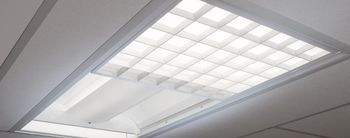
Amico Solar Multifunction 2x4
 Amico · Model Solar Multifunction 2x4
Solar Series 5 Lighting Functions Designed to provide you with the many light functions used in a patient room all in one fixture, the Solar Series Multifunction LED Light comes with up to five lighting functions. Standard functions are Reading, Ambient and Exam. Optional functions are Chart and Night Light. With Patient safety in mind, all of the LED's in the Solar Multifunction LED Light are fully enclosed to offer protection to the patient. The lenses and reflectors used offer clean, glare-free light for the patient as well as ensuring maximum light output for caregivers to perform their tasks.
Key tips
- ·When no category-specific guidance fits, default to the manufacturer's own service manual and the general troubleshooting method in the Engineer's Guide.
- ·Run an incoming and annual electrical safety test regardless of how niche the device is.
Typical Failure Modes
Compiled for this model from its own documentation and established engineering knowledge for this equipment class - not from a verified service record. Confirm against the manufacturer's service manual.
A lighting function fails (reading / ambient / exam / chart / night)
MediumSymptoms: One of the up-to-five functions out, will not select, dim or flickering.
Root cause: Failed LED zone or driver for that function, or a control/switch fault.
Enclosure / lens integrity
LowSymptoms: Glare, reduced output, cracked or discoloured enclosed lens.
Root cause: Aged lens or reflector; the LEDs are fully enclosed for patient safety.
Control / mode-switch fault
LowSymptoms: Cannot cycle between functions, wrong function activates.
Root cause: Failed control module or wall switch.
Serviceable Parts & Consumables
Serviceable items for this model, compiled from its documentation and engineering knowledge for this equipment class. Service class and relative cost are estimates, not manufacturer figures; no part numbers are given. Confirm intervals and pricing against the manufacturer.
LED zone module
Class Major service partRel. cost $$R&R Moderate
LED driver (per zone)
Class Major service partRel. cost $R&R Moderate
Control / mode-switch module
Class Major service partRel. cost $R&R Fairly easy
Enclosed lens / reflector
Class Major service partRel. cost $R&R Fairly easy
| Part | Service class | Relative cost | R&R difficulty |
|---|---|---|---|
| LED zone module | Major service part | $$ | Moderate |
| LED driver (per zone) | Major service part | $ | Moderate |
| Control / mode-switch module | Major service part | $ | Fairly easy |
| Enclosed lens / reflector | Major service part | $ | Fairly easy |
Relative cost: $ lowest · $$$$ highest service-part cost for this equipment class. Not a price.
PM Checklist
Preventive-maintenance tasks typical of this equipment class. Perform to the manufacturer's procedure and your facility's policy - this is general reference, not a schedule for this specific unit.
- ·Follow the manufacturer's PM schedule
- ·Perform incoming and annual electrical safety testing per facility biomedical program
Troubleshooting Approach
A starting sequence for this model, compiled from its documentation and engineering knowledge for this equipment class. Follow the manufacturer's service documentation for the actual procedure.
Symptom: A function will not work
- Confirm power to the fixture.
- Cycle each function and note which fail.
- Isolate the LED zone vs its driver vs the control module.
- Replace the failed component.
- Verify every fitted function and its brightness.
Symptom: Cannot switch functions
- Test at the wall switch and any local control.
- Check the control-module wiring.
- Replace the control module or switch.
- Confirm each function selects correctly.
- Electrical-safety-test the fixture.
Typical Location
Where this class of equipment is typically deployed - general reference, not this unit's own placement record.
- Varies by device - check the unit's own manual for facility placement guidance
Documents & Manuals
Troubleshoot this device with Bio
Describe a symptom or error code. Bio answers from this device's own documented error codes, failure modes, parts, and guides.
Ask Bio