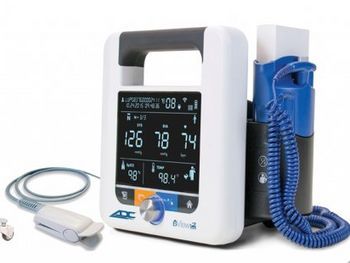
American Diagnostic Corporation ADView 2
 American Diagnostic Corporation · Model ADView 2
Clinical-grade Advantage™ BP technology from SunTech Medical Contemporary, compact design with an integrated handle and easy-to-read display Manual blood pressure mode for real-time verification Customizable average mode options Next-generation EMR ready with HL7 messaging for electronic data transfer Network enabled with built-in Ethernet or optional Wi-Fi Lithium-ion power for longer-lasting battery life and a lighter weight Built-in memory with up to 99 charting sessions New Pediatric Mode to ensure accurate measurements for younger patients Firmware upgradeable.
Key tips
- ·When no category-specific guidance fits, default to the manufacturer's own service manual and the general troubleshooting method in the Engineer's Guide.
- ·Run an incoming and annual electrical safety test regardless of how niche the device is.
Typical Failure Modes
Compiled for this model from its own documentation and established engineering knowledge for this equipment class - not from a verified service record. Confirm against the manufacturer's service manual.
Erratic or fluctuating BP readings
MediumSymptoms: Display shows widely varying systolic/diastolic values across consecutive measurements with the same cuff and patient position; device may intermittently fail to detect pulse.
Root cause: Degraded Advantage™ BP algorithm calibration or loose internal wiring to the pressure transducer.
Device fails to power on or shuts down unexpectedly
HighSymptoms: No display illumination; unit does not respond to button presses even when charged; sudden power loss during use.
Root cause: Lithium-ion battery management system failure or loose internal ribbon cable connection to the power board.
Inaccurate systolic/diastolic values compared to auscultation
MediumSymptoms: Readings consistently 10-20 mmHg higher or lower than Korotkoff sounds; pulse detection indicator does not align with actual pulse.
Root cause: Sensor drift or contamination of the pressure port; incorrect cuff size selection overriding the algorithm.
Communication failure with EMR or network
LowSymptoms: HL7 messages not transmitted; Ethernet/Wi-Fi indicator off; data does not appear in hospital information system.
Root cause: Network interface card failure or corrupted firmware version after an upgrade.
Pediatric mode not functioning correctly
LowSymptoms: Device applies adult BP algorithm in pediatric mode; heart rate display incorrect for child patient.
Root cause: Firmware flag error or missing pediatric algorithm update.
Serviceable Parts & Consumables
Serviceable items for this model, compiled from its documentation and engineering knowledge for this equipment class. Service class and relative cost are estimates, not manufacturer figures; no part numbers are given. Confirm intervals and pricing against the manufacturer.
Lithium-ion battery pack
Capacity loss leads to reduced operating time; genuine ADC units only.
Class Periodic replacementRel. cost $$R&R Moderate
Pressure transducer module
Core component of Advantage™ BP technology; drift requires factory recalibration.
Class Periodic replacementRel. cost $$$R&R Difficult
Network interface card (Ethernet/Wi-Fi)
Optional field-replaceable unit; firmware reinstall often resolves connectivity loss.
Class Major service partRel. cost $$R&R Moderate
Display assembly with touch membrane
Flex cable failure common; replacement does not affect BP accuracy.
Class Periodic replacementRel. cost $R&R Fairly easy
Cuff pressure hose and quick-connect
Per-procedure wear; check for leaks or kinks before calibration steps.
Class Periodic replacementRel. cost $R&R Easy
| Part | Service class | Relative cost | R&R difficulty |
|---|---|---|---|
| Lithium-ion battery pack Capacity loss leads to reduced operating time; genuine ADC units only. | Periodic replacement | $$ | Moderate |
| Pressure transducer module Core component of Advantage™ BP technology; drift requires factory recalibration. | Periodic replacement | $$$ | Difficult |
| Network interface card (Ethernet/Wi-Fi) Optional field-replaceable unit; firmware reinstall often resolves connectivity loss. | Major service part | $$ | Moderate |
| Display assembly with touch membrane Flex cable failure common; replacement does not affect BP accuracy. | Periodic replacement | $ | Fairly easy |
| Cuff pressure hose and quick-connect Per-procedure wear; check for leaks or kinks before calibration steps. | Periodic replacement | $ | Easy |
Relative cost: $ lowest · $$$$ highest service-part cost for this equipment class. Not a price.
PM Checklist
Preventive-maintenance tasks typical of this equipment class. Perform to the manufacturer's procedure and your facility's policy - this is general reference, not a schedule for this specific unit.
- ·Follow the manufacturer's PM schedule
- ·Perform incoming and annual electrical safety testing per facility biomedical program
Troubleshooting Approach
A starting sequence for this model, compiled from its documentation and engineering knowledge for this equipment class. Follow the manufacturer's service documentation for the actual procedure.
Symptom: BP readings significantly higher than auscultation
- Verify correct cuff size and application; ensure bladder is centered over brachial artery with no slack.
- Inspect pressure hose and transducer port for leaks or kinks; perform self-test calibration per service menu.
- If readings remain inconsistent, replace pressure transducer module and perform factory recalibration.
Typical Location
Where this class of equipment is typically deployed - general reference, not this unit's own placement record.
- Varies by device - check the unit's own manual for facility placement guidance
Documents & Manuals
- AdView 2 Desk Stand Instruction.pdfUser Manual · External
- ADView 2 Quick Reference Guide.pdfUser Manual · External
- AdView2 Mobile Stand Instruction.pdfUser Manual · External
- AdView2 Quickstart Guide.pdfUser Manual · External
- Adview2UserManual.pdfUser Manual · External
- AdView 2 brochure.pdfBrochure · External
- ADView 2 Error Codes.pdfDocument · External
- AdView2 Tips.pdfDocument · External
Troubleshoot this device with Bio
Describe a symptom or error code. Bio answers from this device's own documented error codes, failure modes, parts, and guides.
Ask Bio