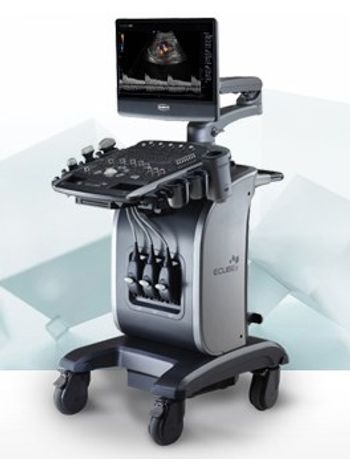
ALPINION Medical Systems E-CUBE 9 DIAMOND
 ALPINION Medical Systems · Model E-CUBE 9 DIAMOND
[u]Specialized features for various applications[/u] Volume Master ALPINION’s intuitive 3D/4D software which offers fast rendering speed and outstanding rendering quality. [u]Live HQ[/u] The innovative rendering technology, Live HQ, provides realistic fetus images and fosters maternal-fetal bonding. Its illumination effect enhances diagnostic confirmation of a morphological examination. [u]CUBE Strain and Stress Echo[/u] These high-end softwares for CV offer an accurate diagnosis of cardiac disorders by quantifying myocardial deformation. Full Cardiac Measurement Packages & DICOM Cardiac Structured Report The full CV measurement package and CV-specialized tools (ECG and Auto IMT) support more precise cardiovascular examinations. [u] Anatomical M-mode[/u] Anatomical M-mode enables studies independent of the orientation of the ultrasound beam. It enhances accuracy of cardiac measurements. [u]Wide range of transducer set for superior clinical precision[/u] Crystal Signature provides single crystal transducers with wide band and deep penetration. Special transducers with ALPINION’s advanced technology L3-12HWD: Wide linear transducer for breast exams SVC1-6: World first single crystal volume convex transducer IO3-12: World first Intra-oral transducer [u]Technologies for outstanding image performances[/u] PITHI & FTHI – Advanced Harmonic Imaging PITHI (Phase Inversion Tissue Harmonic Imaging) and FTHI (Filtered Tissue Harmonic Imaging) permit accurate diagnosis through rapid and clean images. [u]SRI / FullSRI[/u] SRI / FullSRI minimize artifacts and enhance edge boundaries. Features that make users diagnostic procedures more efficient Quick ID enables a patient registration process by simply entering basic information. (patient ID, name, birth date and gender) [u]Power User Preset[/u] Power preset is based on user-defined presets that include transducer selection, assigned specific functions, and image parameters. [u]Xpeed[/u] Xpeed is a one-button optimization tool for efficient diagnostic flow. It optimizes images in 2D, Color flow and Doppler modes. [u]Auto IMT[/u] Carotid scanning observes in early stage of arteriosclerosis. ALPINION’s Auto IMT software enables accurate and automatic measurements for the thickness of the upper and lower intima-media through a single line near the intima. [u]Live Dual[/u] Live dual mode compares real-time images in dual screen (BW/BW, BW/CF, BW/PD), enabling quick operation with diagnostic accuracy. [u]CUBE View[/u] CUBE View is ALPINION’s world’s first real-time ultrasound image sharing solution. Through wireless connection and CUBE View app in iPhone and iPad, users can share live ultrasound images from E-CUBE to anywhere. [u]Needle Vision Plus[/u] ALPINION’s sophisticated needle visualization technology, Needle Vision Plus dramatically enhances visibility of needle tip by increasing perpendicular reflection with Beam steering technology. [u]Auto NT(Nuchal Translucency)[/u] Auto NT (Nuchal Translucency) is a semi-auto traced measurement tool of the Nuchal Translucency in the first trimester. Without a user dependency, this tool allows you to improve the accuracy of the routine biometry during early second-trimester evaluations with reproducibility, avoiding over and under estimation, which integrates easily into user's workflow.
Key tips
- ·Never bypass a radiation interlock to "just get the image" - this is one of the few true zero-tolerance rules in BMET work.
- ·Trend image-quality phantom results over time - drift shows up before an outright failure does.
- ·Portable/mobile units take real physical abuse from transport - check wheel locks and cable strain reliefs more often than fixed units.
Typical Failure Modes
Compiled for this model from its own documentation and established engineering knowledge for this equipment class - not from a verified service record. Confirm against the manufacturer's service manual.
Poor 2D image quality across multiple probes
HighSymptoms: Noisy, low-contrast or non-uniform image, missing sector, drop-out that follows the system not the probe.
Root cause: Front-end / beamformer board fault, a probe-port (connector) board fault, or a system-board fault.
Transducer not recognised / probe-port fault
MediumSymptoms: A probe works on one port but not another, or is not detected at all.
Root cause: Worn probe-port connector or a scan-connector board fault.
Will not boot / intermittent shutdown
HighSymptoms: Dead system, hangs at boot, or powers off under load.
Root cause: Power supply / DC converter, the system battery, or a system-board fault.
Control panel / touchscreen or monitor fault
MediumSymptoms: Unresponsive TGC sliders or keys, distorted or blank display.
Root cause: Control-panel board, touchscreen, or the monitor.
Overheating / loud cooling fan
LowSymptoms: Thermal-shutdown warning, fan roar, hot exhaust.
Root cause: Failed or dust-clogged cooling fan or blocked air path.
DICOM / network / storage fault
LowSymptoms: Studies will not send to PACS, images will not archive, worklist empty.
Root cause: Network configuration or a storage-drive fault.
Serviceable Parts & Consumables
Serviceable items for this model, compiled from its documentation and engineering knowledge for this equipment class. Service class and relative cost are estimates, not manufacturer figures; no part numbers are given. Confirm intervals and pricing against the manufacturer.
Front-end / beamformer board
Class Major service partRel. cost $$$$R&R Difficult
Probe-port / scan-connector board
Class Major service partRel. cost $$$R&R Difficult
Power supply / DC converter
Class Major service partRel. cost $$$R&R Difficult
Control-panel / touchscreen assembly
Class Major service partRel. cost $$$R&R Moderate
Cooling fan
Class Major service partRel. cost $R&R Moderate
System hard drive
Class Major service partRel. cost $$R&R Moderate
| Part | Service class | Relative cost | R&R difficulty |
|---|---|---|---|
| Front-end / beamformer board | Major service part | $$$$ | Difficult |
| Probe-port / scan-connector board | Major service part | $$$ | Difficult |
| Power supply / DC converter | Major service part | $$$ | Difficult |
| Control-panel / touchscreen assembly | Major service part | $$$ | Moderate |
| Cooling fan | Major service part | $ | Moderate |
| System hard drive | Major service part | $$ | Moderate |
Relative cost: $ lowest · $$$$ highest service-part cost for this equipment class. Not a price.
PM Checklist
Preventive-maintenance tasks typical of this equipment class. Perform to the manufacturer's procedure and your facility's policy - this is general reference, not a schedule for this specific unit.
- ·Daily QC per modality: image-quality phantom test
- ·Tube and detector inspection
- ·Annual state-required radiation safety survey
- ·Vendor-scheduled preventive maintenance
Troubleshooting Approach
A starting sequence for this model, compiled from its documentation and engineering knowledge for this equipment class. Follow the manufacturer's service documentation for the actual procedure.
Symptom: Poor image quality or a probe not recognised
- Try the probe on a second port and a known-good probe on the suspect port.
- Wipe off all gel, inspect the lens, and scan a phantom or your own forearm.
- Inspect the probe-port connectors for bent pins or debris.
- Run any built-in front-end / channel diagnostics.
- Replace the probe-port board or front-end board as isolated.
Symptom: Will not boot or shuts down
- Confirm mains and the on/off sequence per the manual.
- Check the power-supply / DC-converter outputs.
- Note any boot / POST beep or code.
- Reseat the system boards.
- Refer the power supply or system board as isolated.
Typical Location
Where this class of equipment is typically deployed - general reference, not this unit's own placement record.
- Radiology / Imaging department
- Emergency Department (portable units)
- Operating Room (C-arms)
- Cath lab
- Bedside ICU (portable X-ray)
Documents & Manuals
Troubleshoot this device with Bio
Describe a symptom or error code. Bio answers from this device's own documented error codes, failure modes, parts, and guides.
Ask Bio