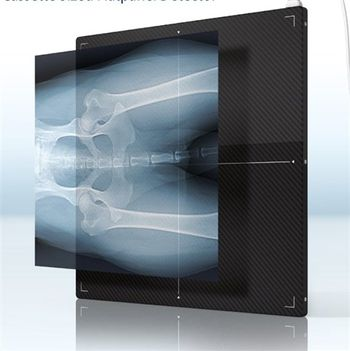
Allpro Imaging Scan X DR Flatpanel
 Allpro Imaging · Model Scan X DR Flatpanel
NO Modification, Simple Transition to DR - this ultra thin and light detector allows digitizing without modification of existing conventional imaging systems NO Generator Connection, Plug & Play - the Auto-sensor will take care of the exposure timing Mobile - “Instant On” means no delay in setup.
Key tips
- ·Never bypass a radiation interlock to "just get the image" - this is one of the few true zero-tolerance rules in BMET work.
- ·Trend image-quality phantom results over time - drift shows up before an outright failure does.
- ·Portable/mobile units take real physical abuse from transport - check wheel locks and cable strain reliefs more often than fixed units.
Typical Failure Modes
Compiled for this model from its own documentation and established engineering knowledge for this equipment class - not from a verified service record. Confirm against the manufacturer's service manual.
Detector not connecting / dropped images
HighSymptoms: Panel not detected, images not received, wireless / tethered link drops mid-exam.
Root cause: Detector battery (wireless), Wi-Fi / tether cable, a docking / connector fault, or detector electronics.
Image quality / calibration fault
MediumSymptoms: Fixed-pattern artefacts, non-uniformity, dead pixels / lines, calibration overdue or failing.
Root cause: Detector gain / offset calibration, a bad pixel map, or physical detector (drop) damage.
Generator / exposure fault
HighSymptoms: Exposure inhibited, kV / mAs error, no exposure captured, AEC over/under.
Root cause: HV generator, tube, filament supply, or an AEC / interface fault.
Positioner / tube-stand / bucky fault
MediumSymptoms: Tube column, wall stand or table bucky will not track, detent, or auto-position.
Root cause: Drive motor, brake, encoder, or the auto-positioning interface.
Acquisition workstation / PACS fault
MediumSymptoms: Images will not display, process or send; worklist missing; slow processing.
Root cause: Workstation PC, software, or the DICOM / network configuration.
Serviceable Parts & Consumables
Serviceable items for this model, compiled from its documentation and engineering knowledge for this equipment class. Service class and relative cost are estimates, not manufacturer figures; no part numbers are given. Confirm intervals and pricing against the manufacturer.
Flat-panel detector (exchange)
Class Major service partRel. cost $$$$R&R Moderate
Detector battery (wireless)
Class Periodic replacementRel. cost $$R&R Easy
Tether cable / access point
Class Periodic replacementRel. cost $$R&R Fairly easy
Positioner drive / brake / encoder
Class Major service partRel. cost $$$R&R Difficult
Acquisition workstation PC
Class Major service partRel. cost $$$R&R Moderate
AEC ion chamber
Class Major service partRel. cost $$$R&R Difficult
| Part | Service class | Relative cost | R&R difficulty |
|---|---|---|---|
| Flat-panel detector (exchange) | Major service part | $$$$ | Moderate |
| Detector battery (wireless) | Periodic replacement | $$ | Easy |
| Tether cable / access point | Periodic replacement | $$ | Fairly easy |
| Positioner drive / brake / encoder | Major service part | $$$ | Difficult |
| Acquisition workstation PC | Major service part | $$$ | Moderate |
| AEC ion chamber | Major service part | $$$ | Difficult |
Relative cost: $ lowest · $$$$ highest service-part cost for this equipment class. Not a price.
PM Checklist
Preventive-maintenance tasks typical of this equipment class. Perform to the manufacturer's procedure and your facility's policy - this is general reference, not a schedule for this specific unit.
- ·Daily QC per modality: image-quality phantom test
- ·Tube and detector inspection
- ·Annual state-required radiation safety survey
- ·Vendor-scheduled preventive maintenance
Troubleshooting Approach
A starting sequence for this model, compiled from its documentation and engineering knowledge for this equipment class. Follow the manufacturer's service documentation for the actual procedure.
Symptom: Detector not connecting or images not arriving
- Check the detector battery (wireless) or reseat the tether.
- Confirm the Wi-Fi access point, channel and range.
- Reboot the detector and the acquisition workstation.
- Try a known-good detector if the site has one.
- Escalate a confirmed detector-electronics fault to the OEM.
Symptom: Fixed-pattern artefacts or failed calibration
- Run the detector gain / offset calibration and the dead-pixel map.
- Inspect the detector for drop / crush damage.
- Expose a uniform phantom and check uniformity.
- Confirm the generator and AEC are within spec with an analyser.
- Exchange the detector if calibration will not hold.
Technical Specs
- Height
- 462 mm
- Length
- 15 mm
- Weight
- 8.4 lbs
- Width
- 464 mm
Typical Location
Where this class of equipment is typically deployed - general reference, not this unit's own placement record.
- Radiology / Imaging department
- Emergency Department (portable units)
- Operating Room (C-arms)
- Cath lab
- Bedside ICU (portable X-ray)
Documents & Manuals
Troubleshoot this device with Bio
Describe a symptom or error code. Bio answers from this device's own documented error codes, failure modes, parts, and guides.
Ask Bio