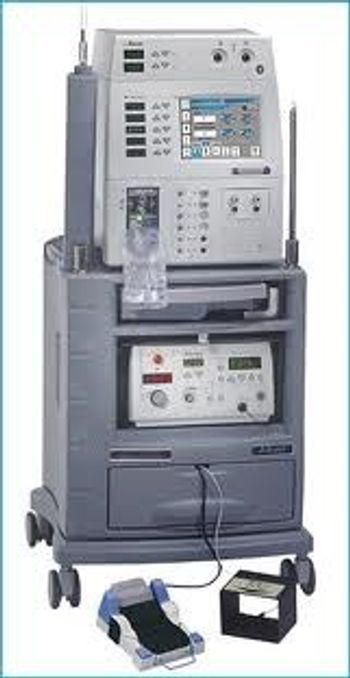
Alcon ACCURUS
 Alcon · Model ACCURUS
Digital Infusion Pressure and Irrigation Pressure Provides fast response to increase or decrease IOP Surgeon controlled pressurized infusion provides chamber stability Fluid/Air Exchange Digital control of air pressure for precise Fluid/Air exchange Diathermy Available from the foot pedal anytime, even during U/S tuning Illumination The ACCURUS Xenon Illuminator provides unbiased color contrast for improved visibility during surgery Dual high-intensity illuminators provide the color and power needed for the most demanding surgeries Vitrectomy Technology Touching the Vit icon provides you a quick menu from which to select either the Proportional Vacuum, Momentary, or 3D Technology modes Fragmentation The Frag icon allows you to select four different fragmentation modes 3D Frag provides simultaneous control of power and vacuum Linear Frag Fixed Frag Momentary Frag Pulsed Frag is available in all modes except 3D Scissors Press the Scissors icon and you can select Proportional, Multi-cut, or MPC modes Vacuum assist for tissue manipulation is available in MPC and Multi-cut scissors modes Extrusion The Extrude icon gives you the option of three different extrusion vacuum settings: High, Medium, and Low Viscous Fluid Control Touch the Viscous Fluid Controller (VFC) icon and choose whether you want to inject or extract viscous fluids Wireless Remote Control Provides convenient access to important surgical modes for selection and parameter adjustment.
Key tips
- ·Verify laser output with a real power meter, not the unit's own display - the display can drift independently of true output.
- ·Take "the image looks a little off" reports seriously - optical alignment drift is usually gradual, not sudden.
Typical Failure Modes
Compiled for this model from its own documentation and established engineering knowledge for this equipment class - not from a verified service record. Confirm against the manufacturer's service manual.
Poor phaco / vacuum performance
HighSymptoms: Weak ultrasonic power, poor followability, vacuum will not build or holds poorly, surge.
Root cause: Worn phaco handpiece / tip, a cracked or worn tubing / cassette, or a pump / vacuum-sensor fault.
Handpiece fault (phaco / I-A / vit)
MediumSymptoms: Handpiece will not tune, overheats, no irrigation / aspiration, cutter not cutting (vit).
Root cause: Worn or damaged handpiece, or its connector / cable.
Fluidics / cassette-detection fault
MediumSymptoms: Cassette not recognised, priming / tuning fails, fluid leaks at the cassette.
Root cause: Cassette-detection switch, the peristaltic / Venturi pump, or fluidics seals.
Footpedal fault
MediumSymptoms: Pedal positions not registering, wireless pedal not pairing.
Root cause: Worn footpedal or its cable / wireless module.
Pneumatics fault (vitrectomy cutter)
LowSymptoms: Cut rate low or erratic, cutter will not drive.
Root cause: Internal pneumatic valve or a supply-pressure fault.
Serviceable Parts & Consumables
Serviceable items for this model, compiled from its documentation and engineering knowledge for this equipment class. Service class and relative cost are estimates, not manufacturer figures; no part numbers are given. Confirm intervals and pricing against the manufacturer.
Phaco / I-A / vitrectomy handpiece
Class Periodic replacementRel. cost $$$R&R Fairly easy
Peristaltic / Venturi pump components
Class Periodic replacementRel. cost $$$R&R Difficult
Cassette-detection switch / fluidics seals
Class Periodic replacementRel. cost $$R&R Moderate
Footpedal / wireless module
Class Periodic replacementRel. cost $$R&R Fairly easy
Pneumatic valve (vitrectomy)
Class Major service partRel. cost $$R&R Moderate
| Part | Service class | Relative cost | R&R difficulty |
|---|---|---|---|
| Phaco / I-A / vitrectomy handpiece | Periodic replacement | $$$ | Fairly easy |
| Peristaltic / Venturi pump components | Periodic replacement | $$$ | Difficult |
| Cassette-detection switch / fluidics seals | Periodic replacement | $$ | Moderate |
| Footpedal / wireless module | Periodic replacement | $$ | Fairly easy |
| Pneumatic valve (vitrectomy) | Major service part | $$ | Moderate |
Relative cost: $ lowest · $$$$ highest service-part cost for this equipment class. Not a price.
PM Checklist
Preventive-maintenance tasks typical of this equipment class. Perform to the manufacturer's procedure and your facility's policy - this is general reference, not a schedule for this specific unit.
- ·Optical alignment / calibration check
- ·Lamp or laser output verification
- ·Annual full PM
Troubleshooting Approach
A starting sequence for this model, compiled from its documentation and engineering knowledge for this equipment class. Follow the manufacturer's service documentation for the actual procedure.
Symptom: Poor phaco or vacuum performance
- Fit a fresh tip and test-tune the handpiece in a beaker.
- Fit a new cassette / tubing and re-prime.
- Run the fluidics / vacuum self-test and check for leaks.
- Verify vacuum and rise time against the service spec.
- Send the handpiece for service or exchange if it will not tune.
Symptom: Cassette not recognised or priming fails
- Reseat the cassette and confirm it clicks home.
- Check the cassette-detection switch.
- Inspect the pump rollers / Venturi and the fluidics seals.
- Re-run prime and tune.
- Replace the detection switch or pump components as isolated.
Typical Location
Where this class of equipment is typically deployed - general reference, not this unit's own placement record.
- Eye clinic / ophthalmology suite
- Operating Room (ophthalmic surgery)
Documents & Manuals
No documents available for this device yet.
Safety & Recalls
Synced live from the FDA openFDA API.
- RECALL
Insufficient seal on the outside packaging, potentially affecting the sterility of the product.
- RECALL
This medical device correction is related to Alcon products that present a 23G non-valved trocar cannula and infusion cannula together because of an issue regarding the loose fit between the 23G non-valved trocar cannula and infusion cannula that could potentially cause a detachment between the non-valved trocar cannula and infusion cannula during surgery.
Troubleshoot this device with Bio
Describe a symptom or error code. Bio answers from this device's own documented error codes, failure modes, parts, and guides.
Ask Bio