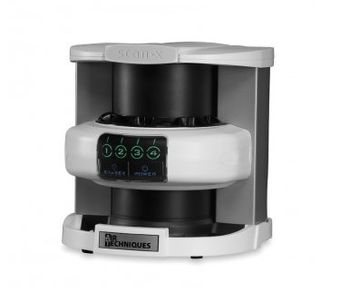
Air Techniques ScanX Intraoral
 Air Techniques · Model ScanX Intraoral
ScanX delivers crisp, sharp images in up to 18 lp/mm true resolution, meeting the needs of all diagnostic requirements. Capture all areas of your patients anatomy thanks to ScanX PSPs that have a 100% active surface area. This means you capture up to nearly 40% more anatomy than with the comparable sized wired sensor. Once a PSP has been inserted into ScanX, the sharp, crisp image appears on your screen in seconds. Digital images are ready to be reviewed, shared, archived or emailed. ScanX PSPs are 30 times thinner then wired sensors; flexible, with rounded corners that provide optimum comfort for your patients. Patients and staff are all protected by ScanX barrier envelopes that 100% hygienically seal each PSP. A film-like workflow will enable your staff to confidently start using ScanX with virtually no learning curve and will result in fewer retakes. The thin, wireless PSPs are durable and immediately ready to be used again thanks to the automatic read and erase technology.
Key tips
- ·Never bypass a radiation interlock to "just get the image" - this is one of the few true zero-tolerance rules in BMET work.
- ·Trend image-quality phantom results over time - drift shows up before an outright failure does.
- ·Portable/mobile units take real physical abuse from transport - check wheel locks and cable strain reliefs more often than fixed units.
Typical Failure Modes
Compiled for this model from its own documentation and established engineering knowledge for this equipment class - not from a verified service record. Confirm against the manufacturer's service manual.
Poor image quality / artefacts
HighSymptoms: Banding, streaks, ghost images, non-uniform density, dust artefacts.
Root cause: Dirty light guide / scanning optics, a worn erase-lamp array, imaging-plate wear, or transport-roller contamination.
Plate / cassette transport jam or mis-feed
MediumSymptoms: Plate jams in the reader, transport error, plate not returned.
Root cause: Worn or contaminated transport rollers / belts, or a sensor fault.
Incomplete erase / residual latent image
MediumSymptoms: Faint previous image on the next exposure.
Root cause: Erase-lamp array degradation or a driver fault.
Laser / PMT scanning fault
MediumSymptoms: No or very noisy image, scan-error message.
Root cause: Scanning laser or the photomultiplier / detection chain.
Workstation / DICOM fault
MediumSymptoms: Images will not display, annotate or send to PACS.
Root cause: Workstation PC or the DICOM configuration.
Serviceable Parts & Consumables
Serviceable items for this model, compiled from its documentation and engineering knowledge for this equipment class. Service class and relative cost are estimates, not manufacturer figures; no part numbers are given. Confirm intervals and pricing against the manufacturer.
Transport rollers / belts
Class Periodic replacementRel. cost $$R&R Moderate
Erase-lamp array
Class Periodic replacementRel. cost $$$R&R Moderate
Imaging plates / cassettes
Class Periodic replacementRel. cost $$$R&R Easy
Light guide / scanning optics
Class Major service partRel. cost $$$R&R Difficult
Workstation PC
Class Major service partRel. cost $$$R&R Moderate
| Part | Service class | Relative cost | R&R difficulty |
|---|---|---|---|
| Transport rollers / belts | Periodic replacement | $$ | Moderate |
| Erase-lamp array | Periodic replacement | $$$ | Moderate |
| Imaging plates / cassettes | Periodic replacement | $$$ | Easy |
| Light guide / scanning optics | Major service part | $$$ | Difficult |
| Workstation PC | Major service part | $$$ | Moderate |
Relative cost: $ lowest · $$$$ highest service-part cost for this equipment class. Not a price.
PM Checklist
Preventive-maintenance tasks typical of this equipment class. Perform to the manufacturer's procedure and your facility's policy - this is general reference, not a schedule for this specific unit.
- ·Daily QC per modality: image-quality phantom test
- ·Tube and detector inspection
- ·Annual state-required radiation safety survey
- ·Vendor-scheduled preventive maintenance
Troubleshooting Approach
A starting sequence for this model, compiled from its documentation and engineering knowledge for this equipment class. Follow the manufacturer's service documentation for the actual procedure.
Symptom: Poor image quality / artefacts
- Run the reader's cleaning / calibration procedure.
- Clean the light guide, scanning optics and transport rollers.
- Erase and re-image a plate to check for residual latent image.
- Rotate in a fresh imaging plate to rule out plate wear.
- Escalate a scanning-laser / PMT fault to the manufacturer.
Symptom: Plate transport jam
- Clear the jammed plate / cassette per the manual.
- Inspect and clean / replace the transport rollers and belts.
- Check the transport sensors.
- Cycle several cassettes.
- Confirm reliable feed and return.
Technical Specs
- Weight
- 44 lbs
Typical Location
Where this class of equipment is typically deployed - general reference, not this unit's own placement record.
- Radiology / Imaging department
- Emergency Department (portable units)
- Operating Room (C-arms)
- Cath lab
- Bedside ICU (portable X-ray)
Documents & Manuals
Troubleshoot this device with Bio
Describe a symptom or error code. Bio answers from this device's own documented error codes, failure modes, parts, and guides.
Ask Bio